usrp-users@lists.ettus.com
Discussion and technical support related to USRP, UHD, RFNoC
View all threadswhite rabbit connectivity problems

All,
Following
http://kb.ettus.com/Using_Ethernet-Based_Synchronization_on_the_USRP%E2%84%A2_N3xx_Devices
and all other documentation can find across the web, I’ve been trying to
stand my N320 to sync using White Rabbit, so I can see UTC time on my N320.
I have a Orolia SecureSync 2400 connected via 10Mhz/1PPS + NTP to my
WRZ-16. Fiber using recommended receiver wavelengths (violet/blue).
Using UHD 4.4 (uhd_usrp_probe attached).
When I load the WX FPGA, the WR switch, I get green link lights, “Up link”
on WRS dashboard. Eth Layer 1 seems good.
While /data/network/sfp0.network is defined, it’s unclear if the N320 WX
FPGA uses it.
Only when using WX, “ip a” no longer shows sfp0. Go back to another FGPA
flavor and sfp0 appears again.
root@SDR2:~# ip a
1: lo: <LOOPBACK,UP,LOWER_UP> mtu 65536 qdisc noqueue qlen 1000
link/loopback 00:00:00:00:00:00 brd 00:00:00:00:00:00

inet 127.0.0.1/8 scope host lo

   valid_lft forever preferred_lft forever
2: eth0: <BROADCAST,MULTICAST,UP,LOWER_UP> mtu 1500 qdisc pfifo_fast qlen
1000
link/ether 00:80:2f:35:45:f5 brd ff:ff:ff:ff:ff:ff

inet 172.16.1.102/16 brd 172.16.255.255 scope global eth0

   valid_lft forever preferred_lft forever
3: sfp1: <BROADCAST,MULTICAST,UP,LOWER_UP> mtu 9000 qdisc pfifo_fast qlen
1000
link/ether 00:80:2f:35:45:f7 brd ff:ff:ff:ff:ff:ff

inet 172.17.1.102/16 brd 172.17.255.255 scope global sfp1

   valid_lft forever preferred_lft forever
4: int0: <BROADCAST,MULTICAST,UP,LOWER_UP> mtu 9000 qdisc pfifo_fast qlen
1000
link/ether d2:d4:dd:88:14:3d brd ff:ff:ff:ff:ff:ff

inet 169.254.0.1/24 brd 169.254.0.255 scope global int0

   valid_lft forever preferred_lft forever
Is this expected?
Is the FGPA using the network settings? If not, how do I configure sfp0
network settings for WR?
Layer 2: The WR switch can’t see the MAC address. From the WR switch, “arp
-a” doesn’t show the ettus sfp0 MAC.
Layer 3: I likely need to change the subnet once we get to layer 3, but
it’s unclear if I can set the network via /data/network/sfp0.network since
the NIC doesn’t show with the WX FPGA. I’m not sure if ping is expected to
work if ICMP is implemented on the Ettus for WX.
It’s unclear what utilities are available from the Ettus to validate WR is
syncing properly. Ultimately, I want to get UTC time and I want IQ to be
timestamped with UTC all sync’d from White Rabbit.
Running the white rabbit BIST I get no error:
root@SDR2:/data/network# n3xx_bist --skip-fpga-reload -v whiterabbit
Executing test method: bist_whiterabbit
{
"whiterabbit": {

    "error_msg": "",

    "lock_status": 1,

    "status": true

}
}
I created a simple script (attached) to check for
usrp.get_time_synchronized() and get_time_now(). Time synch = true. Time
however is only uptime, not UTC time.
mboard[0] time_synchronized: True, Clock Source: internal, Time Source: sfp0
2023-03-27 09:58:53,238 [INFO]: mboard[0] time_now -- 1597.523411010742166s
(Thu, 01 Jan 1970 00:26:37 +0000)
2023-03-27 09:58:53,241 [INFO]: mboard[0] time_last_pps --
1597.281655090331924s (Thu, 01 Jan 1970 00:26:37 +0000)
2023-03-27 09:58:54,247 [INFO]:
mboard[0] time_synchronized: True, Clock Source: internal, Time Source: sfp0
2023-03-27 09:58:54,247 [INFO]: mboard[0] time_now -- 1598.532448559570412s
(Thu, 01 Jan 1970 00:26:38 +0000)
2023-03-27 09:58:54,250 [INFO]: mboard[0] time_last_pps --
1598.281655090331924s (Thu, 01 Jan 1970 00:26:38 +0000)
2023-03-27 09:58:55,256 [INFO]:
mboard[0] time_synchronized: True, Clock Source: internal, Time Source: sfp0
2023-03-27 09:58:55,257 [INFO]: mboard[0] time_now -- 1599.541964416504015s
(Thu, 01 Jan 1970 00:26:39 +0000)
2023-03-27 09:58:55,260 [INFO]: mboard[0] time_last_pps --
1599.281655090331924s (Thu, 01 Jan 1970 00:26:39 +0000)
The time_source=sfp0 & clock_source=internal are set both in –args and in
set_xxx_source code, per some mail list emails I’ve seen.
Surprisingly, time_synchronized remained True even as we rebooted the WR
switch, so it’s clearly not dependable at this time.
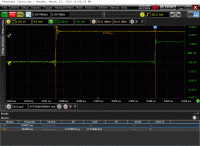
Finally, for an extra data point, we attached a scope from our WRZ-16 PPS
out to the N320 trigger out, as we’ve yet to get to running 2 SDRS pre the
top link.
WE measure about 57 microseconds (far from 222 ps in the WR link above).
Screenshot attached.
It’s unclear what’s going on as we have no insight into WR within the N320.
At this point, I believe there’s an issue with sfp0 on the WX FPGA image,
as I don’t see sfp0.
Could someone who’s used White Rabbit successfully please help provide
guidance on what is expected and suggested next steps?
Thanks,
-Ryan