usrp-users@lists.ettus.com
Discussion and technical support related to USRP, UHD, RFNoC
View all threadsWhen ssh'ing Getting prompt for Password Issue

Now, I tried to use Windows Putty to login...
I get to a screen that tells me to place login - which when I place root... it then takes me to the prompt
root@192.168.10.2's password:
When I place enter a few times it tells me access denied.
The E310 unit is new, so I am assuming there is no previous password.
Any other ideas???
Thanks
-----Original Message-----
From: USRP-users [mailto:usrp-users-bounces@lists.ettus.com] On Behalf Of Matheou, Konstantin J. (GRC-LCI0)[ZIN TECHNOLOGIES INC] via USRP-users
Sent: Thursday, August 03, 2017 2:27 PM
To: Nate Temple nate.temple@ettus.com; Philip Balister philip@balister.org
Cc: usrp-users@lists.ettus.com
Subject: Re: [USRP-users] When ssh'ing Getting prompt for Password Issue
Nate,
As soon I put it into bridged mode, nothing works.. What I mean is that I am not able to communicate/ping to the E310 that way.
It may work maybe for other VM software, but again, I am using Oracle VirtualBox.
Thanks
-----Original Message-----
From: Nate Temple [mailto:nate.temple@ettus.com]
Sent: Thursday, August 03, 2017 1:37 PM
To: Philip Balister philip@balister.org
Cc: Matheou, Konstantin J. (GRC-LCI0)[ZIN TECHNOLOGIES INC] konstantin.j.matheou@nasa.gov; usrp-users@lists.ettus.com
Subject: Re: [USRP-users] When ssh'ing Getting prompt for Password Issue
Hi Konstantin,
You may want to try putting your VM into a Bridge Network mode. There may be an issue with the NAT routing. If operating in Bridged mode, ensure your Host, VM and E3xx all have different IP addresses.
Regards,
Nate Temple
On Aug 3, 2017, at 9:39 AM, Philip Balister via USRP-users usrp-users@lists.ettus.com wrote:
On 08/03/2017 11:07 AM, Matheou, Konstantin J. (GRC-LCI0)[ZIN
TECHNOLOGIES INC] via USRP-users wrote:
Hello All,
I have the E310 hooked up with an Ethernet wire, and I can ping from my Linux Ubuntu Virtual machine (created by Oracle VirtualBox software).
But when I try to SSH, I did get access denied.. until I added a VM rule for port 22 in Network Settings of the VM.
But now I get the password message in the Linux terminal to place a password. As we know, the password is empty per the instructions on the website.
Did you hit return to see if it gave you a prompt?
Philip
So I went into ssh_config file in Linux at ect/ssh and altered a line
that allows for no passwords... This is the site..
http://developer.toradex.com/knowledge-base/ssh
But I am still not getting past the password login.
Is there any other advice you can give me?
Thanks,
Konstantin
USRP-users mailing list
USRP-users@lists.ettus.com
http://lists.ettus.com/mailman/listinfo/usrp-users_lists.ettus.com
USRP-users mailing list
USRP-users@lists.ettus.com
http://lists.ettus.com/mailman/listinfo/usrp-users_lists.ettus.com
USRP-users mailing list
USRP-users@lists.ettus.com
http://lists.ettus.com/mailman/listinfo/usrp-users_lists.ettus.com

Hi Konstantin,
When operating in bridged mode, did you manually set the (static) IP address within your VM?
Regards,
Nate Temple
On Aug 3, 2017, at 11:27 AM, Matheou, Konstantin J. (GRC-LCI0)[ZIN TECHNOLOGIES INC] konstantin.j.matheou@nasa.gov wrote:
Nate,
As soon I put it into bridged mode, nothing works.. What I mean is that I am not able to communicate/ping to the E310 that way.
It may work maybe for other VM software, but again, I am using Oracle VirtualBox.
Thanks
-----Original Message-----
From: Nate Temple [mailto:nate.temple@ettus.com]
Sent: Thursday, August 03, 2017 1:37 PM
To: Philip Balister philip@balister.org
Cc: Matheou, Konstantin J. (GRC-LCI0)[ZIN TECHNOLOGIES INC] konstantin.j.matheou@nasa.gov; usrp-users@lists.ettus.com
Subject: Re: [USRP-users] When ssh'ing Getting prompt for Password Issue
Hi Konstantin,
You may want to try putting your VM into a Bridge Network mode. There may be an issue with the NAT routing. If operating in Bridged mode, ensure your Host, VM and E3xx all have different IP addresses.
Regards,
Nate Temple
On Aug 3, 2017, at 9:39 AM, Philip Balister via USRP-users usrp-users@lists.ettus.com wrote:
On 08/03/2017 11:07 AM, Matheou, Konstantin J. (GRC-LCI0)[ZIN
TECHNOLOGIES INC] via USRP-users wrote:
Hello All,
I have the E310 hooked up with an Ethernet wire, and I can ping from my Linux Ubuntu Virtual machine (created by Oracle VirtualBox software).
But when I try to SSH, I did get access denied.. until I added a VM rule for port 22 in Network Settings of the VM.
But now I get the password message in the Linux terminal to place a password. As we know, the password is empty per the instructions on the website.
Did you hit return to see if it gave you a prompt?
Philip
So I went into ssh_config file in Linux at ect/ssh and altered a line
that allows for no passwords... This is the site..
http://developer.toradex.com/knowledge-base/ssh
But I am still not getting past the password login.
Is there any other advice you can give me?
Thanks,
Konstantin
USRP-users mailing list
USRP-users@lists.ettus.com
http://lists.ettus.com/mailman/listinfo/usrp-users_lists.ettus.com
USRP-users mailing list
USRP-users@lists.ettus.com
http://lists.ettus.com/mailman/listinfo/usrp-users_lists.ettus.com
The Software does not allow me to do that.. Here is a screen shot.. This is all that it offers...
[cid:image001.png@01D30C67.D6BCD260]

-----Original Message-----
From: Nate Temple [mailto:nate.temple@ettus.com]
Sent: Thursday, August 03, 2017 2:48 PM
To: Matheou, Konstantin J. (GRC-LCI0)[ZIN TECHNOLOGIES INC] konstantin.j.matheou@nasa.gov
Cc: Philip Balister philip@balister.org; usrp-users@lists.ettus.com
Subject: Re: [USRP-users] When ssh'ing Getting prompt for Password Issue
Hi Konstantin,
When operating in bridged mode, did you manually set the (static) IP address within your VM?
Regards,
Nate Temple
On Aug 3, 2017, at 11:27 AM, Matheou, Konstantin J. (GRC-LCI0)[ZIN TECHNOLOGIES INC] <konstantin.j.matheou@nasa.govmailto:konstantin.j.matheou@nasa.gov> wrote:
Nate,
As soon I put it into bridged mode, nothing works.. What I mean is that I am not able to communicate/ping to the E310 that way.
It may work maybe for other VM software, but again, I am using Oracle VirtualBox.
Thanks
-----Original Message-----
From: Nate Temple [mailto:nate.temple@ettus.com]
Sent: Thursday, August 03, 2017 1:37 PM
To: Philip Balister <philip@balister.orgmailto:philip@balister.org>
Cc: Matheou, Konstantin J. (GRC-LCI0)[ZIN TECHNOLOGIES INC]
<konstantin.j.matheou@nasa.govmailto:konstantin.j.matheou@nasa.gov>; usrp-users@lists.ettus.commailto:usrp-users@lists.ettus.com
Subject: Re: [USRP-users] When ssh'ing Getting prompt for Password
Issue
Hi Konstantin,
You may want to try putting your VM into a Bridge Network mode. There may be an issue with the NAT routing. If operating in Bridged mode, ensure your Host, VM and E3xx all have different IP addresses.
Regards,
Nate Temple
On Aug 3, 2017, at 9:39 AM, Philip Balister via USRP-users <usrp-users@lists.ettus.commailto:usrp-users@lists.ettus.com> wrote:
On 08/03/2017 11:07 AM, Matheou, Konstantin J. (GRC-LCI0)[ZIN
TECHNOLOGIES INC] via USRP-users wrote:
Hello All,
I have the E310 hooked up with an Ethernet wire, and I can ping from my Linux Ubuntu Virtual machine (created by Oracle VirtualBox software).
But when I try to SSH, I did get access denied.. until I added a VM rule for port 22 in Network Settings of the VM.
But now I get the password message in the Linux terminal to place a password. As we know, the password is empty per the instructions on the website.
Did you hit return to see if it gave you a prompt?
Philip
So I went into ssh_config file in Linux at ect/ssh and altered a
line that allows for no passwords... This is the site..
But I am still not getting past the password login.
Is there any other advice you can give me?
Thanks,
Konstantin
USRP-users mailing list
USRP-users mailing list
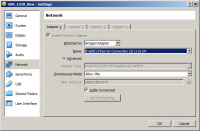
Hi Konstantin,
After setting the NIC to be Bridged for the VM from VirtualBox, you need to start the VM, then within the System Settings -> Network of the VM, manually set the NIC to have a static IP address.
Regards,
Nate Temple
On Aug 3, 2017, at 11:50 AM, Matheou, Konstantin J. (GRC-LCI0)[ZIN TECHNOLOGIES INC] konstantin.j.matheou@nasa.gov wrote:
The Software does not allow me to do that.. Here is a screen shot.. This is all that it offers…
<image001.png>
-----Original Message-----
From: Nate Temple [mailto:nate.temple@ettus.com]
Sent: Thursday, August 03, 2017 2:48 PM
To: Matheou, Konstantin J. (GRC-LCI0)[ZIN TECHNOLOGIES INC] konstantin.j.matheou@nasa.gov
Cc: Philip Balister philip@balister.org; usrp-users@lists.ettus.com
Subject: Re: [USRP-users] When ssh'ing Getting prompt for Password Issue
Hi Konstantin,
When operating in bridged mode, did you manually set the (static) IP address within your VM?
Regards,
Nate Temple
On Aug 3, 2017, at 11:27 AM, Matheou, Konstantin J. (GRC-LCI0)[ZIN TECHNOLOGIES INC] konstantin.j.matheou@nasa.gov wrote:
Nate,
As soon I put it into bridged mode, nothing works.. What I mean is that I am not able to communicate/ping to the E310 that way.
It may work maybe for other VM software, but again, I am using Oracle VirtualBox.
Thanks
-----Original Message-----
From: Nate Temple [mailto:nate.temple@ettus.com]
Sent: Thursday, August 03, 2017 1:37 PM
To: Philip Balister philip@balister.org
Cc: Matheou, Konstantin J. (GRC-LCI0)[ZIN TECHNOLOGIES INC]
konstantin.j.matheou@nasa.gov; usrp-users@lists.ettus.com
Subject: Re: [USRP-users] When ssh'ing Getting prompt for Password
Issue
Hi Konstantin,
You may want to try putting your VM into a Bridge Network mode. There may be an issue with the NAT routing. If operating in Bridged mode, ensure your Host, VM and E3xx all have different IP addresses.
Regards,
Nate Temple
On Aug 3, 2017, at 9:39 AM, Philip Balister via USRP-users usrp-users@lists.ettus.com wrote:
On 08/03/2017 11:07 AM, Matheou, Konstantin J. (GRC-LCI0)[ZIN
TECHNOLOGIES INC] via USRP-users wrote:
Hello All,
I have the E310 hooked up with an Ethernet wire, and I can ping from my Linux Ubuntu Virtual machine (created by Oracle VirtualBox software).
But when I try to SSH, I did get access denied.. until I added a VM rule for port 22 in Network Settings of the VM.
But now I get the password message in the Linux terminal to place a password. As we know, the password is empty per the instructions on the website.
Did you hit return to see if it gave you a prompt?
Philip
So I went into ssh_config file in Linux at ect/ssh and altered a
line that allows for no passwords... This is the site..
http://developer.toradex.com/knowledge-base/ssh
But I am still not getting past the password login.
Is there any other advice you can give me?
Thanks,
Konstantin
USRP-users mailing list
USRP-users@lists.ettus.com
http://lists.ettus.com/mailman/listinfo/usrp-users_lists.ettus.com
USRP-users mailing list
USRP-users@lists.ettus.com
http://lists.ettus.com/mailman/listinfo/usrp-users_lists.ettus.com
OK.. I did it your way and I am connecting via ping your way now too....
Bu again, when I do the ssh command, it is asking for a password.
So, I am getting the samething as I was before...
Does ssh have to be setup on the E310???
Is there a way to check/reset the password on the E310?
Thanks
-----Original Message-----
From: Nate Temple [mailto:nate.temple@ettus.com]
Sent: Thursday, August 03, 2017 2:54 PM
To: Matheou, Konstantin J. (GRC-LCI0)[ZIN TECHNOLOGIES INC] konstantin.j.matheou@nasa.gov
Cc: Philip Balister philip@balister.org; usrp-users@lists.ettus.com
Subject: Re: [USRP-users] When ssh'ing Getting prompt for Password Issue
Hi Konstantin,
After setting the NIC to be Bridged for the VM from VirtualBox, you need to start the VM, then within the System Settings -> Network of the VM, manually set the NIC to have a static IP address.
Regards,
Nate Temple
On Aug 3, 2017, at 11:50 AM, Matheou, Konstantin J. (GRC-LCI0)[ZIN TECHNOLOGIES INC] konstantin.j.matheou@nasa.gov wrote:
The Software does not allow me to do that.. Here is a screen shot..
This is all that it offers…
<image001.png>
-----Original Message-----
From: Nate Temple [mailto:nate.temple@ettus.com]
Sent: Thursday, August 03, 2017 2:48 PM
To: Matheou, Konstantin J. (GRC-LCI0)[ZIN TECHNOLOGIES INC]
konstantin.j.matheou@nasa.gov
Cc: Philip Balister philip@balister.org; usrp-users@lists.ettus.com
Subject: Re: [USRP-users] When ssh'ing Getting prompt for Password
Issue
Hi Konstantin,
When operating in bridged mode, did you manually set the (static) IP address within your VM?
Regards,
Nate Temple
On Aug 3, 2017, at 11:27 AM, Matheou, Konstantin J. (GRC-LCI0)[ZIN TECHNOLOGIES INC] konstantin.j.matheou@nasa.gov wrote:
Nate,
As soon I put it into bridged mode, nothing works.. What I mean is that I am not able to communicate/ping to the E310 that way.
It may work maybe for other VM software, but again, I am using Oracle VirtualBox.
Thanks
-----Original Message-----
From: Nate Temple [mailto:nate.temple@ettus.com]
Sent: Thursday, August 03, 2017 1:37 PM
To: Philip Balister philip@balister.org
Cc: Matheou, Konstantin J. (GRC-LCI0)[ZIN TECHNOLOGIES INC]
konstantin.j.matheou@nasa.gov; usrp-users@lists.ettus.com
Subject: Re: [USRP-users] When ssh'ing Getting prompt for Password
Issue
Hi Konstantin,
You may want to try putting your VM into a Bridge Network mode. There may be an issue with the NAT routing. If operating in Bridged mode, ensure your Host, VM and E3xx all have different IP addresses.
Regards,
Nate Temple
On Aug 3, 2017, at 9:39 AM, Philip Balister via USRP-users usrp-users@lists.ettus.com wrote:
On 08/03/2017 11:07 AM, Matheou, Konstantin J. (GRC-LCI0)[ZIN
TECHNOLOGIES INC] via USRP-users wrote:
Hello All,
I have the E310 hooked up with an Ethernet wire, and I can ping from my Linux Ubuntu Virtual machine (created by Oracle VirtualBox software).
But when I try to SSH, I did get access denied.. until I added a VM rule for port 22 in Network Settings of the VM.
But now I get the password message in the Linux terminal to place a password. As we know, the password is empty per the instructions on the website.
Did you hit return to see if it gave you a prompt?
Philip
So I went into ssh_config file in Linux at ect/ssh and altered a
line that allows for no passwords... This is the site..
http://developer.toradex.com/knowledge-base/ssh
But I am still not getting past the password login.
Is there any other advice you can give me?
Thanks,
Konstantin
USRP-users mailing list
USRP-users@lists.ettus.com
http://lists.ettus.com/mailman/listinfo/usrp-users_lists.ettus.com
USRP-users mailing list
USRP-users@lists.ettus.com
http://lists.ettus.com/mailman/listinfo/usrp-users_lists.ettus.com
Hi Konstantin,
You can try connecting via the Serial port [1]. I would suggest to first try undoing any changes you have made to the ssh_config. By default it will not require any passwords.
If that is not successful, I would suggest downloading a fresh release-4 image from [2] and writing it to the SD Card. The SD Card section [3] of the Ettus KB will detail which image you need based on your device serial number.
[1] - https://kb.ettus.com/Ettus_USRP_E300_Embedded_Family_Getting_Started_Guides#Serial_Console_Connectivity
[2] - http://files.ettus.com/e3xx_images/
[3] - https://kb.ettus.com/Ettus_USRP_E300_Embedded_Family_Hardware_Resources#SD_Card_Images
Regards,
Nate Temple
On Aug 3, 2017, at 12:06 PM, Matheou, Konstantin J. (GRC-LCI0)[ZIN TECHNOLOGIES INC] konstantin.j.matheou@nasa.gov wrote:
OK.. I did it your way and I am connecting via ping your way now too....
Bu again, when I do the ssh command, it is asking for a password.
So, I am getting the samething as I was before...
Does ssh have to be setup on the E310???
Is there a way to check/reset the password on the E310?
Thanks
-----Original Message-----
From: Nate Temple [mailto:nate.temple@ettus.com]
Sent: Thursday, August 03, 2017 2:54 PM
To: Matheou, Konstantin J. (GRC-LCI0)[ZIN TECHNOLOGIES INC] konstantin.j.matheou@nasa.gov
Cc: Philip Balister philip@balister.org; usrp-users@lists.ettus.com
Subject: Re: [USRP-users] When ssh'ing Getting prompt for Password Issue
Hi Konstantin,
After setting the NIC to be Bridged for the VM from VirtualBox, you need to start the VM, then within the System Settings -> Network of the VM, manually set the NIC to have a static IP address.
Regards,
Nate Temple
On Aug 3, 2017, at 11:50 AM, Matheou, Konstantin J. (GRC-LCI0)[ZIN TECHNOLOGIES INC] konstantin.j.matheou@nasa.gov wrote:
The Software does not allow me to do that.. Here is a screen shot..
This is all that it offers…
<image001.png>
-----Original Message-----
From: Nate Temple [mailto:nate.temple@ettus.com]
Sent: Thursday, August 03, 2017 2:48 PM
To: Matheou, Konstantin J. (GRC-LCI0)[ZIN TECHNOLOGIES INC]
konstantin.j.matheou@nasa.gov
Cc: Philip Balister philip@balister.org; usrp-users@lists.ettus.com
Subject: Re: [USRP-users] When ssh'ing Getting prompt for Password
Issue
Hi Konstantin,
When operating in bridged mode, did you manually set the (static) IP address within your VM?
Regards,
Nate Temple
On Aug 3, 2017, at 11:27 AM, Matheou, Konstantin J. (GRC-LCI0)[ZIN TECHNOLOGIES INC] konstantin.j.matheou@nasa.gov wrote:
Nate,
As soon I put it into bridged mode, nothing works.. What I mean is that I am not able to communicate/ping to the E310 that way.
It may work maybe for other VM software, but again, I am using Oracle VirtualBox.
Thanks
-----Original Message-----
From: Nate Temple [mailto:nate.temple@ettus.com]
Sent: Thursday, August 03, 2017 1:37 PM
To: Philip Balister philip@balister.org
Cc: Matheou, Konstantin J. (GRC-LCI0)[ZIN TECHNOLOGIES INC]
konstantin.j.matheou@nasa.gov; usrp-users@lists.ettus.com
Subject: Re: [USRP-users] When ssh'ing Getting prompt for Password
Issue
Hi Konstantin,
You may want to try putting your VM into a Bridge Network mode. There may be an issue with the NAT routing. If operating in Bridged mode, ensure your Host, VM and E3xx all have different IP addresses.
Regards,
Nate Temple
On Aug 3, 2017, at 9:39 AM, Philip Balister via USRP-users usrp-users@lists.ettus.com wrote:
On 08/03/2017 11:07 AM, Matheou, Konstantin J. (GRC-LCI0)[ZIN
TECHNOLOGIES INC] via USRP-users wrote:
Hello All,
I have the E310 hooked up with an Ethernet wire, and I can ping from my Linux Ubuntu Virtual machine (created by Oracle VirtualBox software).
But when I try to SSH, I did get access denied.. until I added a VM rule for port 22 in Network Settings of the VM.
But now I get the password message in the Linux terminal to place a password. As we know, the password is empty per the instructions on the website.
Did you hit return to see if it gave you a prompt?
Philip
So I went into ssh_config file in Linux at ect/ssh and altered a
line that allows for no passwords... This is the site..
http://developer.toradex.com/knowledge-base/ssh
But I am still not getting past the password login.
Is there any other advice you can give me?
Thanks,
Konstantin
USRP-users mailing list
USRP-users@lists.ettus.com
http://lists.ettus.com/mailman/listinfo/usrp-users_lists.ettus.com
USRP-users mailing list
USRP-users@lists.ettus.com
http://lists.ettus.com/mailman/listinfo/usrp-users_lists.ettus.com
Nate, Thanks for all the info..
I just want to refresh your memory that I was able to connect via serial port... Only root was needed and no password was needed... so that worked fine.. because this is how I altered the IP address of the E310.
So with that stated, should I just jump t refreshing the SD card - step 2?
-----Original Message-----
From: Nate Temple [mailto:nate.temple@ettus.com]
Sent: Thursday, August 03, 2017 3:14 PM
To: Matheou, Konstantin J. (GRC-LCI0)[ZIN TECHNOLOGIES INC] konstantin.j.matheou@nasa.gov
Cc: Philip Balister philip@balister.org; usrp-users@lists.ettus.com
Subject: Re: [USRP-users] When ssh'ing Getting prompt for Password Issue
Hi Konstantin,
You can try connecting via the Serial port [1]. I would suggest to first try undoing any changes you have made to the ssh_config. By default it will not require any passwords.
If that is not successful, I would suggest downloading a fresh release-4 image from [2] and writing it to the SD Card. The SD Card section [3] of the Ettus KB will detail which image you need based on your device serial number.
[1] - https://kb.ettus.com/Ettus_USRP_E300_Embedded_Family_Getting_Started_Guides#Serial_Console_Connectivity
[2] - http://files.ettus.com/e3xx_images/
[3] - https://kb.ettus.com/Ettus_USRP_E300_Embedded_Family_Hardware_Resources#SD_Card_Images
Regards,
Nate Temple
On Aug 3, 2017, at 12:06 PM, Matheou, Konstantin J. (GRC-LCI0)[ZIN TECHNOLOGIES INC] konstantin.j.matheou@nasa.gov wrote:
OK.. I did it your way and I am connecting via ping your way now too....
Bu again, when I do the ssh command, it is asking for a password.
So, I am getting the samething as I was before...
Does ssh have to be setup on the E310???
Is there a way to check/reset the password on the E310?
Thanks
-----Original Message-----
From: Nate Temple [mailto:nate.temple@ettus.com]
Sent: Thursday, August 03, 2017 2:54 PM
To: Matheou, Konstantin J. (GRC-LCI0)[ZIN TECHNOLOGIES INC]
konstantin.j.matheou@nasa.gov
Cc: Philip Balister philip@balister.org; usrp-users@lists.ettus.com
Subject: Re: [USRP-users] When ssh'ing Getting prompt for Password
Issue
Hi Konstantin,
After setting the NIC to be Bridged for the VM from VirtualBox, you need to start the VM, then within the System Settings -> Network of the VM, manually set the NIC to have a static IP address.
Regards,
Nate Temple
On Aug 3, 2017, at 11:50 AM, Matheou, Konstantin J. (GRC-LCI0)[ZIN TECHNOLOGIES INC] konstantin.j.matheou@nasa.gov wrote:
The Software does not allow me to do that.. Here is a screen shot..
This is all that it offers…
<image001.png>
-----Original Message-----
From: Nate Temple [mailto:nate.temple@ettus.com]
Sent: Thursday, August 03, 2017 2:48 PM
To: Matheou, Konstantin J. (GRC-LCI0)[ZIN TECHNOLOGIES INC]
konstantin.j.matheou@nasa.gov
Cc: Philip Balister philip@balister.org; usrp-users@lists.ettus.com
Subject: Re: [USRP-users] When ssh'ing Getting prompt for Password
Issue
Hi Konstantin,
When operating in bridged mode, did you manually set the (static) IP address within your VM?
Regards,
Nate Temple
On Aug 3, 2017, at 11:27 AM, Matheou, Konstantin J. (GRC-LCI0)[ZIN TECHNOLOGIES INC] konstantin.j.matheou@nasa.gov wrote:
Nate,
As soon I put it into bridged mode, nothing works.. What I mean is that I am not able to communicate/ping to the E310 that way.
It may work maybe for other VM software, but again, I am using Oracle VirtualBox.
Thanks
-----Original Message-----
From: Nate Temple [mailto:nate.temple@ettus.com]
Sent: Thursday, August 03, 2017 1:37 PM
To: Philip Balister philip@balister.org
Cc: Matheou, Konstantin J. (GRC-LCI0)[ZIN TECHNOLOGIES INC]
konstantin.j.matheou@nasa.gov; usrp-users@lists.ettus.com
Subject: Re: [USRP-users] When ssh'ing Getting prompt for Password
Issue
Hi Konstantin,
You may want to try putting your VM into a Bridge Network mode. There may be an issue with the NAT routing. If operating in Bridged mode, ensure your Host, VM and E3xx all have different IP addresses.
Regards,
Nate Temple
On Aug 3, 2017, at 9:39 AM, Philip Balister via USRP-users usrp-users@lists.ettus.com wrote:
On 08/03/2017 11:07 AM, Matheou, Konstantin J. (GRC-LCI0)[ZIN
TECHNOLOGIES INC] via USRP-users wrote:
Hello All,
I have the E310 hooked up with an Ethernet wire, and I can ping from my Linux Ubuntu Virtual machine (created by Oracle VirtualBox software).
But when I try to SSH, I did get access denied.. until I added a VM rule for port 22 in Network Settings of the VM.
But now I get the password message in the Linux terminal to place a password. As we know, the password is empty per the instructions on the website.
Did you hit return to see if it gave you a prompt?
Philip
So I went into ssh_config file in Linux at ect/ssh and altered a
line that allows for no passwords... This is the site..
http://developer.toradex.com/knowledge-base/ssh
But I am still not getting past the password login.
Is there any other advice you can give me?
Thanks,
Konstantin
USRP-users mailing list
USRP-users@lists.ettus.com
http://lists.ettus.com/mailman/listinfo/usrp-users_lists.ettus.com
USRP-users mailing list
USRP-users@lists.ettus.com
http://lists.ettus.com/mailman/listinfo/usrp-users_lists.ettus.com
Hi Konstantin,
Yes, I suspect there may be an issue with a configuration or change to the SSH configs on your current image. Starting with a fresh release-4 image should resolve the issue.
Regards,
Nate Temple
On Aug 3, 2017, at 12:17 PM, Matheou, Konstantin J. (GRC-LCI0)[ZIN TECHNOLOGIES INC] konstantin.j.matheou@nasa.gov wrote:
Nate, Thanks for all the info..
I just want to refresh your memory that I was able to connect via serial port... Only root was needed and no password was needed... so that worked fine.. because this is how I altered the IP address of the E310.
So with that stated, should I just jump t refreshing the SD card - step 2?
-----Original Message-----
From: Nate Temple [mailto:nate.temple@ettus.com]
Sent: Thursday, August 03, 2017 3:14 PM
To: Matheou, Konstantin J. (GRC-LCI0)[ZIN TECHNOLOGIES INC] konstantin.j.matheou@nasa.gov
Cc: Philip Balister philip@balister.org; usrp-users@lists.ettus.com
Subject: Re: [USRP-users] When ssh'ing Getting prompt for Password Issue
Hi Konstantin,
You can try connecting via the Serial port [1]. I would suggest to first try undoing any changes you have made to the ssh_config. By default it will not require any passwords.
If that is not successful, I would suggest downloading a fresh release-4 image from [2] and writing it to the SD Card. The SD Card section [3] of the Ettus KB will detail which image you need based on your device serial number.
[1] - https://kb.ettus.com/Ettus_USRP_E300_Embedded_Family_Getting_Started_Guides#Serial_Console_Connectivity
[2] - http://files.ettus.com/e3xx_images/
[3] - https://kb.ettus.com/Ettus_USRP_E300_Embedded_Family_Hardware_Resources#SD_Card_Images
Regards,
Nate Temple
On Aug 3, 2017, at 12:06 PM, Matheou, Konstantin J. (GRC-LCI0)[ZIN TECHNOLOGIES INC] konstantin.j.matheou@nasa.gov wrote:
OK.. I did it your way and I am connecting via ping your way now too....
Bu again, when I do the ssh command, it is asking for a password.
So, I am getting the samething as I was before...
Does ssh have to be setup on the E310???
Is there a way to check/reset the password on the E310?
Thanks
-----Original Message-----
From: Nate Temple [mailto:nate.temple@ettus.com]
Sent: Thursday, August 03, 2017 2:54 PM
To: Matheou, Konstantin J. (GRC-LCI0)[ZIN TECHNOLOGIES INC]
konstantin.j.matheou@nasa.gov
Cc: Philip Balister philip@balister.org; usrp-users@lists.ettus.com
Subject: Re: [USRP-users] When ssh'ing Getting prompt for Password
Issue
Hi Konstantin,
After setting the NIC to be Bridged for the VM from VirtualBox, you need to start the VM, then within the System Settings -> Network of the VM, manually set the NIC to have a static IP address.
Regards,
Nate Temple
On Aug 3, 2017, at 11:50 AM, Matheou, Konstantin J. (GRC-LCI0)[ZIN TECHNOLOGIES INC] konstantin.j.matheou@nasa.gov wrote:
The Software does not allow me to do that.. Here is a screen shot..
This is all that it offers…
<image001.png>
-----Original Message-----
From: Nate Temple [mailto:nate.temple@ettus.com]
Sent: Thursday, August 03, 2017 2:48 PM
To: Matheou, Konstantin J. (GRC-LCI0)[ZIN TECHNOLOGIES INC]
konstantin.j.matheou@nasa.gov
Cc: Philip Balister philip@balister.org; usrp-users@lists.ettus.com
Subject: Re: [USRP-users] When ssh'ing Getting prompt for Password
Issue
Hi Konstantin,
When operating in bridged mode, did you manually set the (static) IP address within your VM?
Regards,
Nate Temple
On Aug 3, 2017, at 11:27 AM, Matheou, Konstantin J. (GRC-LCI0)[ZIN TECHNOLOGIES INC] konstantin.j.matheou@nasa.gov wrote:
Nate,
As soon I put it into bridged mode, nothing works.. What I mean is that I am not able to communicate/ping to the E310 that way.
It may work maybe for other VM software, but again, I am using Oracle VirtualBox.
Thanks
-----Original Message-----
From: Nate Temple [mailto:nate.temple@ettus.com]
Sent: Thursday, August 03, 2017 1:37 PM
To: Philip Balister philip@balister.org
Cc: Matheou, Konstantin J. (GRC-LCI0)[ZIN TECHNOLOGIES INC]
konstantin.j.matheou@nasa.gov; usrp-users@lists.ettus.com
Subject: Re: [USRP-users] When ssh'ing Getting prompt for Password
Issue
Hi Konstantin,
You may want to try putting your VM into a Bridge Network mode. There may be an issue with the NAT routing. If operating in Bridged mode, ensure your Host, VM and E3xx all have different IP addresses.
Regards,
Nate Temple
On Aug 3, 2017, at 9:39 AM, Philip Balister via USRP-users usrp-users@lists.ettus.com wrote:
On 08/03/2017 11:07 AM, Matheou, Konstantin J. (GRC-LCI0)[ZIN
TECHNOLOGIES INC] via USRP-users wrote:
Hello All,
I have the E310 hooked up with an Ethernet wire, and I can ping from my Linux Ubuntu Virtual machine (created by Oracle VirtualBox software).
But when I try to SSH, I did get access denied.. until I added a VM rule for port 22 in Network Settings of the VM.
But now I get the password message in the Linux terminal to place a password. As we know, the password is empty per the instructions on the website.
Did you hit return to see if it gave you a prompt?
Philip
So I went into ssh_config file in Linux at ect/ssh and altered a
line that allows for no passwords... This is the site..
http://developer.toradex.com/knowledge-base/ssh
But I am still not getting past the password login.
Is there any other advice you can give me?
Thanks,
Konstantin
USRP-users mailing list
USRP-users@lists.ettus.com
http://lists.ettus.com/mailman/listinfo/usrp-users_lists.ettus.com
USRP-users mailing list
USRP-users@lists.ettus.com
http://lists.ettus.com/mailman/listinfo/usrp-users_lists.ettus.com
Nate,
I just remcalled...
There were 2 SD cards that came with the E310... The one that was inserted, and another one that was in its own bag.
I am using the one that was inserted. Is that correct?
-----Original Message-----
From: Nate Temple [mailto:nate.temple@ettus.com]
Sent: Thursday, August 03, 2017 3:24 PM
To: Matheou, Konstantin J. (GRC-LCI0)[ZIN TECHNOLOGIES INC] konstantin.j.matheou@nasa.gov
Cc: Philip Balister philip@balister.org; usrp-users@lists.ettus.com
Subject: Re: [USRP-users] When ssh'ing Getting prompt for Password Issue
Hi Konstantin,
Yes, I suspect there may be an issue with a configuration or change to the SSH configs on your current image. Starting with a fresh release-4 image should resolve the issue.
Regards,
Nate Temple
On Aug 3, 2017, at 12:17 PM, Matheou, Konstantin J. (GRC-LCI0)[ZIN TECHNOLOGIES INC] konstantin.j.matheou@nasa.gov wrote:
Nate, Thanks for all the info..
I just want to refresh your memory that I was able to connect via serial port... Only root was needed and no password was needed... so that worked fine.. because this is how I altered the IP address of the E310.
So with that stated, should I just jump t refreshing the SD card - step 2?
-----Original Message-----
From: Nate Temple [mailto:nate.temple@ettus.com]
Sent: Thursday, August 03, 2017 3:14 PM
To: Matheou, Konstantin J. (GRC-LCI0)[ZIN TECHNOLOGIES INC]
konstantin.j.matheou@nasa.gov
Cc: Philip Balister philip@balister.org; usrp-users@lists.ettus.com
Subject: Re: [USRP-users] When ssh'ing Getting prompt for Password
Issue
Hi Konstantin,
You can try connecting via the Serial port [1]. I would suggest to first try undoing any changes you have made to the ssh_config. By default it will not require any passwords.
If that is not successful, I would suggest downloading a fresh release-4 image from [2] and writing it to the SD Card. The SD Card section [3] of the Ettus KB will detail which image you need based on your device serial number.
[1] -
https://kb.ettus.com/Ettus_USRP_E300_Embedded_Family_Getting_Started_G
uides#Serial_Console_Connectivity [2] -
http://files.ettus.com/e3xx_images/
[3] -
https://kb.ettus.com/Ettus_USRP_E300_Embedded_Family_Hardware_Resource
s#SD_Card_Images
Regards,
Nate Temple
On Aug 3, 2017, at 12:06 PM, Matheou, Konstantin J. (GRC-LCI0)[ZIN TECHNOLOGIES INC] konstantin.j.matheou@nasa.gov wrote:
OK.. I did it your way and I am connecting via ping your way now too....
Bu again, when I do the ssh command, it is asking for a password.
So, I am getting the samething as I was before...
Does ssh have to be setup on the E310???
Is there a way to check/reset the password on the E310?
Thanks
-----Original Message-----
From: Nate Temple [mailto:nate.temple@ettus.com]
Sent: Thursday, August 03, 2017 2:54 PM
To: Matheou, Konstantin J. (GRC-LCI0)[ZIN TECHNOLOGIES INC]
konstantin.j.matheou@nasa.gov
Cc: Philip Balister philip@balister.org; usrp-users@lists.ettus.com
Subject: Re: [USRP-users] When ssh'ing Getting prompt for Password
Issue
Hi Konstantin,
After setting the NIC to be Bridged for the VM from VirtualBox, you need to start the VM, then within the System Settings -> Network of the VM, manually set the NIC to have a static IP address.
Regards,
Nate Temple
On Aug 3, 2017, at 11:50 AM, Matheou, Konstantin J. (GRC-LCI0)[ZIN TECHNOLOGIES INC] konstantin.j.matheou@nasa.gov wrote:
The Software does not allow me to do that.. Here is a screen shot..
This is all that it offers…
<image001.png>
-----Original Message-----
From: Nate Temple [mailto:nate.temple@ettus.com]
Sent: Thursday, August 03, 2017 2:48 PM
To: Matheou, Konstantin J. (GRC-LCI0)[ZIN TECHNOLOGIES INC]
konstantin.j.matheou@nasa.gov
Cc: Philip Balister philip@balister.org;
usrp-users@lists.ettus.com
Subject: Re: [USRP-users] When ssh'ing Getting prompt for Password
Issue
Hi Konstantin,
When operating in bridged mode, did you manually set the (static) IP address within your VM?
Regards,
Nate Temple
On Aug 3, 2017, at 11:27 AM, Matheou, Konstantin J. (GRC-LCI0)[ZIN TECHNOLOGIES INC] konstantin.j.matheou@nasa.gov wrote:
Nate,
As soon I put it into bridged mode, nothing works.. What I mean is that I am not able to communicate/ping to the E310 that way.
It may work maybe for other VM software, but again, I am using Oracle VirtualBox.
Thanks
-----Original Message-----
From: Nate Temple [mailto:nate.temple@ettus.com]
Sent: Thursday, August 03, 2017 1:37 PM
To: Philip Balister philip@balister.org
Cc: Matheou, Konstantin J. (GRC-LCI0)[ZIN TECHNOLOGIES INC]
konstantin.j.matheou@nasa.gov; usrp-users@lists.ettus.com
Subject: Re: [USRP-users] When ssh'ing Getting prompt for Password
Issue
Hi Konstantin,
You may want to try putting your VM into a Bridge Network mode. There may be an issue with the NAT routing. If operating in Bridged mode, ensure your Host, VM and E3xx all have different IP addresses.
Regards,
Nate Temple
On Aug 3, 2017, at 9:39 AM, Philip Balister via USRP-users usrp-users@lists.ettus.com wrote:
On 08/03/2017 11:07 AM, Matheou, Konstantin J. (GRC-LCI0)[ZIN
TECHNOLOGIES INC] via USRP-users wrote:
Hello All,
I have the E310 hooked up with an Ethernet wire, and I can ping from my Linux Ubuntu Virtual machine (created by Oracle VirtualBox software).
But when I try to SSH, I did get access denied.. until I added a VM rule for port 22 in Network Settings of the VM.
But now I get the password message in the Linux terminal to place a password. As we know, the password is empty per the instructions on the website.
Did you hit return to see if it gave you a prompt?
Philip
So I went into ssh_config file in Linux at ect/ssh and altered a
line that allows for no passwords... This is the site..
http://developer.toradex.com/knowledge-base/ssh
But I am still not getting past the password login.
Is there any other advice you can give me?
Thanks,
Konstantin
USRP-users mailing list
USRP-users@lists.ettus.com
http://lists.ettus.com/mailman/listinfo/usrp-users_lists.ettus.co
m
USRP-users mailing list
USRP-users@lists.ettus.com
http://lists.ettus.com/mailman/listinfo/usrp-users_lists.ettus.com
Nate,
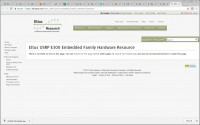
I went to start to redo the SD card and the 3rd link gave no instructions. Here is the screen shot.
Btw, I received a second SD card with the purchase of the E310. I plugged that in and it did not work.
Are you sure I need to redo the card? Or is there an SSH setup on the E310 I may need to do?
Thanks
[cid:image001.jpg@01D30D01.15531090]

-----Original Message-----
From: Nate Temple [mailto:nate.temple@ettus.com]
Sent: Thursday, August 03, 2017 3:24 PM
To: Matheou, Konstantin J. (GRC-LCI0)[ZIN TECHNOLOGIES INC] konstantin.j.matheou@nasa.gov
Cc: Philip Balister philip@balister.org; usrp-users@lists.ettus.com
Subject: Re: [USRP-users] When ssh'ing Getting prompt for Password Issue
Hi Konstantin,
Yes, I suspect there may be an issue with a configuration or change to the SSH configs on your current image. Starting with a fresh release-4 image should resolve the issue.
Regards,
Nate Temple
On Aug 3, 2017, at 12:17 PM, Matheou, Konstantin J. (GRC-LCI0)[ZIN TECHNOLOGIES INC] <konstantin.j.matheou@nasa.govmailto:konstantin.j.matheou@nasa.gov> wrote:
Nate, Thanks for all the info..
I just want to refresh your memory that I was able to connect via serial port... Only root was needed and no password was needed... so that worked fine.. because this is how I altered the IP address of the E310.
So with that stated, should I just jump t refreshing the SD card - step 2?
-----Original Message-----
From: Nate Temple [mailto:nate.temple@ettus.com]
Sent: Thursday, August 03, 2017 3:14 PM
To: Matheou, Konstantin J. (GRC-LCI0)[ZIN TECHNOLOGIES INC]
Cc: Philip Balister <philip@balister.orgmailto:philip@balister.org>; usrp-users@lists.ettus.commailto:usrp-users@lists.ettus.com
Subject: Re: [USRP-users] When ssh'ing Getting prompt for Password
Issue
Hi Konstantin,
You can try connecting via the Serial port [1]. I would suggest to first try undoing any changes you have made to the ssh_config. By default it will not require any passwords.
If that is not successful, I would suggest downloading a fresh release-4 image from [2] and writing it to the SD Card. The SD Card section [3] of the Ettus KB will detail which image you need based on your device serial number.
[1] -
uides#Serial_Console_Connectivity [2] -
[3] -
s#SD_Card_Images
Regards,
Nate Temple
On Aug 3, 2017, at 12:06 PM, Matheou, Konstantin J. (GRC-LCI0)[ZIN TECHNOLOGIES INC] <konstantin.j.matheou@nasa.govmailto:konstantin.j.matheou@nasa.gov> wrote:
OK.. I did it your way and I am connecting via ping your way now too....
Bu again, when I do the ssh command, it is asking for a password.
So, I am getting the samething as I was before...
Does ssh have to be setup on the E310???
Is there a way to check/reset the password on the E310?
Thanks
-----Original Message-----
From: Nate Temple [mailto:nate.temple@ettus.com]
Sent: Thursday, August 03, 2017 2:54 PM
To: Matheou, Konstantin J. (GRC-LCI0)[ZIN TECHNOLOGIES INC]
Subject: Re: [USRP-users] When ssh'ing Getting prompt for Password
Issue
Hi Konstantin,
After setting the NIC to be Bridged for the VM from VirtualBox, you need to start the VM, then within the System Settings -> Network of the VM, manually set the NIC to have a static IP address.
Regards,
Nate Temple
On Aug 3, 2017, at 11:50 AM, Matheou, Konstantin J. (GRC-LCI0)[ZIN TECHNOLOGIES INC] <konstantin.j.matheou@nasa.govmailto:konstantin.j.matheou@nasa.gov> wrote:
The Software does not allow me to do that.. Here is a screen shot..
This is all that it offers…
<image001.png>
-----Original Message-----
From: Nate Temple [mailto:nate.temple@ettus.com]
Sent: Thursday, August 03, 2017 2:48 PM
To: Matheou, Konstantin J. (GRC-LCI0)[ZIN TECHNOLOGIES INC]
Cc: Philip Balister <philip@balister.orgmailto:philip@balister.org>;
Subject: Re: [USRP-users] When ssh'ing Getting prompt for Password
Issue
Hi Konstantin,
When operating in bridged mode, did you manually set the (static) IP address within your VM?
Regards,
Nate Temple
On Aug 3, 2017, at 11:27 AM, Matheou, Konstantin J. (GRC-LCI0)[ZIN TECHNOLOGIES INC] <konstantin.j.matheou@nasa.govmailto:konstantin.j.matheou@nasa.gov> wrote:
Nate,
As soon I put it into bridged mode, nothing works.. What I mean is that I am not able to communicate/ping to the E310 that way.
It may work maybe for other VM software, but again, I am using Oracle VirtualBox.
Thanks
-----Original Message-----
From: Nate Temple [mailto:nate.temple@ettus.com]
Sent: Thursday, August 03, 2017 1:37 PM
To: Philip Balister <philip@balister.orgmailto:philip@balister.org>
Cc: Matheou, Konstantin J. (GRC-LCI0)[ZIN TECHNOLOGIES INC]
Subject: Re: [USRP-users] When ssh'ing Getting prompt for Password
Issue
Hi Konstantin,
You may want to try putting your VM into a Bridge Network mode. There may be an issue with the NAT routing. If operating in Bridged mode, ensure your Host, VM and E3xx all have different IP addresses.
Regards,
Nate Temple
On Aug 3, 2017, at 9:39 AM, Philip Balister via USRP-users <usrp-users@lists.ettus.commailto:usrp-users@lists.ettus.com> wrote:
On 08/03/2017 11:07 AM, Matheou, Konstantin J. (GRC-LCI0)[ZIN
TECHNOLOGIES INC] via USRP-users wrote:
Hello All,
I have the E310 hooked up with an Ethernet wire, and I can ping from my Linux Ubuntu Virtual machine (created by Oracle VirtualBox software).
But when I try to SSH, I did get access denied.. until I added a VM rule for port 22 in Network Settings of the VM.
But now I get the password message in the Linux terminal to place a password. As we know, the password is empty per the instructions on the website.
Did you hit return to see if it gave you a prompt?
Philip
So I went into ssh_config file in Linux at ect/ssh and altered a
line that allows for no passwords... This is the site..
But I am still not getting past the password login.
Is there any other advice you can give me?
Thanks,
Konstantin
USRP-users mailing list
m
USRP-users mailing list