usrp-users@lists.ettus.com

Discussion and technical support related to USRP, UHD, RFNoC

View all threads

UHD Driver Installation for Windows 10

TM
Thangaraj Mukara Dhakshinamoorthy
Wed, Oct 27, 2021 12:06 PM

Hello everyone,

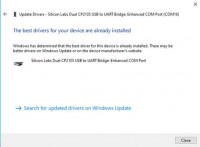
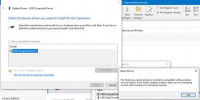
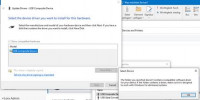
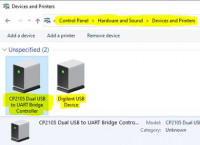
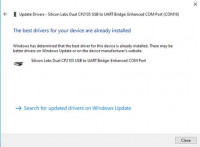
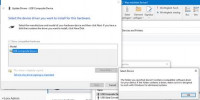
I am trying to connect the N320 to my windows 10, but I can’t install the usb driver from the hardware settings of the device, either it is automatically installing best suitable driver like standard com driver or not installing .inf file from UHD/WinUSB folder!(I copied the files of erllc_uhd_winusb_driver into C:\Program Files\UHD\share\uhd\images\driver)

PS C:\Program Files\UHD\bin> .\uhd_find_devices.exe
[INFO] [UHD] Win32; Microsoft Visual C++ version 1925; Boost_107000; UHD_4.1.0.4-release
[ERROR] [X300] X300 Network discovery error receive_from: An existing connection was forcibly closed by the remote host
[ERROR] [UHD] Device discovery error: receive_from: An existing connection was forcibly closed by the remote host
[ERROR] [UHD] Device discovery error: receive_from: An existing connection was forcibly closed by the remote host
No UHD Devices Found
[ERROR] [UHD] Device discovery error: receive_from: An existing connection was forcibly closed by the remote host
PS C:\Program Files\UHD\bin>

[cid:image001.jpg@01D7CB3B.CF6990B0]

[cid:image002.jpg@01D7CB3B.CF6990B0]
[cid:image003.jpg@01D7CB3B.CF6990B0]

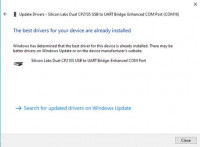
It is just installing the com drivers! Not the .inf file provided with UHD! I tried a lot, it is not working!

Have anyone successfully installed UHD in windows? Please help!

Regards,
Thangaraj
Hello everyone, I am trying to connect the N320 to my windows 10, but I can’t install the usb driver from the hardware settings of the device, either it is automatically installing best suitable driver like standard com driver or not installing .inf file from UHD/WinUSB folder!(I copied the files of erllc_uhd_winusb_driver into C:\Program Files\UHD\share\uhd\images\driver) PS C:\Program Files\UHD\bin> .\uhd_find_devices.exe [INFO] [UHD] Win32; Microsoft Visual C++ version 1925; Boost_107000; UHD_4.1.0.4-release [ERROR] [X300] X300 Network discovery error receive_from: An existing connection was forcibly closed by the remote host [ERROR] [UHD] Device discovery error: receive_from: An existing connection was forcibly closed by the remote host [ERROR] [UHD] Device discovery error: receive_from: An existing connection was forcibly closed by the remote host No UHD Devices Found [ERROR] [UHD] Device discovery error: receive_from: An existing connection was forcibly closed by the remote host PS C:\Program Files\UHD\bin> [cid:image001.jpg@01D7CB3B.CF6990B0] [cid:image002.jpg@01D7CB3B.CF6990B0] [cid:image003.jpg@01D7CB3B.CF6990B0] It is just installing the com drivers! Not the .inf file provided with UHD! I tried a lot, it is not working! Have anyone successfully installed UHD in windows? Please help! Regards, Thangaraj
MD
Marcus D. Leech
Wed, Oct 27, 2021 2:09 PM

On 2021-10-27 08:06, Thangaraj Mukara Dhakshinamoorthy wrote:

Hello everyone,

I am trying to connect the N320 to my windows 10, but I can’t install
the usb driver from the hardware settings of the device, either it is
automatically installing best suitable driver like standard com driver
or not installing .inf file from UHD/WinUSB folder!(I copied the files
of erllc_uhd_winusb_driver into C:\Program
Files\UHD\share\uhd\images\driver)

PS C:\Program Files\UHD\bin> .\uhd_find_devices.exe

[INFO] [UHD] Win32; Microsoft Visual C++ version 1925; Boost_107000;
UHD_4.1.0.4-release

[ERROR] [X300] X300 Network discovery error receive_from: An existing
connection was forcibly closed by the remote host

[ERROR] [UHD] Device discovery error: receive_from: An existing
connection was forcibly closed by the remote host

[ERROR] [UHD] Device discovery error: receive_from: An existing
connection was forcibly closed by the remote host

No UHD Devices Found

[ERROR] [UHD] Device discovery error: receive_from: An existing
connection was forcibly closed by the remote host

PS C:\Program Files\UHD\bin>

The USB port on your N320 is strictly for console use, so UHD won't be
able to "see" it.

Can you ping your N320 over its network cable?

The N320 USB port should "look" like a USB serial device to your Windows
system.

It is just installing the com drivers! Not the .inf file provided with
UHD! I tried a lot, it is not working!

Have anyone successfully installed UHD in windows? Please help!

Regards,

Thangaraj
On 2021-10-27 08:06, Thangaraj Mukara Dhakshinamoorthy wrote: > > Hello everyone, > > I am trying to connect the N320 to my windows 10, but I can’t install > the usb driver from the hardware settings of the device, either it is > automatically installing best suitable driver like standard com driver > or not installing .inf file from UHD/WinUSB folder!(I copied the files > of erllc_uhd_winusb_driver into C:\Program > Files\UHD\share\uhd\images\driver) > > PS C:\Program Files\UHD\bin> .\uhd_find_devices.exe > > [INFO] [UHD] Win32; Microsoft Visual C++ version 1925; Boost_107000; > UHD_4.1.0.4-release > > [ERROR] [X300] X300 Network discovery error receive_from: An existing > connection was forcibly closed by the remote host > > [ERROR] [UHD] Device discovery error: receive_from: An existing > connection was forcibly closed by the remote host > > [ERROR] [UHD] Device discovery error: receive_from: An existing > connection was forcibly closed by the remote host > > No UHD Devices Found > > [ERROR] [UHD] Device discovery error: receive_from: An existing > connection was forcibly closed by the remote host > > PS C:\Program Files\UHD\bin> > The USB port on your N320 is strictly for console use, so UHD won't be able to "see" it. Can you ping your N320 over its network cable? The N320 USB port should "look" like a USB serial device to your Windows system. > It is just installing the com drivers! Not the .inf file provided with > UHD! I tried a lot, it is not working! > > Have anyone successfully installed UHD in windows? Please help! > > Regards, > > Thangaraj >
TM
Thangaraj Mukara Dhakshinamoorthy
Thu, Oct 28, 2021 10:16 AM

Hello Marcus,

I am able to ping the USRP device, but UHD was not able to find it!
Console:
C:\Program Files\UHD\bin>ping 192.168.10.2

Pinging 192.168.10.2 with 32 bytes of data:
Reply from 192.168.10.2: bytes=32 time=1ms TTL=64

Ping statistics for 192.168.10.2:
Packets: Sent = 4, Received = 4, Lost = 0 (0% loss),
Approximate round trip times in milli-seconds:
Minimum = 1ms, Maximum = 1ms, Average = 1ms

C:\Program Files\UHD\bin>uhd_find_devices.exe
[INFO] [UHD] Win32; Microsoft Visual C++ version 1925; Boost_107000; UHD_4.1.0.4-release
[ERROR] [X300] X300 Network discovery error receive_from: An existing connection was forcibly closed by the remote host
[ERROR] [UHD] Device discovery error: receive_from: An existing connection was forcibly closed by the remote host
[ERROR] [UHD] Device discovery error: receive_from: An existing connection was forcibly closed by the remote host
No UHD Devices Found
[ERROR] [UHD] Device discovery error: receive_from: An existing connection was forcibly closed by the remote host

C:\Program Files\UHD\bin>

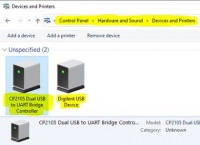
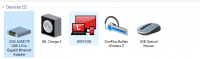
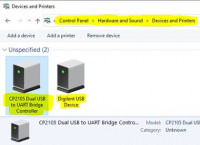
USB to Ethernet Adapter detected in Control Panel\Hardware and Sound\Devices and Printers:
[cid:image001.png@01D7CBF5.80B65CE0]

But still no success! What would be the problem?

Regards,
Thangaraj

Von: Marcus D. Leech patchvonbraun@gmail.com
Gesendet: Mittwoch, 27. Oktober 2021 16:10
An: Thangaraj Mukara Dhakshinamoorthy thangaraj@komro.net; usrp-users@lists.ettus.com
Betreff: Re: UHD Driver Installation for Windows 10

On 2021-10-27 08:06, Thangaraj Mukara Dhakshinamoorthy wrote:
Hello everyone,

I am trying to connect the N320 to my windows 10, but I can’t install the usb driver from the hardware settings of the device, either it is automatically installing best suitable driver like standard com driver or not installing .inf file from UHD/WinUSB folder!(I copied the files of erllc_uhd_winusb_driver into C:\Program Files\UHD\share\uhd\images\driver)

PS C:\Program Files\UHD\bin> .\uhd_find_devices.exe
[INFO] [UHD] Win32; Microsoft Visual C++ version 1925; Boost_107000; UHD_4.1.0.4-release
[ERROR] [X300] X300 Network discovery error receive_from: An existing connection was forcibly closed by the remote host
[ERROR] [UHD] Device discovery error: receive_from: An existing connection was forcibly closed by the remote host
[ERROR] [UHD] Device discovery error: receive_from: An existing connection was forcibly closed by the remote host
No UHD Devices Found
[ERROR] [UHD] Device discovery error: receive_from: An existing connection was forcibly closed by the remote host
PS C:\Program Files\UHD\bin>

The USB port on your N320 is strictly for console use, so UHD won't be able to "see" it.

Can you ping your N320 over its network cable?

The N320 USB port should "look" like a USB serial device to your Windows system.

[cid:image002.jpg@01D7CBF5.80B65CE0]

[cid:image003.jpg@01D7CBF5.80B65CE0]
[cid:image004.jpg@01D7CBF5.80B65CE0]

It is just installing the com drivers! Not the .inf file provided with UHD! I tried a lot, it is not working!

Have anyone successfully installed UHD in windows? Please help!

Regards,
Thangaraj

Hello Marcus, I am able to ping the USRP device, but UHD was not able to find it! Console: C:\Program Files\UHD\bin>ping 192.168.10.2 Pinging 192.168.10.2 with 32 bytes of data: Reply from 192.168.10.2: bytes=32 time=1ms TTL=64 Reply from 192.168.10.2: bytes=32 time=1ms TTL=64 Reply from 192.168.10.2: bytes=32 time=1ms TTL=64 Reply from 192.168.10.2: bytes=32 time=1ms TTL=64 Ping statistics for 192.168.10.2: Packets: Sent = 4, Received = 4, Lost = 0 (0% loss), Approximate round trip times in milli-seconds: Minimum = 1ms, Maximum = 1ms, Average = 1ms C:\Program Files\UHD\bin>uhd_find_devices.exe [INFO] [UHD] Win32; Microsoft Visual C++ version 1925; Boost_107000; UHD_4.1.0.4-release [ERROR] [X300] X300 Network discovery error receive_from: An existing connection was forcibly closed by the remote host [ERROR] [UHD] Device discovery error: receive_from: An existing connection was forcibly closed by the remote host [ERROR] [UHD] Device discovery error: receive_from: An existing connection was forcibly closed by the remote host No UHD Devices Found [ERROR] [UHD] Device discovery error: receive_from: An existing connection was forcibly closed by the remote host C:\Program Files\UHD\bin> USB to Ethernet Adapter detected in Control Panel\Hardware and Sound\Devices and Printers: [cid:image001.png@01D7CBF5.80B65CE0] But still no success! What would be the problem? Regards, Thangaraj Von: Marcus D. Leech <patchvonbraun@gmail.com> Gesendet: Mittwoch, 27. Oktober 2021 16:10 An: Thangaraj Mukara Dhakshinamoorthy <thangaraj@komro.net>; usrp-users@lists.ettus.com Betreff: Re: UHD Driver Installation for Windows 10 On 2021-10-27 08:06, Thangaraj Mukara Dhakshinamoorthy wrote: Hello everyone, I am trying to connect the N320 to my windows 10, but I can’t install the usb driver from the hardware settings of the device, either it is automatically installing best suitable driver like standard com driver or not installing .inf file from UHD/WinUSB folder!(I copied the files of erllc_uhd_winusb_driver into C:\Program Files\UHD\share\uhd\images\driver) PS C:\Program Files\UHD\bin> .\uhd_find_devices.exe [INFO] [UHD] Win32; Microsoft Visual C++ version 1925; Boost_107000; UHD_4.1.0.4-release [ERROR] [X300] X300 Network discovery error receive_from: An existing connection was forcibly closed by the remote host [ERROR] [UHD] Device discovery error: receive_from: An existing connection was forcibly closed by the remote host [ERROR] [UHD] Device discovery error: receive_from: An existing connection was forcibly closed by the remote host No UHD Devices Found [ERROR] [UHD] Device discovery error: receive_from: An existing connection was forcibly closed by the remote host PS C:\Program Files\UHD\bin> The USB port on your N320 is strictly for console use, so UHD won't be able to "see" it. Can you ping your N320 over its network cable? The N320 USB port should "look" like a USB serial device to your Windows system. [cid:image002.jpg@01D7CBF5.80B65CE0] [cid:image003.jpg@01D7CBF5.80B65CE0] [cid:image004.jpg@01D7CBF5.80B65CE0] It is just installing the com drivers! Not the .inf file provided with UHD! I tried a lot, it is not working! Have anyone successfully installed UHD in windows? Please help! Regards, Thangaraj
MD
Marcus D. Leech
Thu, Oct 28, 2021 2:53 PM

On 2021-10-28 06:16, Thangaraj Mukara Dhakshinamoorthy wrote:

Hello Marcus,

I am able to ping the USRP device, but UHD was not able to find it!

Console:

C:\Program Files\UHD\bin>ping 192.168.10.2

Pinging 192.168.10.2 with 32 bytes of data:

Reply from 192.168.10.2: bytes=32 time=1ms TTL=64

Reply from 192.168.10.2: bytes=32 time=1ms TTL=64

Reply from 192.168.10.2: bytes=32 time=1ms TTL=64

Reply from 192.168.10.2: bytes=32 time=1ms TTL=64

Ping statistics for 192.168.10.2:

Packets: Sent = 4, Received = 4, Lost = 0 (0% loss),

Approximate round trip times in milli-seconds:

    Minimum = 1ms, Maximum = 1ms, Average = 1ms

C:\Program Files\UHD\bin>uhd_find_devices.exe

[INFO] [UHD] Win32; Microsoft Visual C++ version 1925; Boost_107000;
UHD_4.1.0.4-release

[ERROR] [X300] X300 Network discovery error receive_from: An existing
connection was forcibly closed by the remote host

[ERROR] [UHD] Device discovery error: receive_from: An existing
connection was forcibly closed by the remote host

[ERROR] [UHD] Device discovery error: receive_from: An existing
connection was forcibly closed by the remote host

No UHD Devices Found

[ERROR] [UHD] Device discovery error: receive_from: An existing
connection was forcibly closed by the remote host

C:

"Find" doesn't always work on all OS configurations.

Use uhd_usrp_probes --args "addr=192.168.10.2,type=n3xx,product=n320"

On 2021-10-28 06:16, Thangaraj Mukara Dhakshinamoorthy wrote: > > Hello Marcus, > > I am able to ping the USRP device, but UHD was not able to find it! > > Console: > > C:\Program Files\UHD\bin>ping 192.168.10.2 > > Pinging 192.168.10.2 with 32 bytes of data: > > Reply from 192.168.10.2: bytes=32 time=1ms TTL=64 > > Reply from 192.168.10.2: bytes=32 time=1ms TTL=64 > > Reply from 192.168.10.2: bytes=32 time=1ms TTL=64 > > Reply from 192.168.10.2: bytes=32 time=1ms TTL=64 > > Ping statistics for 192.168.10.2: > > Packets: Sent = 4, Received = 4, Lost = 0 (0% loss), > > Approximate round trip times in milli-seconds: > >     Minimum = 1ms, Maximum = 1ms, Average = 1ms > > C:\Program Files\UHD\bin>uhd_find_devices.exe > > [INFO] [UHD] Win32; Microsoft Visual C++ version 1925; Boost_107000; > UHD_4.1.0.4-release > > [ERROR] [X300] X300 Network discovery error receive_from: An existing > connection was forcibly closed by the remote host > > [ERROR] [UHD] Device discovery error: receive_from: An existing > connection was forcibly closed by the remote host > > [ERROR] [UHD] Device discovery error: receive_from: An existing > connection was forcibly closed by the remote host > > No UHD Devices Found > > [ERROR] [UHD] Device discovery error: receive_from: An existing > connection was forcibly closed by the remote host > > C: > "Find" doesn't always work on all OS configurations. Use uhd_usrp_probes --args "addr=192.168.10.2,type=n3xx,product=n320"