

usrp-users@lists.ettus.com

Discussion and technical support related to USRP, UHD, RFNoC

View all threads

Re: [USRP-users] SBX RF board simultaneous mode with USRP Hardware Support for MATLAB

MM
Mike McLernon
Thu, Jul 19, 2012 3:05 PM

Hi Stan,

I did the following experiment to ascertain our level of full duplex support:

Experiment Setup

  1. N210/SBX
  2. VERT900 antennas for both tx and rx
  3. Win64 on a 12-core development machine
  4. One MATLAB session, one Simulink model
  5. SDRu Tx block and SDRu Rx block in same model
  6. Model runs in accelerator mode
  7. Spectrum Scope blocks for tx and rx waveforms, a Simulink Scope to monitor rx overruns
  8. Interpolation/decimation factor of 512 (maximum allowed)
  9. Tx center frequency = 915 MHz
  10. Rx center frequency = 915 or 915.04 MHz (controlled with a manual switch)
  11. Optimizations:
    *  Use singles rather than doubles
    *  Use accelerator rather than normal mode
    *  Turned on compiler optimizations
    *  Turned off all data logging

Results

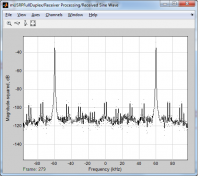
  1. Rx Spectrum Scope shows tones where they should be
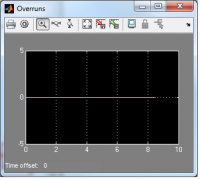
  2. Simulink Scope shows no overruns
  3. When the SDRu Receiver block's center frequency is changed with the manual switch shortly after the simulation starts, the rx Spectrum Scope shows the change quickly.
  4. As the simulation continues, it takes progressively longer for the change to show in the Spectrum Scope.
    *  With one scope removed, the change is reflected more quickly, but it still takes progressively longer as the simulation continues.
    *  Conclusion is that a data buffer is slowly filling up and taking more time to empty out.
    *  If the tx Spectrum Scope were removed, the model would run faster, and the frequency changes would show more quickly.

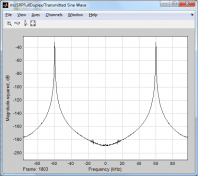
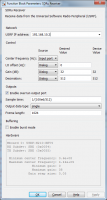
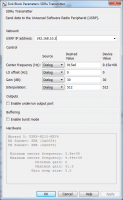
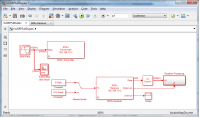
I've attached images of the model, the block dialogs, the tx and rx spectra, and the time plot of the overrun signal with this message.  Please let us know if you have additional questions.

Best,
Mike

From: usrp-users-bounces@lists.ettus.com [mailto:usrp-users-bounces@lists.ettus.com] On Behalf Of Stan Gamla
Sent: Sunday, July 15, 2012 6:14 AM
To: Marc Erickson; usrp-users@lists.ettus.com
Subject: Re: [USRP-users] SBX RF board simultaneous mode with USRP HardwareSupport for MATLAB

Hi Marc,

Thanks for the kind offer to provide support.

In order to continue this thread within the community, I would like to respond by repeating my previous request:
Could you please comment and perhaps provide an illustration of how to configure the N210/SBX using both MATLAB and Simulink so that a signal is transmitted from the RF1 port and received by the RF2. As a suggestion, slider controls could be used in Simulink to independently adjust the RF settings of both the transmitter and receiver to include at least gain and center frequency. A spectrum of the received signal should be displayed.
With many thanks,

Stan


From: Marc Erickson [mailto:Marc.Erickson@mathworks.com]
Sent: 05 July 2012 19:19
To: Stan Gamla; usrp-users@lists.ettus.com
Subject: RE: [USRP-users] SBX RF board simultaneous mode with USRP HardwareSupport for MATLAB
Hi Stan,

Sorry for the confusion about our support.  We have stated some limitations of our support in the product release notes which are available in the download package.  Type 'help sdru' and follow the 'Help and Examples' link.  Then click on the link under 'Release Notes'.  The relevant limitation is stated as follows:

"Communications with USRP(tm) only supports half-duplex applications. MATLAB and Simulink applications must be receive-only or transmit-only. Full-duplex is not supported."

Our package has separate Rx and Tx blocks (for Simulink) and separate Rx and Tx System objects (for MATLAB) with their own configuration parameters.  We allow binding the Rx and Tx to the same board in order to support some duplex operations.  Full duplex operation might be possible when adhering to some modeling constraints.

Please feel free to contact us directly to discuss any use-cases and specific applications you might be interested in pursuing and we'd be happy to work with you.

Regards,
Marc

From: usrp-users-bounces@lists.ettus.com [mailto:usrp-users-bounces@lists.ettus.com] On Behalf Of Stan Gamla
Sent: Friday, June 29, 2012 7:03 AM
To: usrp-users@lists.ettus.com
Subject: [USRP-users] SBX RF board simultaneous mode with USRP Hardware Support for MATLAB

As far as I understand, the Ettus SBX RF board comprises a full-duplex transceiver with separate receive and transmit chains, each having its own local oscillator.

https://www.ettus.com/product#tabs-3 states that:
"The SBX is a wide bandwidth transceiver that provides up to 100 mW of output power, and a typical noise figure of 5 dB. The local oscillators for the receive and transmit chains operate independently, which allows dual-band operation. The SBX is MIMO capable, and provides 40 MHz of bandwidth. The SBX is ideal for applications requiring access to a variety of bands in the 400 MHz-4400 MHz range. Example application areas include WiFi, WiMax, S-band transceivers and 2.4 GHz ISM band transceivers."

Further, according to their website "The MathWorks USRP(r) Hardware Support from [sic] MATLAB and Simulink is compatible with UHD(tm)-based Ettus radios".

http://www.mathworks.com/discovery/sdr/usrp.html viz:
"MATLAB and Simulink support for USRP(r) devices has been tested on N210 and USRP2(r) devices with WBX, SBX, XCVR2450, TVRX, TVRX2, LFRX, LFTX, DBSRX, and DBSRX2 daughterboards. Support may also extend to other UHD(tm)-based radios and daughterboards from National Instruments(r)."

Are both of these statements correct, I wonder?

If The MathWorks is tuned in to this channel, could you please comment and perhaps provide an illustration of how to configure the N210/SBX using both MATLAB and Simulink so that a signal is transmitted from the RF1 port and received by the RF2. As a suggestion, slider controls could be used in Simulink to independently adjust the RF settings of both the transmitter and receiver to include at least gain and center frequency. A spectrum of the received signal should be displayed.

On the other hand, if I have misunderstood what is meant by the word "supported" could either Ettus or The MathWorks comment please.

Thanks,

Stan
Hi Stan, I did the following experiment to ascertain our level of full duplex support: Experiment Setup 1. N210/SBX 2. VERT900 antennas for both tx and rx 3. Win64 on a 12-core development machine 4. One MATLAB session, one Simulink model 5. SDRu Tx block and SDRu Rx block in same model 6. Model runs in accelerator mode 7. Spectrum Scope blocks for tx and rx waveforms, a Simulink Scope to monitor rx overruns 8. Interpolation/decimation factor of 512 (maximum allowed) 9. Tx center frequency = 915 MHz 10. Rx center frequency = 915 or 915.04 MHz (controlled with a manual switch) 11. Optimizations: * Use singles rather than doubles * Use accelerator rather than normal mode * Turned on compiler optimizations * Turned off all data logging Results 1. Rx Spectrum Scope shows tones where they should be 2. Simulink Scope shows no overruns 3. When the SDRu Receiver block's center frequency is changed with the manual switch shortly after the simulation starts, the rx Spectrum Scope shows the change quickly. 4. As the simulation continues, it takes progressively longer for the change to show in the Spectrum Scope. * With one scope removed, the change is reflected more quickly, but it still takes progressively longer as the simulation continues. * Conclusion is that a data buffer is slowly filling up and taking more time to empty out. * If the tx Spectrum Scope were removed, the model would run faster, and the frequency changes would show more quickly. I've attached images of the model, the block dialogs, the tx and rx spectra, and the time plot of the overrun signal with this message. Please let us know if you have additional questions. Best, Mike From: usrp-users-bounces@lists.ettus.com [mailto:usrp-users-bounces@lists.ettus.com] On Behalf Of Stan Gamla Sent: Sunday, July 15, 2012 6:14 AM To: Marc Erickson; usrp-users@lists.ettus.com Subject: Re: [USRP-users] SBX RF board simultaneous mode with USRP HardwareSupport for MATLAB Hi Marc, Thanks for the kind offer to provide support. In order to continue this thread within the community, I would like to respond by repeating my previous request: Could you please comment and perhaps provide an illustration of how to configure the N210/SBX using both MATLAB and Simulink so that a signal is transmitted from the RF1 port and received by the RF2. As a suggestion, slider controls could be used in Simulink to independently adjust the RF settings of both the transmitter and receiver to include at least gain and center frequency. A spectrum of the received signal should be displayed. With many thanks, Stan ________________________________ From: Marc Erickson [mailto:Marc.Erickson@mathworks.com] Sent: 05 July 2012 19:19 To: Stan Gamla; usrp-users@lists.ettus.com Subject: RE: [USRP-users] SBX RF board simultaneous mode with USRP HardwareSupport for MATLAB Hi Stan, Sorry for the confusion about our support. We have stated some limitations of our support in the product release notes which are available in the download package. Type 'help sdru' and follow the 'Help and Examples' link. Then click on the link under 'Release Notes'. The relevant limitation is stated as follows: "Communications with USRP(tm) only supports half-duplex applications. MATLAB and Simulink applications must be receive-only or transmit-only. Full-duplex is not supported." Our package has separate Rx and Tx blocks (for Simulink) and separate Rx and Tx System objects (for MATLAB) with their own configuration parameters. We allow binding the Rx and Tx to the same board in order to support some duplex operations. Full duplex operation might be possible when adhering to some modeling constraints. Please feel free to contact us directly to discuss any use-cases and specific applications you might be interested in pursuing and we'd be happy to work with you. Regards, Marc From: usrp-users-bounces@lists.ettus.com [mailto:usrp-users-bounces@lists.ettus.com] On Behalf Of Stan Gamla Sent: Friday, June 29, 2012 7:03 AM To: usrp-users@lists.ettus.com Subject: [USRP-users] SBX RF board simultaneous mode with USRP Hardware Support for MATLAB As far as I understand, the Ettus SBX RF board comprises a full-duplex transceiver with separate receive and transmit chains, each having its own local oscillator. https://www.ettus.com/product#tabs-3 states that: "The SBX is a wide bandwidth transceiver that provides up to 100 mW of output power, and a typical noise figure of 5 dB. The local oscillators for the receive and transmit chains operate independently, which allows dual-band operation. The SBX is MIMO capable, and provides 40 MHz of bandwidth. The SBX is ideal for applications requiring access to a variety of bands in the 400 MHz-4400 MHz range. Example application areas include WiFi, WiMax, S-band transceivers and 2.4 GHz ISM band transceivers." Further, according to their website "The MathWorks USRP(r) Hardware Support from [sic] MATLAB and Simulink is compatible with UHD(tm)-based Ettus radios". http://www.mathworks.com/discovery/sdr/usrp.html viz: "MATLAB and Simulink support for USRP(r) devices has been tested on N210 and USRP2(r) devices with WBX, SBX, XCVR2450, TVRX, TVRX2, LFRX, LFTX, DBSRX, and DBSRX2 daughterboards. Support may also extend to other UHD(tm)-based radios and daughterboards from National Instruments(r)." Are both of these statements correct, I wonder? If The MathWorks is tuned in to this channel, could you please comment and perhaps provide an illustration of how to configure the N210/SBX using both MATLAB and Simulink so that a signal is transmitted from the RF1 port and received by the RF2. As a suggestion, slider controls could be used in Simulink to independently adjust the RF settings of both the transmitter and receiver to include at least gain and center frequency. A spectrum of the received signal should be displayed. On the other hand, if I have misunderstood what is meant by the word "supported" could either Ettus or The MathWorks comment please. Thanks, Stan
SG
Stan Gamla
Thu, Jul 19, 2012 3:53 PM

Hi Mike,

Thanks for the thorough response which has restored my optimism that
full-duplex will work under MATLAB.

In order that I can make a quick start on further investigations, may I ask
if it would be possible for you to share the Simulink file(s) within this
community please?

Also, what ideas do you have on how to handle the bloated data buffer
problem?

With many thanks and kind regards,

Stan

PS Running R2012a on XP and Win7(64).


From: usrp-users-bounces@lists.ettus.com
[mailto:usrp-users-bounces@lists.ettus.com] On Behalf Of Mike McLernon
Sent: 19 July 2012 17:06
To: Stan Gamla
Cc: usrp-users@lists.ettus.com
Subject: Re: [USRP-users] SBX RF board simultaneous mode with USRP Hardware
Support for MATLAB

Hi Stan,

I did the following experiment to ascertain our level of full duplex
support:

Experiment Setup

  1. N210/SBX

  2. VERT900 antennas for both tx and rx

  3. Win64 on a 12-core development machine

  4. One MATLAB session, one Simulink model

  5. SDRu Tx block and SDRu Rx block in same model

  6. Model runs in accelerator mode

  7. Spectrum Scope blocks for tx and rx waveforms, a Simulink Scope to
    monitor rx overruns

  8. Interpolation/decimation factor of 512 (maximum allowed)

  9. Tx center frequency = 915 MHz

  10. Rx center frequency = 915 or 915.04 MHz (controlled with a manual
    switch)

  11. Optimizations:

  • Use singles rather than doubles

  • Use accelerator rather than normal mode

  • Turned on compiler optimizations

  • Turned off all data logging

Results

  1. Rx Spectrum Scope shows tones where they should be

  2. Simulink Scope shows no overruns

  3. When the SDRu Receiver block's center frequency is changed with the
    manual switch shortly after the simulation starts, the rx Spectrum Scope
    shows the change quickly.

  4. As the simulation continues, it takes progressively longer for the
    change to show in the Spectrum Scope.

  • With one scope removed, the change is reflected more quickly, but it
    still takes progressively longer as the simulation continues.

  • Conclusion is that a data buffer is slowly filling up and taking
    more time to empty out.

  • If the tx Spectrum Scope were removed, the model would run faster,
    and the frequency changes would show more quickly.

I've attached images of the model, the block dialogs, the tx and rx spectra,
and the time plot of the overrun signal with this message.  Please let us
know if you have additional questions.

Best,

Mike

From: usrp-users-bounces@lists.ettus.com
[mailto:usrp-users-bounces@lists.ettus.com] On Behalf Of Stan Gamla
Sent: Sunday, July 15, 2012 6:14 AM
To: Marc Erickson; usrp-users@lists.ettus.com
Subject: Re: [USRP-users] SBX RF board simultaneous mode with USRP
HardwareSupport for MATLAB

Hi Marc,

Thanks for the kind offer to provide support.

In order to continue this thread within the community, I would like to
respond by repeating my previous request:

Could you please comment and perhaps provide an illustration of how to
configure the N210/SBX using both MATLAB and Simulink so that a signal is
transmitted from the RF1 port and received by the RF2. As a suggestion,
slider controls could be used in Simulink to independently adjust the RF
settings of both the transmitter and receiver to include at least gain and
center frequency. A spectrum of the received signal should be displayed.

With many thanks,

Stan


From: Marc Erickson [mailto:Marc.Erickson@mathworks.com]
Sent: 05 July 2012 19:19
To: Stan Gamla; usrp-users@lists.ettus.com
Subject: RE: [USRP-users] SBX RF board simultaneous mode with USRP
HardwareSupport for MATLAB

Hi Stan,

Sorry for the confusion about our support.  We have stated some limitations
of our support in the product release notes which are available in the
download package.  Type 'help sdru' and follow the 'Help and Examples' link.
Then click on the link under 'Release Notes'.  The relevant limitation is
stated as follows:

"Communications with USRPT only supports half-duplex applications. MATLAB
and Simulink applications must be receive-only or transmit-only. Full-duplex
is not supported."

Our package has separate Rx and Tx blocks (for Simulink) and separate Rx and
Tx System objects (for MATLAB) with their own configuration parameters.  We
allow binding the Rx and Tx to the same board in order to support some
duplex operations.  Full duplex operation might be possible when adhering to
some modeling constraints.

Please feel free to contact us directly to discuss any use-cases and
specific applications you might be interested in pursuing and we'd be happy
to work with you.

Regards,

Marc

From: usrp-users-bounces@lists.ettus.com
[mailto:usrp-users-bounces@lists.ettus.com] On Behalf Of Stan Gamla
Sent: Friday, June 29, 2012 7:03 AM
To: usrp-users@lists.ettus.com
Subject: [USRP-users] SBX RF board simultaneous mode with USRP Hardware
Support for MATLAB

As far as I understand, the Ettus SBX RF board comprises a full-duplex
transceiver with separate receive and transmit chains, each having its own
local oscillator.

https://www.ettus.com/product#tabs-3 states that:
"The SBX is a wide bandwidth transceiver that provides up to 100 mW of
output power, and a typical noise figure of 5 dB. The local oscillators for
the receive and transmit chains operate independently, which allows
dual-band operation. The SBX is MIMO capable, and provides 40 MHz of
bandwidth. The SBX is ideal for applications requiring access to a variety
of bands in the 400 MHz-4400 MHz range. Example application areas include
WiFi, WiMax, S-band transceivers and 2.4 GHz ISM band transceivers."

Further, according to their website "The MathWorks USRPR Hardware Support
from [sic] MATLAB and Simulink is compatible with UHDT-based Ettus radios".

http://www.mathworks.com/discovery/sdr/usrp.html viz:
"MATLAB and Simulink support for USRPR devices has been tested on N210 and
USRP2R devices with WBX, SBX, XCVR2450, TVRX, TVRX2, LFRX, LFTX, DBSRX, and
DBSRX2 daughterboards. Support may also extend to other UHDT-based radios
and daughterboards from National InstrumentsR."

Are both of these statements correct, I wonder?

If The MathWorks is tuned in to this channel, could you please comment and
perhaps provide an illustration of how to configure the N210/SBX using both
MATLAB and Simulink so that a signal is transmitted from the RF1 port and
received by the RF2. As a suggestion, slider controls could be used in
Simulink to independently adjust the RF settings of both the transmitter and
receiver to include at least gain and center frequency. A spectrum of the
received signal should be displayed.

On the other hand, if I have misunderstood what is meant by the word
"supported" could either Ettus or The MathWorks comment please.

Thanks,

Stan
Hi Mike, Thanks for the thorough response which has restored my optimism that full-duplex will work under MATLAB. In order that I can make a quick start on further investigations, may I ask if it would be possible for you to share the Simulink file(s) within this community please? Also, what ideas do you have on how to handle the bloated data buffer problem? With many thanks and kind regards, Stan PS Running R2012a on XP and Win7(64). _____ From: usrp-users-bounces@lists.ettus.com [mailto:usrp-users-bounces@lists.ettus.com] On Behalf Of Mike McLernon Sent: 19 July 2012 17:06 To: Stan Gamla Cc: usrp-users@lists.ettus.com Subject: Re: [USRP-users] SBX RF board simultaneous mode with USRP Hardware Support for MATLAB Hi Stan, I did the following experiment to ascertain our level of full duplex support: Experiment Setup 1. N210/SBX 2. VERT900 antennas for both tx and rx 3. Win64 on a 12-core development machine 4. One MATLAB session, one Simulink model 5. SDRu Tx block and SDRu Rx block in same model 6. Model runs in accelerator mode 7. Spectrum Scope blocks for tx and rx waveforms, a Simulink Scope to monitor rx overruns 8. Interpolation/decimation factor of 512 (maximum allowed) 9. Tx center frequency = 915 MHz 10. Rx center frequency = 915 or 915.04 MHz (controlled with a manual switch) 11. Optimizations: * Use singles rather than doubles * Use accelerator rather than normal mode * Turned on compiler optimizations * Turned off all data logging Results 1. Rx Spectrum Scope shows tones where they should be 2. Simulink Scope shows no overruns 3. When the SDRu Receiver block's center frequency is changed with the manual switch shortly after the simulation starts, the rx Spectrum Scope shows the change quickly. 4. As the simulation continues, it takes progressively longer for the change to show in the Spectrum Scope. * With one scope removed, the change is reflected more quickly, but it still takes progressively longer as the simulation continues. * Conclusion is that a data buffer is slowly filling up and taking more time to empty out. * If the tx Spectrum Scope were removed, the model would run faster, and the frequency changes would show more quickly. I've attached images of the model, the block dialogs, the tx and rx spectra, and the time plot of the overrun signal with this message. Please let us know if you have additional questions. Best, Mike From: usrp-users-bounces@lists.ettus.com [mailto:usrp-users-bounces@lists.ettus.com] On Behalf Of Stan Gamla Sent: Sunday, July 15, 2012 6:14 AM To: Marc Erickson; usrp-users@lists.ettus.com Subject: Re: [USRP-users] SBX RF board simultaneous mode with USRP HardwareSupport for MATLAB Hi Marc, Thanks for the kind offer to provide support. In order to continue this thread within the community, I would like to respond by repeating my previous request: Could you please comment and perhaps provide an illustration of how to configure the N210/SBX using both MATLAB and Simulink so that a signal is transmitted from the RF1 port and received by the RF2. As a suggestion, slider controls could be used in Simulink to independently adjust the RF settings of both the transmitter and receiver to include at least gain and center frequency. A spectrum of the received signal should be displayed. With many thanks, Stan _____ From: Marc Erickson [mailto:Marc.Erickson@mathworks.com] Sent: 05 July 2012 19:19 To: Stan Gamla; usrp-users@lists.ettus.com Subject: RE: [USRP-users] SBX RF board simultaneous mode with USRP HardwareSupport for MATLAB Hi Stan, Sorry for the confusion about our support. We have stated some limitations of our support in the product release notes which are available in the download package. Type 'help sdru' and follow the 'Help and Examples' link. Then click on the link under 'Release Notes'. The relevant limitation is stated as follows: "Communications with USRPT only supports half-duplex applications. MATLAB and Simulink applications must be receive-only or transmit-only. Full-duplex is not supported." Our package has separate Rx and Tx blocks (for Simulink) and separate Rx and Tx System objects (for MATLAB) with their own configuration parameters. We allow binding the Rx and Tx to the same board in order to support some duplex operations. Full duplex operation might be possible when adhering to some modeling constraints. Please feel free to contact us directly to discuss any use-cases and specific applications you might be interested in pursuing and we'd be happy to work with you. Regards, Marc From: usrp-users-bounces@lists.ettus.com [mailto:usrp-users-bounces@lists.ettus.com] On Behalf Of Stan Gamla Sent: Friday, June 29, 2012 7:03 AM To: usrp-users@lists.ettus.com Subject: [USRP-users] SBX RF board simultaneous mode with USRP Hardware Support for MATLAB As far as I understand, the Ettus SBX RF board comprises a full-duplex transceiver with separate receive and transmit chains, each having its own local oscillator. https://www.ettus.com/product#tabs-3 states that: "The SBX is a wide bandwidth transceiver that provides up to 100 mW of output power, and a typical noise figure of 5 dB. The local oscillators for the receive and transmit chains operate independently, which allows dual-band operation. The SBX is MIMO capable, and provides 40 MHz of bandwidth. The SBX is ideal for applications requiring access to a variety of bands in the 400 MHz-4400 MHz range. Example application areas include WiFi, WiMax, S-band transceivers and 2.4 GHz ISM band transceivers." Further, according to their website "The MathWorks USRPR Hardware Support from [sic] MATLAB and Simulink is compatible with UHDT-based Ettus radios". http://www.mathworks.com/discovery/sdr/usrp.html viz: "MATLAB and Simulink support for USRPR devices has been tested on N210 and USRP2R devices with WBX, SBX, XCVR2450, TVRX, TVRX2, LFRX, LFTX, DBSRX, and DBSRX2 daughterboards. Support may also extend to other UHDT-based radios and daughterboards from National InstrumentsR." Are both of these statements correct, I wonder? If The MathWorks is tuned in to this channel, could you please comment and perhaps provide an illustration of how to configure the N210/SBX using both MATLAB and Simulink so that a signal is transmitted from the RF1 port and received by the RF2. As a suggestion, slider controls could be used in Simulink to independently adjust the RF settings of both the transmitter and receiver to include at least gain and center frequency. A spectrum of the received signal should be displayed. On the other hand, if I have misunderstood what is meant by the word "supported" could either Ettus or The MathWorks comment please. Thanks, Stan
SG
Stan Gamla
Fri, Jul 20, 2012 10:57 AM

Hi Mike,

With reference to the schematic of the Simulink model "mUSRPFullDuplex" that
you posted earlier, could you please reveal what is in (or under) the block
labelled "Receiver Processing"?

Referring to item 5 in the list "experiment setup" (in which the SDRu Tx and
SDRu Rx blocks are in the same model) would the system not perform
full-duplex operation if two models were used?

As a general question, could you please comment on how to configure the RF
ports of the SBX board in which an RF switch is used to configure RF1 for
either Tx or Rx.

Finally, it would be very much appreciated if the sample Simulink model(s)
could be shared in this community and it would be even more appreciated if
they were to be complemented with equivalent MATLAB files. Such a system
would be a useful example to include in future releases from the MathWorks.

Thanks in advance,

Stan


From: Mike McLernon [mailto:Mike.McLernon@mathworks.com]
Sent: 19 July 2012 17:06
To: Stan Gamla
Cc: Marc Erickson; usrp-users@lists.ettus.com
Subject: RE: [USRP-users] SBX RF board simultaneous mode with USRP Hardware
Support for MATLAB

Hi Stan,

I did the following experiment to ascertain our level of full duplex
support:

Experiment Setup

  1. N210/SBX

  2. VERT900 antennas for both tx and rx

  3. Win64 on a 12-core development machine

  4. One MATLAB session, one Simulink model

  5. SDRu Tx block and SDRu Rx block in same model

  6. Model runs in accelerator mode

  7. Spectrum Scope blocks for tx and rx waveforms, a Simulink Scope to
    monitor rx overruns

  8. Interpolation/decimation factor of 512 (maximum allowed)

  9. Tx center frequency = 915 MHz

  10. Rx center frequency = 915 or 915.04 MHz (controlled with a manual
    switch)

  11. Optimizations:

  • Use singles rather than doubles

  • Use accelerator rather than normal mode

  • Turned on compiler optimizations

  • Turned off all data logging

Results

  1. Rx Spectrum Scope shows tones where they should be

  2. Simulink Scope shows no overruns

  3. When the SDRu Receiver block's center frequency is changed with the
    manual switch shortly after the simulation starts, the rx Spectrum Scope
    shows the change quickly.

  4. As the simulation continues, it takes progressively longer for the
    change to show in the Spectrum Scope.

  • With one scope removed, the change is reflected more quickly, but it
    still takes progressively longer as the simulation continues.

  • Conclusion is that a data buffer is slowly filling up and taking
    more time to empty out.

  • If the tx Spectrum Scope were removed, the model would run faster,
    and the frequency changes would show more quickly.

I've attached images of the model, the block dialogs, the tx and rx spectra,
and the time plot of the overrun signal with this message.  Please let us
know if you have additional questions.

Best,

Mike

From: usrp-users-bounces@lists.ettus.com
[mailto:usrp-users-bounces@lists.ettus.com] On Behalf Of Stan Gamla
Sent: Sunday, July 15, 2012 6:14 AM
To: Marc Erickson; usrp-users@lists.ettus.com
Subject: Re: [USRP-users] SBX RF board simultaneous mode with USRP
HardwareSupport for MATLAB

Hi Marc,

Thanks for the kind offer to provide support.

In order to continue this thread within the community, I would like to
respond by repeating my previous request:

Could you please comment and perhaps provide an illustration of how to
configure the N210/SBX using both MATLAB and Simulink so that a signal is
transmitted from the RF1 port and received by the RF2. As a suggestion,
slider controls could be used in Simulink to independently adjust the RF
settings of both the transmitter and receiver to include at least gain and
center frequency. A spectrum of the received signal should be displayed.

With many thanks,

Stan


From: Marc Erickson [mailto:Marc.Erickson@mathworks.com]
Sent: 05 July 2012 19:19
To: Stan Gamla; usrp-users@lists.ettus.com
Subject: RE: [USRP-users] SBX RF board simultaneous mode with USRP
HardwareSupport for MATLAB

Hi Stan,

Sorry for the confusion about our support.  We have stated some limitations
of our support in the product release notes which are available in the
download package.  Type 'help sdru' and follow the 'Help and Examples' link.
Then click on the link under 'Release Notes'.  The relevant limitation is
stated as follows:

"Communications with USRPT only supports half-duplex applications. MATLAB
and Simulink applications must be receive-only or transmit-only. Full-duplex
is not supported."

Our package has separate Rx and Tx blocks (for Simulink) and separate Rx and
Tx System objects (for MATLAB) with their own configuration parameters.  We
allow binding the Rx and Tx to the same board in order to support some
duplex operations.  Full duplex operation might be possible when adhering to
some modeling constraints.

Please feel free to contact us directly to discuss any use-cases and
specific applications you might be interested in pursuing and we'd be happy
to work with you.

Regards,

Marc

From: usrp-users-bounces@lists.ettus.com
[mailto:usrp-users-bounces@lists.ettus.com] On Behalf Of Stan Gamla
Sent: Friday, June 29, 2012 7:03 AM
To: usrp-users@lists.ettus.com
Subject: [USRP-users] SBX RF board simultaneous mode with USRP Hardware
Support for MATLAB

As far as I understand, the Ettus SBX RF board comprises a full-duplex
transceiver with separate receive and transmit chains, each having its own
local oscillator.

https://www.ettus.com/product#tabs-3 states that:
"The SBX is a wide bandwidth transceiver that provides up to 100 mW of
output power, and a typical noise figure of 5 dB. The local oscillators for
the receive and transmit chains operate independently, which allows
dual-band operation. The SBX is MIMO capable, and provides 40 MHz of
bandwidth. The SBX is ideal for applications requiring access to a variety
of bands in the 400 MHz-4400 MHz range. Example application areas include
WiFi, WiMax, S-band transceivers and 2.4 GHz ISM band transceivers."

Further, according to their website "The MathWorks USRPR Hardware Support
from [sic] MATLAB and Simulink is compatible with UHDT-based Ettus radios".

http://www.mathworks.com/discovery/sdr/usrp.html viz:
"MATLAB and Simulink support for USRPR devices has been tested on N210 and
USRP2R devices with WBX, SBX, XCVR2450, TVRX, TVRX2, LFRX, LFTX, DBSRX, and
DBSRX2 daughterboards. Support may also extend to other UHDT-based radios
and daughterboards from National InstrumentsR."

Are both of these statements correct, I wonder?

If The MathWorks is tuned in to this channel, could you please comment and
perhaps provide an illustration of how to configure the N210/SBX using both
MATLAB and Simulink so that a signal is transmitted from the RF1 port and
received by the RF2. As a suggestion, slider controls could be used in
Simulink to independently adjust the RF settings of both the transmitter and
receiver to include at least gain and center frequency. A spectrum of the
received signal should be displayed.

On the other hand, if I have misunderstood what is meant by the word
"supported" could either Ettus or The MathWorks comment please.

Thanks,

Stan
Hi Mike, With reference to the schematic of the Simulink model "mUSRPFullDuplex" that you posted earlier, could you please reveal what is in (or under) the block labelled "Receiver Processing"? Referring to item 5 in the list "experiment setup" (in which the SDRu Tx and SDRu Rx blocks are in the same model) would the system not perform full-duplex operation if two models were used? As a general question, could you please comment on how to configure the RF ports of the SBX board in which an RF switch is used to configure RF1 for either Tx or Rx. Finally, it would be very much appreciated if the sample Simulink model(s) could be shared in this community and it would be even more appreciated if they were to be complemented with equivalent MATLAB files. Such a system would be a useful example to include in future releases from the MathWorks. Thanks in advance, Stan _____ From: Mike McLernon [mailto:Mike.McLernon@mathworks.com] Sent: 19 July 2012 17:06 To: Stan Gamla Cc: Marc Erickson; usrp-users@lists.ettus.com Subject: RE: [USRP-users] SBX RF board simultaneous mode with USRP Hardware Support for MATLAB Hi Stan, I did the following experiment to ascertain our level of full duplex support: Experiment Setup 1. N210/SBX 2. VERT900 antennas for both tx and rx 3. Win64 on a 12-core development machine 4. One MATLAB session, one Simulink model 5. SDRu Tx block and SDRu Rx block in same model 6. Model runs in accelerator mode 7. Spectrum Scope blocks for tx and rx waveforms, a Simulink Scope to monitor rx overruns 8. Interpolation/decimation factor of 512 (maximum allowed) 9. Tx center frequency = 915 MHz 10. Rx center frequency = 915 or 915.04 MHz (controlled with a manual switch) 11. Optimizations: * Use singles rather than doubles * Use accelerator rather than normal mode * Turned on compiler optimizations * Turned off all data logging Results 1. Rx Spectrum Scope shows tones where they should be 2. Simulink Scope shows no overruns 3. When the SDRu Receiver block's center frequency is changed with the manual switch shortly after the simulation starts, the rx Spectrum Scope shows the change quickly. 4. As the simulation continues, it takes progressively longer for the change to show in the Spectrum Scope. * With one scope removed, the change is reflected more quickly, but it still takes progressively longer as the simulation continues. * Conclusion is that a data buffer is slowly filling up and taking more time to empty out. * If the tx Spectrum Scope were removed, the model would run faster, and the frequency changes would show more quickly. I've attached images of the model, the block dialogs, the tx and rx spectra, and the time plot of the overrun signal with this message. Please let us know if you have additional questions. Best, Mike From: usrp-users-bounces@lists.ettus.com [mailto:usrp-users-bounces@lists.ettus.com] On Behalf Of Stan Gamla Sent: Sunday, July 15, 2012 6:14 AM To: Marc Erickson; usrp-users@lists.ettus.com Subject: Re: [USRP-users] SBX RF board simultaneous mode with USRP HardwareSupport for MATLAB Hi Marc, Thanks for the kind offer to provide support. In order to continue this thread within the community, I would like to respond by repeating my previous request: Could you please comment and perhaps provide an illustration of how to configure the N210/SBX using both MATLAB and Simulink so that a signal is transmitted from the RF1 port and received by the RF2. As a suggestion, slider controls could be used in Simulink to independently adjust the RF settings of both the transmitter and receiver to include at least gain and center frequency. A spectrum of the received signal should be displayed. With many thanks, Stan _____ From: Marc Erickson [mailto:Marc.Erickson@mathworks.com] Sent: 05 July 2012 19:19 To: Stan Gamla; usrp-users@lists.ettus.com Subject: RE: [USRP-users] SBX RF board simultaneous mode with USRP HardwareSupport for MATLAB Hi Stan, Sorry for the confusion about our support. We have stated some limitations of our support in the product release notes which are available in the download package. Type 'help sdru' and follow the 'Help and Examples' link. Then click on the link under 'Release Notes'. The relevant limitation is stated as follows: "Communications with USRPT only supports half-duplex applications. MATLAB and Simulink applications must be receive-only or transmit-only. Full-duplex is not supported." Our package has separate Rx and Tx blocks (for Simulink) and separate Rx and Tx System objects (for MATLAB) with their own configuration parameters. We allow binding the Rx and Tx to the same board in order to support some duplex operations. Full duplex operation might be possible when adhering to some modeling constraints. Please feel free to contact us directly to discuss any use-cases and specific applications you might be interested in pursuing and we'd be happy to work with you. Regards, Marc From: usrp-users-bounces@lists.ettus.com [mailto:usrp-users-bounces@lists.ettus.com] On Behalf Of Stan Gamla Sent: Friday, June 29, 2012 7:03 AM To: usrp-users@lists.ettus.com Subject: [USRP-users] SBX RF board simultaneous mode with USRP Hardware Support for MATLAB As far as I understand, the Ettus SBX RF board comprises a full-duplex transceiver with separate receive and transmit chains, each having its own local oscillator. https://www.ettus.com/product#tabs-3 states that: "The SBX is a wide bandwidth transceiver that provides up to 100 mW of output power, and a typical noise figure of 5 dB. The local oscillators for the receive and transmit chains operate independently, which allows dual-band operation. The SBX is MIMO capable, and provides 40 MHz of bandwidth. The SBX is ideal for applications requiring access to a variety of bands in the 400 MHz-4400 MHz range. Example application areas include WiFi, WiMax, S-band transceivers and 2.4 GHz ISM band transceivers." Further, according to their website "The MathWorks USRPR Hardware Support from [sic] MATLAB and Simulink is compatible with UHDT-based Ettus radios". http://www.mathworks.com/discovery/sdr/usrp.html viz: "MATLAB and Simulink support for USRPR devices has been tested on N210 and USRP2R devices with WBX, SBX, XCVR2450, TVRX, TVRX2, LFRX, LFTX, DBSRX, and DBSRX2 daughterboards. Support may also extend to other UHDT-based radios and daughterboards from National InstrumentsR." Are both of these statements correct, I wonder? If The MathWorks is tuned in to this channel, could you please comment and perhaps provide an illustration of how to configure the N210/SBX using both MATLAB and Simulink so that a signal is transmitted from the RF1 port and received by the RF2. As a suggestion, slider controls could be used in Simulink to independently adjust the RF settings of both the transmitter and receiver to include at least gain and center frequency. A spectrum of the received signal should be displayed. On the other hand, if I have misunderstood what is meant by the word "supported" could either Ettus or The MathWorks comment please. Thanks, Stan
MM
Mike McLernon
Fri, Jul 20, 2012 1:28 PM

Hi Stan,

I've done some more testing, and learned the following:

  1.   On my development machine, the model that I described, with the two Spectrum Scope blocks, runs a bit slower than real time in Accelerator mode.  As such, the SDRu Transmitter block would often underrun.  I did not inspect the tx underruns until yesterday, after my first posting.
    
  2.   These underruns occurred even when I turned my anti-virus software off.
    
  3.   I saved several models in 12a, and attached them with this message.  The first one, mUSRPFullDuplex12a.mdl, is the model that I described in my first posting.  The second one, mUSRPFullDuplex12aViewUnderruns.mdl, shows the underruns.  If you remove the scopes from the model, then you won't overrun in Accelerator mode.
    
  4.   It turns out that the manual switch, included in the attached models, is not responsive in Accelerator mode in 12a.  (It is responsive with my post-12b MATLAB.)  However, you can use other means (e.g. the Switch block) to perform automatic switching between input frequencies.
    
  5.   You can get much faster performance by using Rapid Accelerator mode.  However, the Spectrum Scope figures will not update in that mode, so in that case you'll need to log data to a workspace variable and post-process it to observe frequency switching.
    

Hth,
Mike

From: Stan Gamla [mailto:cystrin@hotmail.com]
Sent: Thursday, July 19, 2012 11:53 AM
To: Mike McLernon
Cc: usrp-users@lists.ettus.com
Subject: RE: [USRP-users] SBX RF board simultaneous mode with USRP Hardware Support for MATLAB

Hi Mike,

Thanks for the thorough response which has restored my optimism that full-duplex will work under MATLAB.

In order that I can make a quick start on further investigations, may I ask if it would be possible for you to share the Simulink file(s) within this community please?

Also, what ideas do you have on how to handle the bloated data buffer problem?

With many thanks and kind regards,

Stan

PS Running R2012a on XP and Win7(64).


From: usrp-users-bounces@lists.ettus.com [mailto:usrp-users-bounces@lists.ettus.com] On Behalf Of Mike McLernon
Sent: 19 July 2012 17:06
To: Stan Gamla
Cc: usrp-users@lists.ettus.com
Subject: Re: [USRP-users] SBX RF board simultaneous mode with USRP Hardware Support for MATLAB
Hi Stan,

I did the following experiment to ascertain our level of full duplex support:

Experiment Setup

  1. N210/SBX
  2. VERT900 antennas for both tx and rx
  3. Win64 on a 12-core development machine
  4. One MATLAB session, one Simulink model
  5. SDRu Tx block and SDRu Rx block in same model
  6. Model runs in accelerator mode
  7. Spectrum Scope blocks for tx and rx waveforms, a Simulink Scope to monitor rx overruns
  8. Interpolation/decimation factor of 512 (maximum allowed)
  9. Tx center frequency = 915 MHz
  10. Rx center frequency = 915 or 915.04 MHz (controlled with a manual switch)
  11. Optimizations:
    *  Use singles rather than doubles
    *  Use accelerator rather than normal mode
    *  Turned on compiler optimizations
    *  Turned off all data logging

Results

  1. Rx Spectrum Scope shows tones where they should be
  2. Simulink Scope shows no overruns
  3. When the SDRu Receiver block's center frequency is changed with the manual switch shortly after the simulation starts, the rx Spectrum Scope shows the change quickly.
  4. As the simulation continues, it takes progressively longer for the change to show in the Spectrum Scope.
    *  With one scope removed, the change is reflected more quickly, but it still takes progressively longer as the simulation continues.
    *  Conclusion is that a data buffer is slowly filling up and taking more time to empty out.
    *  If the tx Spectrum Scope were removed, the model would run faster, and the frequency changes would show more quickly.

I've attached images of the model, the block dialogs, the tx and rx spectra, and the time plot of the overrun signal with this message.  Please let us know if you have additional questions.

Best,
Mike

From: usrp-users-bounces@lists.ettus.com [mailto:usrp-users-bounces@lists.ettus.com] On Behalf Of Stan Gamla
Sent: Sunday, July 15, 2012 6:14 AM
To: Marc Erickson; usrp-users@lists.ettus.com
Subject: Re: [USRP-users] SBX RF board simultaneous mode with USRP HardwareSupport for MATLAB

Hi Marc,

Thanks for the kind offer to provide support.

In order to continue this thread within the community, I would like to respond by repeating my previous request:
Could you please comment and perhaps provide an illustration of how to configure the N210/SBX using both MATLAB and Simulink so that a signal is transmitted from the RF1 port and received by the RF2. As a suggestion, slider controls could be used in Simulink to independently adjust the RF settings of both the transmitter and receiver to include at least gain and center frequency. A spectrum of the received signal should be displayed.
With many thanks,

Stan


From: Marc Erickson [mailto:Marc.Erickson@mathworks.com]
Sent: 05 July 2012 19:19
To: Stan Gamla; usrp-users@lists.ettus.com
Subject: RE: [USRP-users] SBX RF board simultaneous mode with USRP HardwareSupport for MATLAB
Hi Stan,

Sorry for the confusion about our support.  We have stated some limitations of our support in the product release notes which are available in the download package.  Type 'help sdru' and follow the 'Help and Examples' link.  Then click on the link under 'Release Notes'.  The relevant limitation is stated as follows:

"Communications with USRP(tm) only supports half-duplex applications. MATLAB and Simulink applications must be receive-only or transmit-only. Full-duplex is not supported."

Our package has separate Rx and Tx blocks (for Simulink) and separate Rx and Tx System objects (for MATLAB) with their own configuration parameters.  We allow binding the Rx and Tx to the same board in order to support some duplex operations.  Full duplex operation might be possible when adhering to some modeling constraints.

Please feel free to contact us directly to discuss any use-cases and specific applications you might be interested in pursuing and we'd be happy to work with you.

Regards,
Marc

From: usrp-users-bounces@lists.ettus.com [mailto:usrp-users-bounces@lists.ettus.com] On Behalf Of Stan Gamla
Sent: Friday, June 29, 2012 7:03 AM
To: usrp-users@lists.ettus.com
Subject: [USRP-users] SBX RF board simultaneous mode with USRP Hardware Support for MATLAB

As far as I understand, the Ettus SBX RF board comprises a full-duplex transceiver with separate receive and transmit chains, each having its own local oscillator.

https://www.ettus.com/product#tabs-3 states that:
"The SBX is a wide bandwidth transceiver that provides up to 100 mW of output power, and a typical noise figure of 5 dB. The local oscillators for the receive and transmit chains operate independently, which allows dual-band operation. The SBX is MIMO capable, and provides 40 MHz of bandwidth. The SBX is ideal for applications requiring access to a variety of bands in the 400 MHz-4400 MHz range. Example application areas include WiFi, WiMax, S-band transceivers and 2.4 GHz ISM band transceivers."

Further, according to their website "The MathWorks USRP(r) Hardware Support from [sic] MATLAB and Simulink is compatible with UHD(tm)-based Ettus radios".

http://www.mathworks.com/discovery/sdr/usrp.html viz:
"MATLAB and Simulink support for USRP(r) devices has been tested on N210 and USRP2(r) devices with WBX, SBX, XCVR2450, TVRX, TVRX2, LFRX, LFTX, DBSRX, and DBSRX2 daughterboards. Support may also extend to other UHD(tm)-based radios and daughterboards from National Instruments(r)."

Are both of these statements correct, I wonder?

If The MathWorks is tuned in to this channel, could you please comment and perhaps provide an illustration of how to configure the N210/SBX using both MATLAB and Simulink so that a signal is transmitted from the RF1 port and received by the RF2. As a suggestion, slider controls could be used in Simulink to independently adjust the RF settings of both the transmitter and receiver to include at least gain and center frequency. A spectrum of the received signal should be displayed.

On the other hand, if I have misunderstood what is meant by the word "supported" could either Ettus or The MathWorks comment please.

Thanks,

Stan

Hi Stan, I've done some more testing, and learned the following: 1. On my development machine, the model that I described, with the two Spectrum Scope blocks, runs a bit slower than real time in Accelerator mode. As such, the SDRu Transmitter block would often underrun. I did not inspect the tx underruns until yesterday, after my first posting. 2. These underruns occurred even when I turned my anti-virus software off. 3. I saved several models in 12a, and attached them with this message. The first one, mUSRPFullDuplex12a.mdl, is the model that I described in my first posting. The second one, mUSRPFullDuplex12aViewUnderruns.mdl, shows the underruns. If you remove the scopes from the model, then you won't overrun in Accelerator mode. 4. It turns out that the manual switch, included in the attached models, is not responsive in Accelerator mode in 12a. (It is responsive with my post-12b MATLAB.) However, you can use other means (e.g. the Switch block) to perform automatic switching between input frequencies. 5. You can get much faster performance by using Rapid Accelerator mode. However, the Spectrum Scope figures will not update in that mode, so in that case you'll need to log data to a workspace variable and post-process it to observe frequency switching. Hth, Mike From: Stan Gamla [mailto:cystrin@hotmail.com] Sent: Thursday, July 19, 2012 11:53 AM To: Mike McLernon Cc: usrp-users@lists.ettus.com Subject: RE: [USRP-users] SBX RF board simultaneous mode with USRP Hardware Support for MATLAB Hi Mike, Thanks for the thorough response which has restored my optimism that full-duplex will work under MATLAB. In order that I can make a quick start on further investigations, may I ask if it would be possible for you to share the Simulink file(s) within this community please? Also, what ideas do you have on how to handle the bloated data buffer problem? With many thanks and kind regards, Stan PS Running R2012a on XP and Win7(64). ________________________________ From: usrp-users-bounces@lists.ettus.com [mailto:usrp-users-bounces@lists.ettus.com] On Behalf Of Mike McLernon Sent: 19 July 2012 17:06 To: Stan Gamla Cc: usrp-users@lists.ettus.com Subject: Re: [USRP-users] SBX RF board simultaneous mode with USRP Hardware Support for MATLAB Hi Stan, I did the following experiment to ascertain our level of full duplex support: Experiment Setup 1. N210/SBX 2. VERT900 antennas for both tx and rx 3. Win64 on a 12-core development machine 4. One MATLAB session, one Simulink model 5. SDRu Tx block and SDRu Rx block in same model 6. Model runs in accelerator mode 7. Spectrum Scope blocks for tx and rx waveforms, a Simulink Scope to monitor rx overruns 8. Interpolation/decimation factor of 512 (maximum allowed) 9. Tx center frequency = 915 MHz 10. Rx center frequency = 915 or 915.04 MHz (controlled with a manual switch) 11. Optimizations: * Use singles rather than doubles * Use accelerator rather than normal mode * Turned on compiler optimizations * Turned off all data logging Results 1. Rx Spectrum Scope shows tones where they should be 2. Simulink Scope shows no overruns 3. When the SDRu Receiver block's center frequency is changed with the manual switch shortly after the simulation starts, the rx Spectrum Scope shows the change quickly. 4. As the simulation continues, it takes progressively longer for the change to show in the Spectrum Scope. * With one scope removed, the change is reflected more quickly, but it still takes progressively longer as the simulation continues. * Conclusion is that a data buffer is slowly filling up and taking more time to empty out. * If the tx Spectrum Scope were removed, the model would run faster, and the frequency changes would show more quickly. I've attached images of the model, the block dialogs, the tx and rx spectra, and the time plot of the overrun signal with this message. Please let us know if you have additional questions. Best, Mike From: usrp-users-bounces@lists.ettus.com [mailto:usrp-users-bounces@lists.ettus.com] On Behalf Of Stan Gamla Sent: Sunday, July 15, 2012 6:14 AM To: Marc Erickson; usrp-users@lists.ettus.com Subject: Re: [USRP-users] SBX RF board simultaneous mode with USRP HardwareSupport for MATLAB Hi Marc, Thanks for the kind offer to provide support. In order to continue this thread within the community, I would like to respond by repeating my previous request: Could you please comment and perhaps provide an illustration of how to configure the N210/SBX using both MATLAB and Simulink so that a signal is transmitted from the RF1 port and received by the RF2. As a suggestion, slider controls could be used in Simulink to independently adjust the RF settings of both the transmitter and receiver to include at least gain and center frequency. A spectrum of the received signal should be displayed. With many thanks, Stan ________________________________ From: Marc Erickson [mailto:Marc.Erickson@mathworks.com] Sent: 05 July 2012 19:19 To: Stan Gamla; usrp-users@lists.ettus.com Subject: RE: [USRP-users] SBX RF board simultaneous mode with USRP HardwareSupport for MATLAB Hi Stan, Sorry for the confusion about our support. We have stated some limitations of our support in the product release notes which are available in the download package. Type 'help sdru' and follow the 'Help and Examples' link. Then click on the link under 'Release Notes'. The relevant limitation is stated as follows: "Communications with USRP(tm) only supports half-duplex applications. MATLAB and Simulink applications must be receive-only or transmit-only. Full-duplex is not supported." Our package has separate Rx and Tx blocks (for Simulink) and separate Rx and Tx System objects (for MATLAB) with their own configuration parameters. We allow binding the Rx and Tx to the same board in order to support some duplex operations. Full duplex operation might be possible when adhering to some modeling constraints. Please feel free to contact us directly to discuss any use-cases and specific applications you might be interested in pursuing and we'd be happy to work with you. Regards, Marc From: usrp-users-bounces@lists.ettus.com [mailto:usrp-users-bounces@lists.ettus.com] On Behalf Of Stan Gamla Sent: Friday, June 29, 2012 7:03 AM To: usrp-users@lists.ettus.com Subject: [USRP-users] SBX RF board simultaneous mode with USRP Hardware Support for MATLAB As far as I understand, the Ettus SBX RF board comprises a full-duplex transceiver with separate receive and transmit chains, each having its own local oscillator. https://www.ettus.com/product#tabs-3 states that: "The SBX is a wide bandwidth transceiver that provides up to 100 mW of output power, and a typical noise figure of 5 dB. The local oscillators for the receive and transmit chains operate independently, which allows dual-band operation. The SBX is MIMO capable, and provides 40 MHz of bandwidth. The SBX is ideal for applications requiring access to a variety of bands in the 400 MHz-4400 MHz range. Example application areas include WiFi, WiMax, S-band transceivers and 2.4 GHz ISM band transceivers." Further, according to their website "The MathWorks USRP(r) Hardware Support from [sic] MATLAB and Simulink is compatible with UHD(tm)-based Ettus radios". http://www.mathworks.com/discovery/sdr/usrp.html viz: "MATLAB and Simulink support for USRP(r) devices has been tested on N210 and USRP2(r) devices with WBX, SBX, XCVR2450, TVRX, TVRX2, LFRX, LFTX, DBSRX, and DBSRX2 daughterboards. Support may also extend to other UHD(tm)-based radios and daughterboards from National Instruments(r)." Are both of these statements correct, I wonder? If The MathWorks is tuned in to this channel, could you please comment and perhaps provide an illustration of how to configure the N210/SBX using both MATLAB and Simulink so that a signal is transmitted from the RF1 port and received by the RF2. As a suggestion, slider controls could be used in Simulink to independently adjust the RF settings of both the transmitter and receiver to include at least gain and center frequency. A spectrum of the received signal should be displayed. On the other hand, if I have misunderstood what is meant by the word "supported" could either Ettus or The MathWorks comment please. Thanks, Stan
MM
Mike McLernon
Fri, Jul 20, 2012 4:31 PM

Hi Stan,

Responses interleaved below . . .

From: Stan Gamla [mailto:cystrin@hotmail.com]
Sent: Friday, July 20, 2012 6:57 AM
To: Mike McLernon
Cc: Marc Erickson; usrp-users@lists.ettus.com
Subject: RE: [USRP-users] SBX RF board simultaneous mode with USRP Hardware Support for MATLAB

Hi Mike,

With reference to the schematic of the Simulink model "mUSRPFullDuplex" that you posted earlier, could you please reveal what is in (or under) the block labeled "Receiver Processing"?

Hopefully you received my mail from earlier today with several models attached.  If not, let me know.

Referring to item 5 in the list "experiment setup" (in which the SDRu Tx and SDRu Rx blocks are in the same model) would the system not perform full-duplex operation if two models were used?

If two models are used, and they are both using the same IP, they should still be performing full duplex.  I have not run that case.

As a general question, could you please comment on how to configure the RF ports of the SBX board in which an RF switch is used to configure RF1 for either Tx or Rx.

Our R2011a and R2011b release notes state that the default antenna configurations cannot be changed.  For my particular application, I did not need to perform any antenna configuration.

Finally, it would be very much appreciated if the sample Simulink model(s) could be shared in this community and it would be even more appreciated if they were to be complemented with equivalent MATLAB files. Such a system would be a useful example to include in future releases from the MathWorks.

Let me know if the models I sent earlier are helpful to you.  We would want to include such models (and complementary MATLAB scripts) in future releases.

Hth,
Mike

Thanks in advance,

Stan


From: Mike McLernon [mailto:Mike.McLernon@mathworks.com]
Sent: 19 July 2012 17:06
To: Stan Gamla
Cc: Marc Erickson; usrp-users@lists.ettus.com
Subject: RE: [USRP-users] SBX RF board simultaneous mode with USRP Hardware Support for MATLAB
Hi Stan,

I did the following experiment to ascertain our level of full duplex support:

Experiment Setup

  1. N210/SBX
  2. VERT900 antennas for both tx and rx
  3. Win64 on a 12-core development machine
  4. One MATLAB session, one Simulink model
  5. SDRu Tx block and SDRu Rx block in same model
  6. Model runs in accelerator mode
  7. Spectrum Scope blocks for tx and rx waveforms, a Simulink Scope to monitor rx overruns
  8. Interpolation/decimation factor of 512 (maximum allowed)
  9. Tx center frequency = 915 MHz
  10. Rx center frequency = 915 or 915.04 MHz (controlled with a manual switch)
  11. Optimizations:
    *  Use singles rather than doubles
    *  Use accelerator rather than normal mode
    *  Turned on compiler optimizations
    *  Turned off all data logging

Results

  1. Rx Spectrum Scope shows tones where they should be
  2. Simulink Scope shows no overruns
  3. When the SDRu Receiver block's center frequency is changed with the manual switch shortly after the simulation starts, the rx Spectrum Scope shows the change quickly.
  4. As the simulation continues, it takes progressively longer for the change to show in the Spectrum Scope.
    *  With one scope removed, the change is reflected more quickly, but it still takes progressively longer as the simulation continues.
    *  Conclusion is that a data buffer is slowly filling up and taking more time to empty out.
    *  If the tx Spectrum Scope were removed, the model would run faster, and the frequency changes would show more quickly.

I've attached images of the model, the block dialogs, the tx and rx spectra, and the time plot of the overrun signal with this message.  Please let us know if you have additional questions.

Best,
Mike

From: usrp-users-bounces@lists.ettus.com [mailto:usrp-users-bounces@lists.ettus.com] On Behalf Of Stan Gamla
Sent: Sunday, July 15, 2012 6:14 AM
To: Marc Erickson; usrp-users@lists.ettus.com
Subject: Re: [USRP-users] SBX RF board simultaneous mode with USRP HardwareSupport for MATLAB

Hi Marc,

Thanks for the kind offer to provide support.

In order to continue this thread within the community, I would like to respond by repeating my previous request:
Could you please comment and perhaps provide an illustration of how to configure the N210/SBX using both MATLAB and Simulink so that a signal is transmitted from the RF1 port and received by the RF2. As a suggestion, slider controls could be used in Simulink to independently adjust the RF settings of both the transmitter and receiver to include at least gain and center frequency. A spectrum of the received signal should be displayed.
With many thanks,

Stan


From: Marc Erickson [mailto:Marc.Erickson@mathworks.com]
Sent: 05 July 2012 19:19
To: Stan Gamla; usrp-users@lists.ettus.com
Subject: RE: [USRP-users] SBX RF board simultaneous mode with USRP HardwareSupport for MATLAB
Hi Stan,

Sorry for the confusion about our support.  We have stated some limitations of our support in the product release notes which are available in the download package.  Type 'help sdru' and follow the 'Help and Examples' link.  Then click on the link under 'Release Notes'.  The relevant limitation is stated as follows:

"Communications with USRP(tm) only supports half-duplex applications. MATLAB and Simulink applications must be receive-only or transmit-only. Full-duplex is not supported."

Our package has separate Rx and Tx blocks (for Simulink) and separate Rx and Tx System objects (for MATLAB) with their own configuration parameters.  We allow binding the Rx and Tx to the same board in order to support some duplex operations.  Full duplex operation might be possible when adhering to some modeling constraints.

Please feel free to contact us directly to discuss any use-cases and specific applications you might be interested in pursuing and we'd be happy to work with you.

Regards,
Marc

From: usrp-users-bounces@lists.ettus.com [mailto:usrp-users-bounces@lists.ettus.com] On Behalf Of Stan Gamla
Sent: Friday, June 29, 2012 7:03 AM
To: usrp-users@lists.ettus.com
Subject: [USRP-users] SBX RF board simultaneous mode with USRP Hardware Support for MATLAB

As far as I understand, the Ettus SBX RF board comprises a full-duplex transceiver with separate receive and transmit chains, each having its own local oscillator.

https://www.ettus.com/product#tabs-3 states that:
"The SBX is a wide bandwidth transceiver that provides up to 100 mW of output power, and a typical noise figure of 5 dB. The local oscillators for the receive and transmit chains operate independently, which allows dual-band operation. The SBX is MIMO capable, and provides 40 MHz of bandwidth. The SBX is ideal for applications requiring access to a variety of bands in the 400 MHz-4400 MHz range. Example application areas include WiFi, WiMax, S-band transceivers and 2.4 GHz ISM band transceivers."

Further, according to their website "The MathWorks USRP(r) Hardware Support from [sic] MATLAB and Simulink is compatible with UHD(tm)-based Ettus radios".

http://www.mathworks.com/discovery/sdr/usrp.html viz:
"MATLAB and Simulink support for USRP(r) devices has been tested on N210 and USRP2(r) devices with WBX, SBX, XCVR2450, TVRX, TVRX2, LFRX, LFTX, DBSRX, and DBSRX2 daughterboards. Support may also extend to other UHD(tm)-based radios and daughterboards from National Instruments(r)."

Are both of these statements correct, I wonder?

If The MathWorks is tuned in to this channel, could you please comment and perhaps provide an illustration of how to configure the N210/SBX using both MATLAB and Simulink so that a signal is transmitted from the RF1 port and received by the RF2. As a suggestion, slider controls could be used in Simulink to independently adjust the RF settings of both the transmitter and receiver to include at least gain and center frequency. A spectrum of the received signal should be displayed.

On the other hand, if I have misunderstood what is meant by the word "supported" could either Ettus or The MathWorks comment please.

Thanks,

Stan

Hi Stan, Responses interleaved below . . . From: Stan Gamla [mailto:cystrin@hotmail.com] Sent: Friday, July 20, 2012 6:57 AM To: Mike McLernon Cc: Marc Erickson; usrp-users@lists.ettus.com Subject: RE: [USRP-users] SBX RF board simultaneous mode with USRP Hardware Support for MATLAB Hi Mike, With reference to the schematic of the Simulink model "mUSRPFullDuplex" that you posted earlier, could you please reveal what is in (or under) the block labeled "Receiver Processing"? Hopefully you received my mail from earlier today with several models attached. If not, let me know. Referring to item 5 in the list "experiment setup" (in which the SDRu Tx and SDRu Rx blocks are in the same model) would the system not perform full-duplex operation if two models were used? If two models are used, and they are both using the same IP, they should still be performing full duplex. I have not run that case. As a general question, could you please comment on how to configure the RF ports of the SBX board in which an RF switch is used to configure RF1 for either Tx or Rx. Our R2011a and R2011b release notes state that the default antenna configurations cannot be changed. For my particular application, I did not need to perform any antenna configuration. Finally, it would be very much appreciated if the sample Simulink model(s) could be shared in this community and it would be even more appreciated if they were to be complemented with equivalent MATLAB files. Such a system would be a useful example to include in future releases from the MathWorks. Let me know if the models I sent earlier are helpful to you. We would want to include such models (and complementary MATLAB scripts) in future releases. Hth, Mike Thanks in advance, Stan ________________________________ From: Mike McLernon [mailto:Mike.McLernon@mathworks.com] Sent: 19 July 2012 17:06 To: Stan Gamla Cc: Marc Erickson; usrp-users@lists.ettus.com Subject: RE: [USRP-users] SBX RF board simultaneous mode with USRP Hardware Support for MATLAB Hi Stan, I did the following experiment to ascertain our level of full duplex support: Experiment Setup 1. N210/SBX 2. VERT900 antennas for both tx and rx 3. Win64 on a 12-core development machine 4. One MATLAB session, one Simulink model 5. SDRu Tx block and SDRu Rx block in same model 6. Model runs in accelerator mode 7. Spectrum Scope blocks for tx and rx waveforms, a Simulink Scope to monitor rx overruns 8. Interpolation/decimation factor of 512 (maximum allowed) 9. Tx center frequency = 915 MHz 10. Rx center frequency = 915 or 915.04 MHz (controlled with a manual switch) 11. Optimizations: * Use singles rather than doubles * Use accelerator rather than normal mode * Turned on compiler optimizations * Turned off all data logging Results 1. Rx Spectrum Scope shows tones where they should be 2. Simulink Scope shows no overruns 3. When the SDRu Receiver block's center frequency is changed with the manual switch shortly after the simulation starts, the rx Spectrum Scope shows the change quickly. 4. As the simulation continues, it takes progressively longer for the change to show in the Spectrum Scope. * With one scope removed, the change is reflected more quickly, but it still takes progressively longer as the simulation continues. * Conclusion is that a data buffer is slowly filling up and taking more time to empty out. * If the tx Spectrum Scope were removed, the model would run faster, and the frequency changes would show more quickly. I've attached images of the model, the block dialogs, the tx and rx spectra, and the time plot of the overrun signal with this message. Please let us know if you have additional questions. Best, Mike From: usrp-users-bounces@lists.ettus.com [mailto:usrp-users-bounces@lists.ettus.com] On Behalf Of Stan Gamla Sent: Sunday, July 15, 2012 6:14 AM To: Marc Erickson; usrp-users@lists.ettus.com Subject: Re: [USRP-users] SBX RF board simultaneous mode with USRP HardwareSupport for MATLAB Hi Marc, Thanks for the kind offer to provide support. In order to continue this thread within the community, I would like to respond by repeating my previous request: Could you please comment and perhaps provide an illustration of how to configure the N210/SBX using both MATLAB and Simulink so that a signal is transmitted from the RF1 port and received by the RF2. As a suggestion, slider controls could be used in Simulink to independently adjust the RF settings of both the transmitter and receiver to include at least gain and center frequency. A spectrum of the received signal should be displayed. With many thanks, Stan ________________________________ From: Marc Erickson [mailto:Marc.Erickson@mathworks.com] Sent: 05 July 2012 19:19 To: Stan Gamla; usrp-users@lists.ettus.com Subject: RE: [USRP-users] SBX RF board simultaneous mode with USRP HardwareSupport for MATLAB Hi Stan, Sorry for the confusion about our support. We have stated some limitations of our support in the product release notes which are available in the download package. Type 'help sdru' and follow the 'Help and Examples' link. Then click on the link under 'Release Notes'. The relevant limitation is stated as follows: "Communications with USRP(tm) only supports half-duplex applications. MATLAB and Simulink applications must be receive-only or transmit-only. Full-duplex is not supported." Our package has separate Rx and Tx blocks (for Simulink) and separate Rx and Tx System objects (for MATLAB) with their own configuration parameters. We allow binding the Rx and Tx to the same board in order to support some duplex operations. Full duplex operation might be possible when adhering to some modeling constraints. Please feel free to contact us directly to discuss any use-cases and specific applications you might be interested in pursuing and we'd be happy to work with you. Regards, Marc From: usrp-users-bounces@lists.ettus.com [mailto:usrp-users-bounces@lists.ettus.com] On Behalf Of Stan Gamla Sent: Friday, June 29, 2012 7:03 AM To: usrp-users@lists.ettus.com Subject: [USRP-users] SBX RF board simultaneous mode with USRP Hardware Support for MATLAB As far as I understand, the Ettus SBX RF board comprises a full-duplex transceiver with separate receive and transmit chains, each having its own local oscillator. https://www.ettus.com/product#tabs-3 states that: "The SBX is a wide bandwidth transceiver that provides up to 100 mW of output power, and a typical noise figure of 5 dB. The local oscillators for the receive and transmit chains operate independently, which allows dual-band operation. The SBX is MIMO capable, and provides 40 MHz of bandwidth. The SBX is ideal for applications requiring access to a variety of bands in the 400 MHz-4400 MHz range. Example application areas include WiFi, WiMax, S-band transceivers and 2.4 GHz ISM band transceivers." Further, according to their website "The MathWorks USRP(r) Hardware Support from [sic] MATLAB and Simulink is compatible with UHD(tm)-based Ettus radios". http://www.mathworks.com/discovery/sdr/usrp.html viz: "MATLAB and Simulink support for USRP(r) devices has been tested on N210 and USRP2(r) devices with WBX, SBX, XCVR2450, TVRX, TVRX2, LFRX, LFTX, DBSRX, and DBSRX2 daughterboards. Support may also extend to other UHD(tm)-based radios and daughterboards from National Instruments(r)." Are both of these statements correct, I wonder? If The MathWorks is tuned in to this channel, could you please comment and perhaps provide an illustration of how to configure the N210/SBX using both MATLAB and Simulink so that a signal is transmitted from the RF1 port and received by the RF2. As a suggestion, slider controls could be used in Simulink to independently adjust the RF settings of both the transmitter and receiver to include at least gain and center frequency. A spectrum of the received signal should be displayed. On the other hand, if I have misunderstood what is meant by the word "supported" could either Ettus or The MathWorks comment please. Thanks, Stan
SG
Stan Gamla
Fri, Jul 27, 2012 1:42 PM

Hi Mike,

Thanks for the responses to my questions and thanks too for the Simulink
model. The latter has proved to be quite useful. To experiment with the
model, I connected together the RF1 and RF2 ports of my N210 (+SBX) via a 30
dB fixed attenuator and a steppable attenuator (0-10 + 0/10/20/30/40 dB). I
also modified the model and replaced the switch with a slider that controls
the center frequency of both the Tx and Rx blocks, simultaneously.

The model and hardware configuration described above allows me to set fc and
the attenuation in the RF path. However, the behaviour of the output (Rx)
spectrum is not quite as I would have expected--instead of the amplitude of
the peak changing when the RF attenuator is adjusted, it appears that the
level of what could be called the noise floor of the output changes instead.
Could this be due to a numerical effect in the Simulink FFT block that holds
the "peak" but instead changes the "floor"? Or has it something to do with
the Ettus radio--perhaps the result of some automatic gain control (AGC)
circuitry?

Regardless of all of the above, I would be very happy to experiment and to
study the complementary MATLAB scripts that are used to construct a system
similar to the Simulink model that you so kindly posted to this forum.

Thanks,

Stan


From: Mike McLernon [mailto:Mike.McLernon@mathworks.com]
Sent: 20 July 2012 18:32
To: Stan Gamla
Cc: Marc Erickson; usrp-users@lists.ettus.com
Subject: RE: [USRP-users] SBX RF board simultaneous mode with USRP Hardware
Support for MATLAB

Hi Stan,

Responses interleaved below . . .

From: Stan Gamla [mailto:cystrin@hotmail.com]
Sent: Friday, July 20, 2012 6:57 AM
To: Mike McLernon
Cc: Marc Erickson; usrp-users@lists.ettus.com
Subject: RE: [USRP-users] SBX RF board simultaneous mode with USRP Hardware
Support for MATLAB

Hi Mike,

With reference to the schematic of the Simulink model "mUSRPFullDuplex" that
you posted earlier, could you please reveal what is in (or under) the block
labeled "Receiver Processing"?

Hopefully you received my mail from earlier today with several models
attached.  If not, let me know.

Referring to item 5 in the list "experiment setup" (in which the SDRu Tx and
SDRu Rx blocks are in the same model) would the system not perform
full-duplex operation if two models were used?

If two models are used, and they are both using the same IP, they should
still be performing full duplex.  I have not run that case.

As a general question, could you please comment on how to configure the RF
ports of the SBX board in which an RF switch is used to configure RF1 for
either Tx or Rx.

Our R2011a and R2011b release notes state that the default antenna
configurations cannot be changed.  For my particular application, I did not
need to perform any antenna configuration.

Finally, it would be very much appreciated if the sample Simulink model(s)
could be shared in this community and it would be even more appreciated if
they were to be complemented with equivalent MATLAB files. Such a system
would be a useful example to include in future releases from the MathWorks.

Let me know if the models I sent earlier are helpful to you.  We would want
to include such models (and complementary MATLAB scripts) in future
releases.

Hth,

Mike

Thanks in advance,

Stan


From: Mike McLernon [mailto:Mike.McLernon@mathworks.com]
Sent: 19 July 2012 17:06
To: Stan Gamla
Cc: Marc Erickson; usrp-users@lists.ettus.com
Subject: RE: [USRP-users] SBX RF board simultaneous mode with USRP Hardware
Support for MATLAB

Hi Stan,

I did the following experiment to ascertain our level of full duplex
support:

Experiment Setup

  1. N210/SBX

  2. VERT900 antennas for both tx and rx

  3. Win64 on a 12-core development machine

  4. One MATLAB session, one Simulink model

  5. SDRu Tx block and SDRu Rx block in same model

  6. Model runs in accelerator mode

  7. Spectrum Scope blocks for tx and rx waveforms, a Simulink Scope to
    monitor rx overruns

  8. Interpolation/decimation factor of 512 (maximum allowed)

  9. Tx center frequency = 915 MHz

  10. Rx center frequency = 915 or 915.04 MHz (controlled with a manual
    switch)

  11. Optimizations:

  • Use singles rather than doubles

  • Use accelerator rather than normal mode

  • Turned on compiler optimizations

  • Turned off all data logging

Results

  1. Rx Spectrum Scope shows tones where they should be

  2. Simulink Scope shows no overruns

  3. When the SDRu Receiver block's center frequency is changed with the
    manual switch shortly after the simulation starts, the rx Spectrum Scope
    shows the change quickly.

  4. As the simulation continues, it takes progressively longer for the
    change to show in the Spectrum Scope.

  • With one scope removed, the change is reflected more quickly, but it
    still takes progressively longer as the simulation continues.

  • Conclusion is that a data buffer is slowly filling up and taking
    more time to empty out.

  • If the tx Spectrum Scope were removed, the model would run faster,
    and the frequency changes would show more quickly.

I've attached images of the model, the block dialogs, the tx and rx spectra,
and the time plot of the overrun signal with this message.  Please let us
know if you have additional questions.

Best,

Mike

From: usrp-users-bounces@lists.ettus.com
[mailto:usrp-users-bounces@lists.ettus.com] On Behalf Of Stan Gamla
Sent: Sunday, July 15, 2012 6:14 AM
To: Marc Erickson; usrp-users@lists.ettus.com
Subject: Re: [USRP-users] SBX RF board simultaneous mode with USRP
HardwareSupport for MATLAB

Hi Marc,

Thanks for the kind offer to provide support.

In order to continue this thread within the community, I would like to
respond by repeating my previous request:

Could you please comment and perhaps provide an illustration of how to
configure the N210/SBX using both MATLAB and Simulink so that a signal is
transmitted from the RF1 port and received by the RF2. As a suggestion,
slider controls could be used in Simulink to independently adjust the RF
settings of both the transmitter and receiver to include at least gain and
center frequency. A spectrum of the received signal should be displayed.

With many thanks,

Stan


From: Marc Erickson [mailto:Marc.Erickson@mathworks.com]
Sent: 05 July 2012 19:19
To: Stan Gamla; usrp-users@lists.ettus.com
Subject: RE: [USRP-users] SBX RF board simultaneous mode with USRP
HardwareSupport for MATLAB

Hi Stan,

Sorry for the confusion about our support.  We have stated some limitations
of our support in the product release notes which are available in the
download package.  Type 'help sdru' and follow the 'Help and Examples' link.
Then click on the link under 'Release Notes'.  The relevant limitation is
stated as follows:

"Communications with USRPT only supports half-duplex applications. MATLAB
and Simulink applications must be receive-only or transmit-only. Full-duplex
is not supported."

Our package has separate Rx and Tx blocks (for Simulink) and separate Rx and
Tx System objects (for MATLAB) with their own configuration parameters.  We
allow binding the Rx and Tx to the same board in order to support some
duplex operations.  Full duplex operation might be possible when adhering to
some modeling constraints.

Please feel free to contact us directly to discuss any use-cases and
specific applications you might be interested in pursuing and we'd be happy
to work with you.

Regards,

Marc

From: usrp-users-bounces@lists.ettus.com
[mailto:usrp-users-bounces@lists.ettus.com] On Behalf Of Stan Gamla
Sent: Friday, June 29, 2012 7:03 AM
To: usrp-users@lists.ettus.com
Subject: [USRP-users] SBX RF board simultaneous mode with USRP Hardware
Support for MATLAB

As far as I understand, the Ettus SBX RF board comprises a full-duplex
transceiver with separate receive and transmit chains, each having its own
local oscillator.

https://www.ettus.com/product#tabs-3 states that:
"The SBX is a wide bandwidth transceiver that provides up to 100 mW of
output power, and a typical noise figure of 5 dB. The local oscillators for
the receive and transmit chains operate independently, which allows
dual-band operation. The SBX is MIMO capable, and provides 40 MHz of
bandwidth. The SBX is ideal for applications requiring access to a variety
of bands in the 400 MHz-4400 MHz range. Example application areas include
WiFi, WiMax, S-band transceivers and 2.4 GHz ISM band transceivers."

Further, according to their website "The MathWorks USRPR Hardware Support
from [sic] MATLAB and Simulink is compatible with UHDT-based Ettus radios".

http://www.mathworks.com/discovery/sdr/usrp.html viz:
"MATLAB and Simulink support for USRPR devices has been tested on N210 and
USRP2R devices with WBX, SBX, XCVR2450, TVRX, TVRX2, LFRX, LFTX, DBSRX, and
DBSRX2 daughterboards. Support may also extend to other UHDT-based radios
and daughterboards from National InstrumentsR."

Are both of these statements correct, I wonder?

If The MathWorks is tuned in to this channel, could you please comment and
perhaps provide an illustration of how to configure the N210/SBX using both
MATLAB and Simulink so that a signal is transmitted from the RF1 port and
received by the RF2. As a suggestion, slider controls could be used in
Simulink to independently adjust the RF settings of both the transmitter and
receiver to include at least gain and center frequency. A spectrum of the
received signal should be displayed.

On the other hand, if I have misunderstood what is meant by the word
"supported" could either Ettus or The MathWorks comment please.

Thanks,

Stan

Hi Mike, Thanks for the responses to my questions and thanks too for the Simulink model. The latter has proved to be quite useful. To experiment with the model, I connected together the RF1 and RF2 ports of my N210 (+SBX) via a 30 dB fixed attenuator and a steppable attenuator (0-10 + 0/10/20/30/40 dB). I also modified the model and replaced the switch with a slider that controls the center frequency of both the Tx and Rx blocks, simultaneously. The model and hardware configuration described above allows me to set fc and the attenuation in the RF path. However, the behaviour of the output (Rx) spectrum is not quite as I would have expected--instead of the amplitude of the peak changing when the RF attenuator is adjusted, it appears that the level of what could be called the noise floor of the output changes instead. Could this be due to a numerical effect in the Simulink FFT block that holds the "peak" but instead changes the "floor"? Or has it something to do with the Ettus radio--perhaps the result of some automatic gain control (AGC) circuitry? Regardless of all of the above, I would be very happy to experiment and to study the complementary MATLAB scripts that are used to construct a system similar to the Simulink model that you so kindly posted to this forum. Thanks, Stan _____ From: Mike McLernon [mailto:Mike.McLernon@mathworks.com] Sent: 20 July 2012 18:32 To: Stan Gamla Cc: Marc Erickson; usrp-users@lists.ettus.com Subject: RE: [USRP-users] SBX RF board simultaneous mode with USRP Hardware Support for MATLAB Hi Stan, Responses interleaved below . . . From: Stan Gamla [mailto:cystrin@hotmail.com] Sent: Friday, July 20, 2012 6:57 AM To: Mike McLernon Cc: Marc Erickson; usrp-users@lists.ettus.com Subject: RE: [USRP-users] SBX RF board simultaneous mode with USRP Hardware Support for MATLAB Hi Mike, With reference to the schematic of the Simulink model "mUSRPFullDuplex" that you posted earlier, could you please reveal what is in (or under) the block labeled "Receiver Processing"? Hopefully you received my mail from earlier today with several models attached. If not, let me know. Referring to item 5 in the list "experiment setup" (in which the SDRu Tx and SDRu Rx blocks are in the same model) would the system not perform full-duplex operation if two models were used? If two models are used, and they are both using the same IP, they should still be performing full duplex. I have not run that case. As a general question, could you please comment on how to configure the RF ports of the SBX board in which an RF switch is used to configure RF1 for either Tx or Rx. Our R2011a and R2011b release notes state that the default antenna configurations cannot be changed. For my particular application, I did not need to perform any antenna configuration. Finally, it would be very much appreciated if the sample Simulink model(s) could be shared in this community and it would be even more appreciated if they were to be complemented with equivalent MATLAB files. Such a system would be a useful example to include in future releases from the MathWorks. Let me know if the models I sent earlier are helpful to you. We would want to include such models (and complementary MATLAB scripts) in future releases. Hth, Mike Thanks in advance, Stan _____ From: Mike McLernon [mailto:Mike.McLernon@mathworks.com] Sent: 19 July 2012 17:06 To: Stan Gamla Cc: Marc Erickson; usrp-users@lists.ettus.com Subject: RE: [USRP-users] SBX RF board simultaneous mode with USRP Hardware Support for MATLAB Hi Stan, I did the following experiment to ascertain our level of full duplex support: Experiment Setup 1. N210/SBX 2. VERT900 antennas for both tx and rx 3. Win64 on a 12-core development machine 4. One MATLAB session, one Simulink model 5. SDRu Tx block and SDRu Rx block in same model 6. Model runs in accelerator mode 7. Spectrum Scope blocks for tx and rx waveforms, a Simulink Scope to monitor rx overruns 8. Interpolation/decimation factor of 512 (maximum allowed) 9. Tx center frequency = 915 MHz 10. Rx center frequency = 915 or 915.04 MHz (controlled with a manual switch) 11. Optimizations: * Use singles rather than doubles * Use accelerator rather than normal mode * Turned on compiler optimizations * Turned off all data logging Results 1. Rx Spectrum Scope shows tones where they should be 2. Simulink Scope shows no overruns 3. When the SDRu Receiver block's center frequency is changed with the manual switch shortly after the simulation starts, the rx Spectrum Scope shows the change quickly. 4. As the simulation continues, it takes progressively longer for the change to show in the Spectrum Scope. * With one scope removed, the change is reflected more quickly, but it still takes progressively longer as the simulation continues. * Conclusion is that a data buffer is slowly filling up and taking more time to empty out. * If the tx Spectrum Scope were removed, the model would run faster, and the frequency changes would show more quickly. I've attached images of the model, the block dialogs, the tx and rx spectra, and the time plot of the overrun signal with this message. Please let us know if you have additional questions. Best, Mike From: usrp-users-bounces@lists.ettus.com [mailto:usrp-users-bounces@lists.ettus.com] On Behalf Of Stan Gamla Sent: Sunday, July 15, 2012 6:14 AM To: Marc Erickson; usrp-users@lists.ettus.com Subject: Re: [USRP-users] SBX RF board simultaneous mode with USRP HardwareSupport for MATLAB Hi Marc, Thanks for the kind offer to provide support. In order to continue this thread within the community, I would like to respond by repeating my previous request: Could you please comment and perhaps provide an illustration of how to configure the N210/SBX using both MATLAB and Simulink so that a signal is transmitted from the RF1 port and received by the RF2. As a suggestion, slider controls could be used in Simulink to independently adjust the RF settings of both the transmitter and receiver to include at least gain and center frequency. A spectrum of the received signal should be displayed. With many thanks, Stan _____ From: Marc Erickson [mailto:Marc.Erickson@mathworks.com] Sent: 05 July 2012 19:19 To: Stan Gamla; usrp-users@lists.ettus.com Subject: RE: [USRP-users] SBX RF board simultaneous mode with USRP HardwareSupport for MATLAB Hi Stan, Sorry for the confusion about our support. We have stated some limitations of our support in the product release notes which are available in the download package. Type 'help sdru' and follow the 'Help and Examples' link. Then click on the link under 'Release Notes'. The relevant limitation is stated as follows: "Communications with USRPT only supports half-duplex applications. MATLAB and Simulink applications must be receive-only or transmit-only. Full-duplex is not supported." Our package has separate Rx and Tx blocks (for Simulink) and separate Rx and Tx System objects (for MATLAB) with their own configuration parameters. We allow binding the Rx and Tx to the same board in order to support some duplex operations. Full duplex operation might be possible when adhering to some modeling constraints. Please feel free to contact us directly to discuss any use-cases and specific applications you might be interested in pursuing and we'd be happy to work with you. Regards, Marc From: usrp-users-bounces@lists.ettus.com [mailto:usrp-users-bounces@lists.ettus.com] On Behalf Of Stan Gamla Sent: Friday, June 29, 2012 7:03 AM To: usrp-users@lists.ettus.com Subject: [USRP-users] SBX RF board simultaneous mode with USRP Hardware Support for MATLAB As far as I understand, the Ettus SBX RF board comprises a full-duplex transceiver with separate receive and transmit chains, each having its own local oscillator. https://www.ettus.com/product#tabs-3 states that: "The SBX is a wide bandwidth transceiver that provides up to 100 mW of output power, and a typical noise figure of 5 dB. The local oscillators for the receive and transmit chains operate independently, which allows dual-band operation. The SBX is MIMO capable, and provides 40 MHz of bandwidth. The SBX is ideal for applications requiring access to a variety of bands in the 400 MHz-4400 MHz range. Example application areas include WiFi, WiMax, S-band transceivers and 2.4 GHz ISM band transceivers." Further, according to their website "The MathWorks USRPR Hardware Support from [sic] MATLAB and Simulink is compatible with UHDT-based Ettus radios". http://www.mathworks.com/discovery/sdr/usrp.html viz: "MATLAB and Simulink support for USRPR devices has been tested on N210 and USRP2R devices with WBX, SBX, XCVR2450, TVRX, TVRX2, LFRX, LFTX, DBSRX, and DBSRX2 daughterboards. Support may also extend to other UHDT-based radios and daughterboards from National InstrumentsR." Are both of these statements correct, I wonder? If The MathWorks is tuned in to this channel, could you please comment and perhaps provide an illustration of how to configure the N210/SBX using both MATLAB and Simulink so that a signal is transmitted from the RF1 port and received by the RF2. As a suggestion, slider controls could be used in Simulink to independently adjust the RF settings of both the transmitter and receiver to include at least gain and center frequency. A spectrum of the received signal should be displayed. On the other hand, if I have misunderstood what is meant by the word "supported" could either Ettus or The MathWorks comment please. Thanks, Stan
M
mleech@ripnet.com
Fri, Jul 27, 2012 2:12 PM

Stan:

While I can't comment on the SimuLink aspects, I will
comment that the SBX has no AGC at all, and neither does any other part
of the signal processing chain in the N210.

I regularly use Ettus
radio gear in my own radiometry applications for Radio Astronomy and
Ionospheric measurements, and in those applications, AGC is essentially
fatal.

-Marcus

On 27 Jul 2012 09:42, Stan Gamla wrote:

Hi Mike,

Thanks for the responses to my questions and thanks too for the

Simulink model. The latter has proved to be quite useful. To experiment
with the model, I connected together the RF1 and RF2 ports of my N210
(+SBX) via a 30 dB fixed attenuator and a steppable attenuator (0-10 +
0/10/20/30/40 dB). I also modified the model and replaced the switch
with a slider that controls the center frequency of both the Tx and Rx
blocks, simultaneously.

The model and hardware configuration

described above allows me to set fc and the attenuation in the RF path.
However, the behaviour of the output (Rx) spectrum is not quite as I
would have expected--instead of the amplitude of the peak changing when
the RF attenuator is adjusted, it appears that the level of what could
be called the noise floor of the output changes instead. Could this be
due to a numerical effect in the Simulink FFT block that holds the
"peak" but instead changes the "floor"? Or has it something to do with
the Ettus radio--perhaps the result of some automatic gain control (AGC)
circuitry?

Regardless of all of the above, I would be very happy

to experiment and to study the complementary MATLAB scripts that are
used to construct a system similar to the Simulink model that you so
kindly posted to this forum.

Thanks,

Stan


Stan: While I can't comment on the SimuLink aspects, I will comment that the SBX has no AGC at all, and neither does any other part of the signal processing chain in the N210. I regularly use Ettus radio gear in my own radiometry applications for Radio Astronomy and Ionospheric measurements, and in those applications, AGC is essentially fatal. -Marcus On 27 Jul 2012 09:42, Stan Gamla wrote: > Hi Mike, > > Thanks for the responses to my questions and thanks too for the Simulink model. The latter has proved to be quite useful. To experiment with the model, I connected together the RF1 and RF2 ports of my N210 (+SBX) via a 30 dB fixed attenuator and a steppable attenuator (0-10 + 0/10/20/30/40 dB). I also modified the model and replaced the switch with a slider that controls the center frequency of both the Tx and Rx blocks, simultaneously. > > The model and hardware configuration described above allows me to set fc and the attenuation in the RF path. However, the behaviour of the output (Rx) spectrum is not quite as I would have expected--instead of the amplitude of the peak changing when the RF attenuator is adjusted, it appears that the level of what could be called the noise floor of the output changes instead. Could this be due to a numerical effect in the Simulink FFT block that holds the "peak" but instead changes the "floor"? Or has it something to do with the Ettus radio--perhaps the result of some automatic gain control (AGC) circuitry? > > Regardless of all of the above, I would be very happy to experiment and to study the complementary MATLAB scripts that are used to construct a system similar to the Simulink model that you so kindly posted to this forum. > > Thanks, > > Stan > -------------------------
MM
Mike McLernon
Fri, Jul 27, 2012 2:16 PM

Hi Stan,

I don't think the Spectrum Scope is secretly scaling the data - I've attached a model, mAdustableNoisySine12a, that shows the amplitude of the spectrum plot changing when you use the slider gain to change the sine wave amplitude.

I saw Marcus' post just now, so it looks like more investigation is necessary to learn why the noise scales and not the signal.

Hth,
Mike

From: Stan Gamla [mailto:cystrin@hotmail.com]
Sent: Friday, July 27, 2012 9:43 AM
To: Mike McLernon
Cc: Marc Erickson; usrp-users@lists.ettus.com
Subject: RE: [USRP-users] SBX RF board simultaneous mode with USRP Hardware Support for MATLAB

Hi Mike,

Thanks for the responses to my questions and thanks too for the Simulink model. The latter has proved to be quite useful. To experiment with the model, I connected together the RF1 and RF2 ports of my N210 (+SBX) via a 30 dB fixed attenuator and a steppable attenuator (0-10 + 0/10/20/30/40 dB). I also modified the model and replaced the switch with a slider that controls the center frequency of both the Tx and Rx blocks, simultaneously.

The model and hardware configuration described above allows me to set fc and the attenuation in the RF path. However, the behaviour of the output (Rx) spectrum is not quite as I would have expected--instead of the amplitude of the peak changing when the RF attenuator is adjusted, it appears that the level of what could be called the noise floor of the output changes instead. Could this be due to a numerical effect in the Simulink FFT block that holds the "peak" but instead changes the "floor"? Or has it something to do with the Ettus radio--perhaps the result of some automatic gain control (AGC) circuitry?

Regardless of all of the above, I would be very happy to experiment and to study the complementary MATLAB scripts that are used to construct a system similar to the Simulink model that you so kindly posted to this forum.

Thanks,

Stan


From: Mike McLernon [mailto:Mike.McLernon@mathworks.com]
Sent: 20 July 2012 18:32
To: Stan Gamla
Cc: Marc Erickson; usrp-users@lists.ettus.com
Subject: RE: [USRP-users] SBX RF board simultaneous mode with USRP Hardware Support for MATLAB
Hi Stan,

Responses interleaved below . . .

From: Stan Gamla [mailto:cystrin@hotmail.com]
Sent: Friday, July 20, 2012 6:57 AM
To: Mike McLernon
Cc: Marc Erickson; usrp-users@lists.ettus.com
Subject: RE: [USRP-users] SBX RF board simultaneous mode with USRP Hardware Support for MATLAB

Hi Mike,

With reference to the schematic of the Simulink model "mUSRPFullDuplex" that you posted earlier, could you please reveal what is in (or under) the block labeled "Receiver Processing"?

Hopefully you received my mail from earlier today with several models attached.  If not, let me know.

Referring to item 5 in the list "experiment setup" (in which the SDRu Tx and SDRu Rx blocks are in the same model) would the system not perform full-duplex operation if two models were used?

If two models are used, and they are both using the same IP, they should still be performing full duplex.  I have not run that case.

As a general question, could you please comment on how to configure the RF ports of the SBX board in which an RF switch is used to configure RF1 for either Tx or Rx.

Our R2011a and R2011b release notes state that the default antenna configurations cannot be changed.  For my particular application, I did not need to perform any antenna configuration.

Finally, it would be very much appreciated if the sample Simulink model(s) could be shared in this community and it would be even more appreciated if they were to be complemented with equivalent MATLAB files. Such a system would be a useful example to include in future releases from the MathWorks.

Let me know if the models I sent earlier are helpful to you.  We would want to include such models (and complementary MATLAB scripts) in future releases.

Hth,
Mike

Thanks in advance,

Stan


From: Mike McLernon [mailto:Mike.McLernon@mathworks.com]
Sent: 19 July 2012 17:06
To: Stan Gamla
Cc: Marc Erickson; usrp-users@lists.ettus.com
Subject: RE: [USRP-users] SBX RF board simultaneous mode with USRP Hardware Support for MATLAB
Hi Stan,

I did the following experiment to ascertain our level of full duplex support:

Experiment Setup

  1. N210/SBX
  2. VERT900 antennas for both tx and rx
  3. Win64 on a 12-core development machine
  4. One MATLAB session, one Simulink model
  5. SDRu Tx block and SDRu Rx block in same model
  6. Model runs in accelerator mode
  7. Spectrum Scope blocks for tx and rx waveforms, a Simulink Scope to monitor rx overruns
  8. Interpolation/decimation factor of 512 (maximum allowed)
  9. Tx center frequency = 915 MHz
  10. Rx center frequency = 915 or 915.04 MHz (controlled with a manual switch)
  11. Optimizations:
    *  Use singles rather than doubles
    *  Use accelerator rather than normal mode
    *  Turned on compiler optimizations
    *  Turned off all data logging

Results

  1. Rx Spectrum Scope shows tones where they should be
  2. Simulink Scope shows no overruns
  3. When the SDRu Receiver block's center frequency is changed with the manual switch shortly after the simulation starts, the rx Spectrum Scope shows the change quickly.
  4. As the simulation continues, it takes progressively longer for the change to show in the Spectrum Scope.
    *  With one scope removed, the change is reflected more quickly, but it still takes progressively longer as the simulation continues.
    *  Conclusion is that a data buffer is slowly filling up and taking more time to empty out.
    *  If the tx Spectrum Scope were removed, the model would run faster, and the frequency changes would show more quickly.

I've attached images of the model, the block dialogs, the tx and rx spectra, and the time plot of the overrun signal with this message.  Please let us know if you have additional questions.

Best,
Mike

From: usrp-users-bounces@lists.ettus.com [mailto:usrp-users-bounces@lists.ettus.com] On Behalf Of Stan Gamla
Sent: Sunday, July 15, 2012 6:14 AM
To: Marc Erickson; usrp-users@lists.ettus.com
Subject: Re: [USRP-users] SBX RF board simultaneous mode with USRP HardwareSupport for MATLAB

Hi Marc,

Thanks for the kind offer to provide support.

In order to continue this thread within the community, I would like to respond by repeating my previous request:
Could you please comment and perhaps provide an illustration of how to configure the N210/SBX using both MATLAB and Simulink so that a signal is transmitted from the RF1 port and received by the RF2. As a suggestion, slider controls could be used in Simulink to independently adjust the RF settings of both the transmitter and receiver to include at least gain and center frequency. A spectrum of the received signal should be displayed.
With many thanks,

Stan


From: Marc Erickson [mailto:Marc.Erickson@mathworks.com]
Sent: 05 July 2012 19:19
To: Stan Gamla; usrp-users@lists.ettus.com
Subject: RE: [USRP-users] SBX RF board simultaneous mode with USRP HardwareSupport for MATLAB
Hi Stan,

Sorry for the confusion about our support.  We have stated some limitations of our support in the product release notes which are available in the download package.  Type 'help sdru' and follow the 'Help and Examples' link.  Then click on the link under 'Release Notes'.  The relevant limitation is stated as follows:

"Communications with USRP(tm) only supports half-duplex applications. MATLAB and Simulink applications must be receive-only or transmit-only. Full-duplex is not supported."

Our package has separate Rx and Tx blocks (for Simulink) and separate Rx and Tx System objects (for MATLAB) with their own configuration parameters.  We allow binding the Rx and Tx to the same board in order to support some duplex operations.  Full duplex operation might be possible when adhering to some modeling constraints.

Please feel free to contact us directly to discuss any use-cases and specific applications you might be interested in pursuing and we'd be happy to work with you.

Regards,
Marc

From: usrp-users-bounces@lists.ettus.com [mailto:usrp-users-bounces@lists.ettus.com] On Behalf Of Stan Gamla
Sent: Friday, June 29, 2012 7:03 AM
To: usrp-users@lists.ettus.com
Subject: [USRP-users] SBX RF board simultaneous mode with USRP Hardware Support for MATLAB

As far as I understand, the Ettus SBX RF board comprises a full-duplex transceiver with separate receive and transmit chains, each having its own local oscillator.

https://www.ettus.com/product#tabs-3 states that:
"The SBX is a wide bandwidth transceiver that provides up to 100 mW of output power, and a typical noise figure of 5 dB. The local oscillators for the receive and transmit chains operate independently, which allows dual-band operation. The SBX is MIMO capable, and provides 40 MHz of bandwidth. The SBX is ideal for applications requiring access to a variety of bands in the 400 MHz-4400 MHz range. Example application areas include WiFi, WiMax, S-band transceivers and 2.4 GHz ISM band transceivers."

Further, according to their website "The MathWorks USRP(r) Hardware Support from [sic] MATLAB and Simulink is compatible with UHD(tm)-based Ettus radios".

http://www.mathworks.com/discovery/sdr/usrp.html viz:
"MATLAB and Simulink support for USRP(r) devices has been tested on N210 and USRP2(r) devices with WBX, SBX, XCVR2450, TVRX, TVRX2, LFRX, LFTX, DBSRX, and DBSRX2 daughterboards. Support may also extend to other UHD(tm)-based radios and daughterboards from National Instruments(r)."

Are both of these statements correct, I wonder?

If The MathWorks is tuned in to this channel, could you please comment and perhaps provide an illustration of how to configure the N210/SBX using both MATLAB and Simulink so that a signal is transmitted from the RF1 port and received by the RF2. As a suggestion, slider controls could be used in Simulink to independently adjust the RF settings of both the transmitter and receiver to include at least gain and center frequency. A spectrum of the received signal should be displayed.

On the other hand, if I have misunderstood what is meant by the word "supported" could either Ettus or The MathWorks comment please.

Thanks,

Stan

Hi Stan, I don't think the Spectrum Scope is secretly scaling the data - I've attached a model, mAdustableNoisySine12a, that shows the amplitude of the spectrum plot changing when you use the slider gain to change the sine wave amplitude. I saw Marcus' post just now, so it looks like more investigation is necessary to learn why the noise scales and not the signal. Hth, Mike From: Stan Gamla [mailto:cystrin@hotmail.com] Sent: Friday, July 27, 2012 9:43 AM To: Mike McLernon Cc: Marc Erickson; usrp-users@lists.ettus.com Subject: RE: [USRP-users] SBX RF board simultaneous mode with USRP Hardware Support for MATLAB Hi Mike, Thanks for the responses to my questions and thanks too for the Simulink model. The latter has proved to be quite useful. To experiment with the model, I connected together the RF1 and RF2 ports of my N210 (+SBX) via a 30 dB fixed attenuator and a steppable attenuator (0-10 + 0/10/20/30/40 dB). I also modified the model and replaced the switch with a slider that controls the center frequency of both the Tx and Rx blocks, simultaneously. The model and hardware configuration described above allows me to set fc and the attenuation in the RF path. However, the behaviour of the output (Rx) spectrum is not quite as I would have expected--instead of the amplitude of the peak changing when the RF attenuator is adjusted, it appears that the level of what could be called the noise floor of the output changes instead. Could this be due to a numerical effect in the Simulink FFT block that holds the "peak" but instead changes the "floor"? Or has it something to do with the Ettus radio--perhaps the result of some automatic gain control (AGC) circuitry? Regardless of all of the above, I would be very happy to experiment and to study the complementary MATLAB scripts that are used to construct a system similar to the Simulink model that you so kindly posted to this forum. Thanks, Stan ________________________________ From: Mike McLernon [mailto:Mike.McLernon@mathworks.com] Sent: 20 July 2012 18:32 To: Stan Gamla Cc: Marc Erickson; usrp-users@lists.ettus.com Subject: RE: [USRP-users] SBX RF board simultaneous mode with USRP Hardware Support for MATLAB Hi Stan, Responses interleaved below . . . From: Stan Gamla [mailto:cystrin@hotmail.com] Sent: Friday, July 20, 2012 6:57 AM To: Mike McLernon Cc: Marc Erickson; usrp-users@lists.ettus.com Subject: RE: [USRP-users] SBX RF board simultaneous mode with USRP Hardware Support for MATLAB Hi Mike, With reference to the schematic of the Simulink model "mUSRPFullDuplex" that you posted earlier, could you please reveal what is in (or under) the block labeled "Receiver Processing"? Hopefully you received my mail from earlier today with several models attached. If not, let me know. Referring to item 5 in the list "experiment setup" (in which the SDRu Tx and SDRu Rx blocks are in the same model) would the system not perform full-duplex operation if two models were used? If two models are used, and they are both using the same IP, they should still be performing full duplex. I have not run that case. As a general question, could you please comment on how to configure the RF ports of the SBX board in which an RF switch is used to configure RF1 for either Tx or Rx. Our R2011a and R2011b release notes state that the default antenna configurations cannot be changed. For my particular application, I did not need to perform any antenna configuration. Finally, it would be very much appreciated if the sample Simulink model(s) could be shared in this community and it would be even more appreciated if they were to be complemented with equivalent MATLAB files. Such a system would be a useful example to include in future releases from the MathWorks. Let me know if the models I sent earlier are helpful to you. We would want to include such models (and complementary MATLAB scripts) in future releases. Hth, Mike Thanks in advance, Stan ________________________________ From: Mike McLernon [mailto:Mike.McLernon@mathworks.com] Sent: 19 July 2012 17:06 To: Stan Gamla Cc: Marc Erickson; usrp-users@lists.ettus.com Subject: RE: [USRP-users] SBX RF board simultaneous mode with USRP Hardware Support for MATLAB Hi Stan, I did the following experiment to ascertain our level of full duplex support: Experiment Setup 1. N210/SBX 2. VERT900 antennas for both tx and rx 3. Win64 on a 12-core development machine 4. One MATLAB session, one Simulink model 5. SDRu Tx block and SDRu Rx block in same model 6. Model runs in accelerator mode 7. Spectrum Scope blocks for tx and rx waveforms, a Simulink Scope to monitor rx overruns 8. Interpolation/decimation factor of 512 (maximum allowed) 9. Tx center frequency = 915 MHz 10. Rx center frequency = 915 or 915.04 MHz (controlled with a manual switch) 11. Optimizations: * Use singles rather than doubles * Use accelerator rather than normal mode * Turned on compiler optimizations * Turned off all data logging Results 1. Rx Spectrum Scope shows tones where they should be 2. Simulink Scope shows no overruns 3. When the SDRu Receiver block's center frequency is changed with the manual switch shortly after the simulation starts, the rx Spectrum Scope shows the change quickly. 4. As the simulation continues, it takes progressively longer for the change to show in the Spectrum Scope. * With one scope removed, the change is reflected more quickly, but it still takes progressively longer as the simulation continues. * Conclusion is that a data buffer is slowly filling up and taking more time to empty out. * If the tx Spectrum Scope were removed, the model would run faster, and the frequency changes would show more quickly. I've attached images of the model, the block dialogs, the tx and rx spectra, and the time plot of the overrun signal with this message. Please let us know if you have additional questions. Best, Mike From: usrp-users-bounces@lists.ettus.com [mailto:usrp-users-bounces@lists.ettus.com] On Behalf Of Stan Gamla Sent: Sunday, July 15, 2012 6:14 AM To: Marc Erickson; usrp-users@lists.ettus.com Subject: Re: [USRP-users] SBX RF board simultaneous mode with USRP HardwareSupport for MATLAB Hi Marc, Thanks for the kind offer to provide support. In order to continue this thread within the community, I would like to respond by repeating my previous request: Could you please comment and perhaps provide an illustration of how to configure the N210/SBX using both MATLAB and Simulink so that a signal is transmitted from the RF1 port and received by the RF2. As a suggestion, slider controls could be used in Simulink to independently adjust the RF settings of both the transmitter and receiver to include at least gain and center frequency. A spectrum of the received signal should be displayed. With many thanks, Stan ________________________________ From: Marc Erickson [mailto:Marc.Erickson@mathworks.com] Sent: 05 July 2012 19:19 To: Stan Gamla; usrp-users@lists.ettus.com Subject: RE: [USRP-users] SBX RF board simultaneous mode with USRP HardwareSupport for MATLAB Hi Stan, Sorry for the confusion about our support. We have stated some limitations of our support in the product release notes which are available in the download package. Type 'help sdru' and follow the 'Help and Examples' link. Then click on the link under 'Release Notes'. The relevant limitation is stated as follows: "Communications with USRP(tm) only supports half-duplex applications. MATLAB and Simulink applications must be receive-only or transmit-only. Full-duplex is not supported." Our package has separate Rx and Tx blocks (for Simulink) and separate Rx and Tx System objects (for MATLAB) with their own configuration parameters. We allow binding the Rx and Tx to the same board in order to support some duplex operations. Full duplex operation might be possible when adhering to some modeling constraints. Please feel free to contact us directly to discuss any use-cases and specific applications you might be interested in pursuing and we'd be happy to work with you. Regards, Marc From: usrp-users-bounces@lists.ettus.com [mailto:usrp-users-bounces@lists.ettus.com] On Behalf Of Stan Gamla Sent: Friday, June 29, 2012 7:03 AM To: usrp-users@lists.ettus.com Subject: [USRP-users] SBX RF board simultaneous mode with USRP Hardware Support for MATLAB As far as I understand, the Ettus SBX RF board comprises a full-duplex transceiver with separate receive and transmit chains, each having its own local oscillator. https://www.ettus.com/product#tabs-3 states that: "The SBX is a wide bandwidth transceiver that provides up to 100 mW of output power, and a typical noise figure of 5 dB. The local oscillators for the receive and transmit chains operate independently, which allows dual-band operation. The SBX is MIMO capable, and provides 40 MHz of bandwidth. The SBX is ideal for applications requiring access to a variety of bands in the 400 MHz-4400 MHz range. Example application areas include WiFi, WiMax, S-band transceivers and 2.4 GHz ISM band transceivers." Further, according to their website "The MathWorks USRP(r) Hardware Support from [sic] MATLAB and Simulink is compatible with UHD(tm)-based Ettus radios". http://www.mathworks.com/discovery/sdr/usrp.html viz: "MATLAB and Simulink support for USRP(r) devices has been tested on N210 and USRP2(r) devices with WBX, SBX, XCVR2450, TVRX, TVRX2, LFRX, LFTX, DBSRX, and DBSRX2 daughterboards. Support may also extend to other UHD(tm)-based radios and daughterboards from National Instruments(r)." Are both of these statements correct, I wonder? If The MathWorks is tuned in to this channel, could you please comment and perhaps provide an illustration of how to configure the N210/SBX using both MATLAB and Simulink so that a signal is transmitted from the RF1 port and received by the RF2. As a suggestion, slider controls could be used in Simulink to independently adjust the RF settings of both the transmitter and receiver to include at least gain and center frequency. A spectrum of the received signal should be displayed. On the other hand, if I have misunderstood what is meant by the word "supported" could either Ettus or The MathWorks comment please. Thanks, Stan
SG
Stan Gamla
Fri, Aug 3, 2012 7:28 AM

Hi Marc and Mike,

Further to my last message, could you please provide an equivalent example
of the Simulink model that you posted earlier but this time written in
MATLAB.

Thanks,

Stan


From: usrp-users-bounces@lists.ettus.com
[mailto:usrp-users-bounces@lists.ettus.com] On Behalf Of Stan Gamla
Sent: 27 July 2012 15:43
To: 'Mike McLernon'
Cc: usrp-users@lists.ettus.com
Subject: Re: [USRP-users] SBX RF board simultaneous mode with USRP
HardwareSupport for MATLAB

Hi Mike,

Thanks for the responses to my questions and thanks too for the Simulink
model. The latter has proved to be quite useful. To experiment with the
model, I connected together the RF1 and RF2 ports of my N210 (+SBX) via a 30
dB fixed attenuator and a steppable attenuator (0-10 + 0/10/20/30/40 dB). I
also modified the model and replaced the switch with a slider that controls
the center frequency of both the Tx and Rx blocks, simultaneously.

The model and hardware configuration described above allows me to set fc and
the attenuation in the RF path. However, the behaviour of the output (Rx)
spectrum is not quite as I would have expected--instead of the amplitude of
the peak changing when the RF attenuator is adjusted, it appears that the
level of what could be called the noise floor of the output changes instead.
Could this be due to a numerical effect in the Simulink FFT block that holds
the "peak" but instead changes the "floor"? Or has it something to do with
the Ettus radio--perhaps the result of some automatic gain control (AGC)
circuitry?

Regardless of all of the above, I would be very happy to experiment and to
study the complementary MATLAB scripts that are used to construct a system
similar to the Simulink model that you so kindly posted to this forum.

Thanks,

Stan


From: Mike McLernon [mailto:Mike.McLernon@mathworks.com]
Sent: 20 July 2012 18:32
To: Stan Gamla
Cc: Marc Erickson; usrp-users@lists.ettus.com
Subject: RE: [USRP-users] SBX RF board simultaneous mode with USRP Hardware
Support for MATLAB

Hi Stan,

Responses interleaved below . . .

From: Stan Gamla [mailto:cystrin@hotmail.com]
Sent: Friday, July 20, 2012 6:57 AM
To: Mike McLernon
Cc: Marc Erickson; usrp-users@lists.ettus.com
Subject: RE: [USRP-users] SBX RF board simultaneous mode with USRP Hardware
Support for MATLAB

Hi Mike,

With reference to the schematic of the Simulink model "mUSRPFullDuplex" that
you posted earlier, could you please reveal what is in (or under) the block
labeled "Receiver Processing"?

Hopefully you received my mail from earlier today with several models
attached.  If not, let me know.

Referring to item 5 in the list "experiment setup" (in which the SDRu Tx and
SDRu Rx blocks are in the same model) would the system not perform
full-duplex operation if two models were used?

If two models are used, and they are both using the same IP, they should
still be performing full duplex.  I have not run that case.

As a general question, could you please comment on how to configure the RF
ports of the SBX board in which an RF switch is used to configure RF1 for
either Tx or Rx.

Our R2011a and R2011b release notes state that the default antenna
configurations cannot be changed.  For my particular application, I did not
need to perform any antenna configuration.

Finally, it would be very much appreciated if the sample Simulink model(s)
could be shared in this community and it would be even more appreciated if
they were to be complemented with equivalent MATLAB files. Such a system
would be a useful example to include in future releases from the MathWorks.

Let me know if the models I sent earlier are helpful to you.  We would want
to include such models (and complementary MATLAB scripts) in future
releases.

Hth,

Mike

Thanks in advance,

Stan


From: Mike McLernon [mailto:Mike.McLernon@mathworks.com]
Sent: 19 July 2012 17:06
To: Stan Gamla
Cc: Marc Erickson; usrp-users@lists.ettus.com
Subject: RE: [USRP-users] SBX RF board simultaneous mode with USRP Hardware
Support for MATLAB

Hi Stan,

I did the following experiment to ascertain our level of full duplex
support:

Experiment Setup

  1. N210/SBX

  2. VERT900 antennas for both tx and rx

  3. Win64 on a 12-core development machine

  4. One MATLAB session, one Simulink model

  5. SDRu Tx block and SDRu Rx block in same model

  6. Model runs in accelerator mode

  7. Spectrum Scope blocks for tx and rx waveforms, a Simulink Scope to
    monitor rx overruns

  8. Interpolation/decimation factor of 512 (maximum allowed)

  9. Tx center frequency = 915 MHz

  10. Rx center frequency = 915 or 915.04 MHz (controlled with a manual
    switch)

  11. Optimizations:

  • Use singles rather than doubles

  • Use accelerator rather than normal mode

  • Turned on compiler optimizations

  • Turned off all data logging

Results

  1. Rx Spectrum Scope shows tones where they should be

  2. Simulink Scope shows no overruns

  3. When the SDRu Receiver block's center frequency is changed with the
    manual switch shortly after the simulation starts, the rx Spectrum Scope
    shows the change quickly.

  4. As the simulation continues, it takes progressively longer for the
    change to show in the Spectrum Scope.

  • With one scope removed, the change is reflected more quickly, but it
    still takes progressively longer as the simulation continues.

  • Conclusion is that a data buffer is slowly filling up and taking
    more time to empty out.

  • If the tx Spectrum Scope were removed, the model would run faster,
    and the frequency changes would show more quickly.

I've attached images of the model, the block dialogs, the tx and rx spectra,
and the time plot of the overrun signal with this message.  Please let us
know if you have additional questions.

Best,

Mike

From: usrp-users-bounces@lists.ettus.com
[mailto:usrp-users-bounces@lists.ettus.com] On Behalf Of Stan Gamla
Sent: Sunday, July 15, 2012 6:14 AM
To: Marc Erickson; usrp-users@lists.ettus.com
Subject: Re: [USRP-users] SBX RF board simultaneous mode with USRP
HardwareSupport for MATLAB

Hi Marc,

Thanks for the kind offer to provide support.

In order to continue this thread within the community, I would like to
respond by repeating my previous request:

Could you please comment and perhaps provide an illustration of how to
configure the N210/SBX using both MATLAB and Simulink so that a signal is
transmitted from the RF1 port and received by the RF2. As a suggestion,
slider controls could be used in Simulink to independently adjust the RF
settings of both the transmitter and receiver to include at least gain and
center frequency. A spectrum of the received signal should be displayed.

With many thanks,

Stan


From: Marc Erickson [mailto:Marc.Erickson@mathworks.com]
Sent: 05 July 2012 19:19
To: Stan Gamla; usrp-users@lists.ettus.com
Subject: RE: [USRP-users] SBX RF board simultaneous mode with USRP
HardwareSupport for MATLAB

Hi Stan,

Sorry for the confusion about our support.  We have stated some limitations
of our support in the product release notes which are available in the
download package.  Type 'help sdru' and follow the 'Help and Examples' link.
Then click on the link under 'Release Notes'.  The relevant limitation is
stated as follows:

"Communications with USRPT only supports half-duplex applications. MATLAB
and Simulink applications must be receive-only or transmit-only. Full-duplex
is not supported."

Our package has separate Rx and Tx blocks (for Simulink) and separate Rx and
Tx System objects (for MATLAB) with their own configuration parameters.  We
allow binding the Rx and Tx to the same board in order to support some
duplex operations.  Full duplex operation might be possible when adhering to
some modeling constraints.

Please feel free to contact us directly to discuss any use-cases and
specific applications you might be interested in pursuing and we'd be happy
to work with you.

Regards,

Marc

From: usrp-users-bounces@lists.ettus.com
[mailto:usrp-users-bounces@lists.ettus.com] On Behalf Of Stan Gamla
Sent: Friday, June 29, 2012 7:03 AM
To: usrp-users@lists.ettus.com
Subject: [USRP-users] SBX RF board simultaneous mode with USRP Hardware
Support for MATLAB

As far as I understand, the Ettus SBX RF board comprises a full-duplex
transceiver with separate receive and transmit chains, each having its own
local oscillator.

https://www.ettus.com/product#tabs-3 states that:
"The SBX is a wide bandwidth transceiver that provides up to 100 mW of
output power, and a typical noise figure of 5 dB. The local oscillators for
the receive and transmit chains operate independently, which allows
dual-band operation. The SBX is MIMO capable, and provides 40 MHz of
bandwidth. The SBX is ideal for applications requiring access to a variety
of bands in the 400 MHz-4400 MHz range. Example application areas include
WiFi, WiMax, S-band transceivers and 2.4 GHz ISM band transceivers."

Further, according to their website "The MathWorks USRPR Hardware Support
from [sic] MATLAB and Simulink is compatible with UHDT-based Ettus radios".

http://www.mathworks.com/discovery/sdr/usrp.html viz:
"MATLAB and Simulink support for USRPR devices has been tested on N210 and
USRP2R devices with WBX, SBX, XCVR2450, TVRX, TVRX2, LFRX, LFTX, DBSRX, and
DBSRX2 daughterboards. Support may also extend to other UHDT-based radios
and daughterboards from National InstrumentsR."

Are both of these statements correct, I wonder?

If The MathWorks is tuned in to this channel, could you please comment and
perhaps provide an illustration of how to configure the N210/SBX using both
MATLAB and Simulink so that a signal is transmitted from the RF1 port and
received by the RF2. As a suggestion, slider controls could be used in
Simulink to independently adjust the RF settings of both the transmitter and
receiver to include at least gain and center frequency. A spectrum of the
received signal should be displayed.

On the other hand, if I have misunderstood what is meant by the word
"supported" could either Ettus or The MathWorks comment please.

Thanks,

Stan

Hi Marc and Mike, Further to my last message, could you please provide an equivalent example of the Simulink model that you posted earlier but this time written in MATLAB. Thanks, Stan _____ From: usrp-users-bounces@lists.ettus.com [mailto:usrp-users-bounces@lists.ettus.com] On Behalf Of Stan Gamla Sent: 27 July 2012 15:43 To: 'Mike McLernon' Cc: usrp-users@lists.ettus.com Subject: Re: [USRP-users] SBX RF board simultaneous mode with USRP HardwareSupport for MATLAB Hi Mike, Thanks for the responses to my questions and thanks too for the Simulink model. The latter has proved to be quite useful. To experiment with the model, I connected together the RF1 and RF2 ports of my N210 (+SBX) via a 30 dB fixed attenuator and a steppable attenuator (0-10 + 0/10/20/30/40 dB). I also modified the model and replaced the switch with a slider that controls the center frequency of both the Tx and Rx blocks, simultaneously. The model and hardware configuration described above allows me to set fc and the attenuation in the RF path. However, the behaviour of the output (Rx) spectrum is not quite as I would have expected--instead of the amplitude of the peak changing when the RF attenuator is adjusted, it appears that the level of what could be called the noise floor of the output changes instead. Could this be due to a numerical effect in the Simulink FFT block that holds the "peak" but instead changes the "floor"? Or has it something to do with the Ettus radio--perhaps the result of some automatic gain control (AGC) circuitry? Regardless of all of the above, I would be very happy to experiment and to study the complementary MATLAB scripts that are used to construct a system similar to the Simulink model that you so kindly posted to this forum. Thanks, Stan _____ From: Mike McLernon [mailto:Mike.McLernon@mathworks.com] Sent: 20 July 2012 18:32 To: Stan Gamla Cc: Marc Erickson; usrp-users@lists.ettus.com Subject: RE: [USRP-users] SBX RF board simultaneous mode with USRP Hardware Support for MATLAB Hi Stan, Responses interleaved below . . . From: Stan Gamla [mailto:cystrin@hotmail.com] Sent: Friday, July 20, 2012 6:57 AM To: Mike McLernon Cc: Marc Erickson; usrp-users@lists.ettus.com Subject: RE: [USRP-users] SBX RF board simultaneous mode with USRP Hardware Support for MATLAB Hi Mike, With reference to the schematic of the Simulink model "mUSRPFullDuplex" that you posted earlier, could you please reveal what is in (or under) the block labeled "Receiver Processing"? Hopefully you received my mail from earlier today with several models attached. If not, let me know. Referring to item 5 in the list "experiment setup" (in which the SDRu Tx and SDRu Rx blocks are in the same model) would the system not perform full-duplex operation if two models were used? If two models are used, and they are both using the same IP, they should still be performing full duplex. I have not run that case. As a general question, could you please comment on how to configure the RF ports of the SBX board in which an RF switch is used to configure RF1 for either Tx or Rx. Our R2011a and R2011b release notes state that the default antenna configurations cannot be changed. For my particular application, I did not need to perform any antenna configuration. Finally, it would be very much appreciated if the sample Simulink model(s) could be shared in this community and it would be even more appreciated if they were to be complemented with equivalent MATLAB files. Such a system would be a useful example to include in future releases from the MathWorks. Let me know if the models I sent earlier are helpful to you. We would want to include such models (and complementary MATLAB scripts) in future releases. Hth, Mike Thanks in advance, Stan _____ From: Mike McLernon [mailto:Mike.McLernon@mathworks.com] Sent: 19 July 2012 17:06 To: Stan Gamla Cc: Marc Erickson; usrp-users@lists.ettus.com Subject: RE: [USRP-users] SBX RF board simultaneous mode with USRP Hardware Support for MATLAB Hi Stan, I did the following experiment to ascertain our level of full duplex support: Experiment Setup 1. N210/SBX 2. VERT900 antennas for both tx and rx 3. Win64 on a 12-core development machine 4. One MATLAB session, one Simulink model 5. SDRu Tx block and SDRu Rx block in same model 6. Model runs in accelerator mode 7. Spectrum Scope blocks for tx and rx waveforms, a Simulink Scope to monitor rx overruns 8. Interpolation/decimation factor of 512 (maximum allowed) 9. Tx center frequency = 915 MHz 10. Rx center frequency = 915 or 915.04 MHz (controlled with a manual switch) 11. Optimizations: * Use singles rather than doubles * Use accelerator rather than normal mode * Turned on compiler optimizations * Turned off all data logging Results 1. Rx Spectrum Scope shows tones where they should be 2. Simulink Scope shows no overruns 3. When the SDRu Receiver block's center frequency is changed with the manual switch shortly after the simulation starts, the rx Spectrum Scope shows the change quickly. 4. As the simulation continues, it takes progressively longer for the change to show in the Spectrum Scope. * With one scope removed, the change is reflected more quickly, but it still takes progressively longer as the simulation continues. * Conclusion is that a data buffer is slowly filling up and taking more time to empty out. * If the tx Spectrum Scope were removed, the model would run faster, and the frequency changes would show more quickly. I've attached images of the model, the block dialogs, the tx and rx spectra, and the time plot of the overrun signal with this message. Please let us know if you have additional questions. Best, Mike From: usrp-users-bounces@lists.ettus.com [mailto:usrp-users-bounces@lists.ettus.com] On Behalf Of Stan Gamla Sent: Sunday, July 15, 2012 6:14 AM To: Marc Erickson; usrp-users@lists.ettus.com Subject: Re: [USRP-users] SBX RF board simultaneous mode with USRP HardwareSupport for MATLAB Hi Marc, Thanks for the kind offer to provide support. In order to continue this thread within the community, I would like to respond by repeating my previous request: Could you please comment and perhaps provide an illustration of how to configure the N210/SBX using both MATLAB and Simulink so that a signal is transmitted from the RF1 port and received by the RF2. As a suggestion, slider controls could be used in Simulink to independently adjust the RF settings of both the transmitter and receiver to include at least gain and center frequency. A spectrum of the received signal should be displayed. With many thanks, Stan _____ From: Marc Erickson [mailto:Marc.Erickson@mathworks.com] Sent: 05 July 2012 19:19 To: Stan Gamla; usrp-users@lists.ettus.com Subject: RE: [USRP-users] SBX RF board simultaneous mode with USRP HardwareSupport for MATLAB Hi Stan, Sorry for the confusion about our support. We have stated some limitations of our support in the product release notes which are available in the download package. Type 'help sdru' and follow the 'Help and Examples' link. Then click on the link under 'Release Notes'. The relevant limitation is stated as follows: "Communications with USRPT only supports half-duplex applications. MATLAB and Simulink applications must be receive-only or transmit-only. Full-duplex is not supported." Our package has separate Rx and Tx blocks (for Simulink) and separate Rx and Tx System objects (for MATLAB) with their own configuration parameters. We allow binding the Rx and Tx to the same board in order to support some duplex operations. Full duplex operation might be possible when adhering to some modeling constraints. Please feel free to contact us directly to discuss any use-cases and specific applications you might be interested in pursuing and we'd be happy to work with you. Regards, Marc From: usrp-users-bounces@lists.ettus.com [mailto:usrp-users-bounces@lists.ettus.com] On Behalf Of Stan Gamla Sent: Friday, June 29, 2012 7:03 AM To: usrp-users@lists.ettus.com Subject: [USRP-users] SBX RF board simultaneous mode with USRP Hardware Support for MATLAB As far as I understand, the Ettus SBX RF board comprises a full-duplex transceiver with separate receive and transmit chains, each having its own local oscillator. https://www.ettus.com/product#tabs-3 states that: "The SBX is a wide bandwidth transceiver that provides up to 100 mW of output power, and a typical noise figure of 5 dB. The local oscillators for the receive and transmit chains operate independently, which allows dual-band operation. The SBX is MIMO capable, and provides 40 MHz of bandwidth. The SBX is ideal for applications requiring access to a variety of bands in the 400 MHz-4400 MHz range. Example application areas include WiFi, WiMax, S-band transceivers and 2.4 GHz ISM band transceivers." Further, according to their website "The MathWorks USRPR Hardware Support from [sic] MATLAB and Simulink is compatible with UHDT-based Ettus radios". http://www.mathworks.com/discovery/sdr/usrp.html viz: "MATLAB and Simulink support for USRPR devices has been tested on N210 and USRP2R devices with WBX, SBX, XCVR2450, TVRX, TVRX2, LFRX, LFTX, DBSRX, and DBSRX2 daughterboards. Support may also extend to other UHDT-based radios and daughterboards from National InstrumentsR." Are both of these statements correct, I wonder? If The MathWorks is tuned in to this channel, could you please comment and perhaps provide an illustration of how to configure the N210/SBX using both MATLAB and Simulink so that a signal is transmitted from the RF1 port and received by the RF2. As a suggestion, slider controls could be used in Simulink to independently adjust the RF settings of both the transmitter and receiver to include at least gain and center frequency. A spectrum of the received signal should be displayed. On the other hand, if I have misunderstood what is meant by the word "supported" could either Ettus or The MathWorks comment please. Thanks, Stan