

usrp-users@lists.ettus.com

Discussion and technical support related to USRP, UHD, RFNoC

View all threads

Re: [USRP-users] MIMO cable support

TH
Thomas Hobiger
Tue, Dec 21, 2010 6:10 AM

Hi,

Sync is automatic over the cable, so you dont need to even do "unknown
pps" option. See the docs in host/docs/usrp2.rst about the cable

I am sorry to ask again, but the UHD multi_usrp block seems not to be
capable to deal with the MIMO cable.
I detect both URSP2

/>uhd_find_devices
linux; GNU C++ version 4.4.5 20101112 (Red Hat 4.4.5-2); Boost_104100;
UHD_0001.20101214073928.4d9b9ae


-- UHD Device 0

Device Address:
type: usrp2
addr: 192.168.20.2
name:
serial: 00:50:c2:85:39:95


-- UHD Device 1

Device Address:
type: usrp2
addr: 192.168.10.2
name:
serial: 00:50:c2:85:36:8c/

I can see spectra when I run single_ursp mode in GRC, but the multi_usrp
block gives me this error

/Linux; GNU C++ version 4.4.5 20101112 (Red Hat 4.4.5-2); Boost_104100;
UHD_0001.20101214073928.4d9b9ae

Current recv sock buff size: 50000000 bytes
UHD source block got error code 0x1
gr_block_executor: source <gr_block uhd multi_usrp source (1)> produced
no output.  We're marking it DONE./

See also the attached screenshot for settings used on the block. I tried
assigning the second device an IP of 192.168.10.3 and removing the
second Ethernet cable, but then the device is neither detected by
uhd_find_devices nor within GRC.

So how can I get both devices sample synchronously with the uhd
multi_usrp source block?

Regards,
Thomas

--


Dr. Thomas Hobiger
Space-Time Measurement Project
Space-Time Standards Group
New Generation Network Research Center
National Institute of Information and Communications Technology

4-2-1 Nukui-Kitamachi, Koganei
184-8795 Tokyo
Japan

email:hobiger@nict.go.jp
phone:  ++81-042-327-7561
fax:    ++81-042-327-6664

homepage (priv.):http://www.hobiger.org
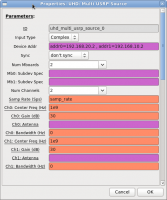

Hi, > Sync is automatic over the cable, so you dont need to even do "unknown > pps" option. See the docs in host/docs/usrp2.rst about the cable > I am sorry to ask again, but the UHD multi_usrp block seems not to be capable to deal with the MIMO cable. I detect both URSP2 />uhd_find_devices linux; GNU C++ version 4.4.5 20101112 (Red Hat 4.4.5-2); Boost_104100; UHD_0001.20101214073928.4d9b9ae -------------------------------------------------- -- UHD Device 0 -------------------------------------------------- Device Address: type: usrp2 addr: 192.168.20.2 name: serial: 00:50:c2:85:39:95 -------------------------------------------------- -- UHD Device 1 -------------------------------------------------- Device Address: type: usrp2 addr: 192.168.10.2 name: serial: 00:50:c2:85:36:8c/ I can see spectra when I run single_ursp mode in GRC, but the multi_usrp block gives me this error /Linux; GNU C++ version 4.4.5 20101112 (Red Hat 4.4.5-2); Boost_104100; UHD_0001.20101214073928.4d9b9ae Current recv sock buff size: 50000000 bytes Current recv sock buff size: 50000000 bytes UHD source block got error code 0x1 gr_block_executor: source <gr_block uhd multi_usrp source (1)> produced no output. We're marking it DONE./ See also the attached screenshot for settings used on the block. I tried assigning the second device an IP of 192.168.10.3 and removing the second Ethernet cable, but then the device is neither detected by uhd_find_devices nor within GRC. So how can I get both devices sample synchronously with the uhd multi_usrp source block? Regards, Thomas -- ****************************************************************** Dr. Thomas Hobiger Space-Time Measurement Project Space-Time Standards Group New Generation Network Research Center National Institute of Information and Communications Technology ------------------------------------------------------------------ 4-2-1 Nukui-Kitamachi, Koganei 184-8795 Tokyo Japan ------------------------------------------------------------------ email:hobiger@nict.go.jp phone: ++81-042-327-7561 fax: ++81-042-327-6664 ------------------------------------------------------------------ homepage (priv.):http://www.hobiger.org ******************************************************************