

usrp-users@lists.ettus.com

Discussion and technical support related to USRP, UHD, RFNoC

View all threads

USRP2 not communicating

MM
md mahbubur
Wed, Jun 15, 2016 4:48 AM

Hi Neel,the fpga and fw files you sent me were worse. Not booting at all. My previous ones uhd-images_003.010.twinrx-devel-234-g6189cea6  were at least bootable and can power the device up with lit up Led. Once I burnt your files the device seems not powered up at all, as no led are lit up. I believe the main problem is from lack of  right fw and fpga files. Please send me the right files that I can try again. Another thing is my mac osx is not responding to sdcard_burner_gui.py  anymore! I don't know why but I burnt your files through terminal command and made them FAT32 bootable sdcard. I erased your files from the loaded sdcard and reloaded my previous files. Seems the device is booted well as F Led is lit up again. But the ethernet is not responding to my terminal command  <ping 192.168.10.2> and shows continuous timed out... 
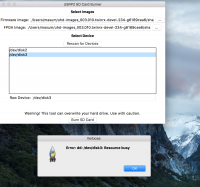
Hi,Currently, I am working with USRP2 device for my research. I have been trying to activate this previously used device for last three days but failed to make it talk to my computer(Mac OSx El Capitan) via ping command (usb2 ethernet adapter is used for connection between computer and device; also direct ethernet cable connection was tested with another pc but seems the device is dead, no response!). Then I assumed the there might be a firmware issue. I erased the sd card and tried to copy usrp2_fw.bin and usrp2_fpga.bin files via sdcard_burner_gui.py program but the program was giving an error saying "the dd/disk3: resource is busy!". However, Then I tried to copy those files by drag and dropping them, which copied well but couldn't help to communicate the device. The device loads the firmware first and stays with only F LED indicator lit up. In this instance, I need suggestion what should I do to make it run! P.S. bin files are collected from uhd-images_003.010.twinrx-devel-234-g6189cea6 folder from ettus support website. Thanks

Regards,Mahbubur RahmanUniverity of New South Wales, Australia
Hi Neel,the fpga and fw files you sent me were worse. Not booting at all. My previous ones uhd-images_003.010.twinrx-devel-234-g6189cea6  were at least bootable and can power the device up with lit up Led. Once I burnt your files the device seems not powered up at all, as no led are lit up. I believe the main problem is from lack of  right fw and fpga files. Please send me the right files that I can try again. Another thing is my mac osx is not responding to sdcard_burner_gui.py  anymore! I don't know why but I burnt your files through terminal command and made them FAT32 bootable sdcard. I erased your files from the loaded sdcard and reloaded my previous files. Seems the device is booted well as F Led is lit up again. But the ethernet is not responding to my terminal command  <ping 192.168.10.2> and shows continuous timed out...  Hi,Currently, I am working with USRP2 device for my research. I have been trying to activate this previously used device for last three days but failed to make it talk to my computer(Mac OSx El Capitan) via ping command (usb2 ethernet adapter is used for connection between computer and device; also direct ethernet cable connection was tested with another pc but seems the device is dead, no response!). Then I assumed the there might be a firmware issue. I erased the sd card and tried to copy usrp2_fw.bin and usrp2_fpga.bin files via sdcard_burner_gui.py program but the program was giving an error saying "the dd/disk3: resource is busy!". However, Then I tried to copy those files by drag and dropping them, which copied well but couldn't help to communicate the device. The device loads the firmware first and stays with only F LED indicator lit up. In this instance, I need suggestion what should I do to make it run! P.S. bin files are collected from uhd-images_003.010.twinrx-devel-234-g6189cea6 folder from ettus support website. Thanks Regards,Mahbubur RahmanUniverity of New South Wales, Australia
MD
Marcus D. Leech
Wed, Jun 15, 2016 2:10 PM

On 06/15/2016 12:48 AM, md mahbubur via USRP-users wrote:

Hi Neel,
the fpga and fw files you sent me were worse. Not booting at all. My
previous ones uhd-images_003.010.twinrx-devel-234-g6189cea6 were at
least bootable and can power the device up with lit up Led. Once I
burnt your files the device seems not powered up at all, as no led are
lit up. I believe the main problem is from lack of  right fw and fpga
files. Please send me the right files that I can try again. Another
thing is my mac osx is not responding to sdcard_burner_gui.py
anymore! I don't know why but I burnt your files through terminal
command and made them FAT32 bootable sdcard. I erased your files from
the loaded sdcard and reloaded my previous files. Seems the device is
booted well as F Led is lit up again. But the ethernet is not
responding to my terminal command  <ping 192.168.10.2> and shows
continuous timed out...

It's possible that your device has had a different IP address set, in
which case, if you put it in "safe mode", as below:

http://files.ettus.com/manual/page_usrp2.html#usrp2_loadflash_brick

The IP address will be (temporarily) at the factory-default, which will
allow you to change the IP address.

Hi,
Currently, I am working with USRP2 device for my research. I have been
trying to activate this previously used device for last three days but
failed to make it talk to my computer(Mac OSx El Capitan) via ping
command (usb2 ethernet adapter is used for connection between computer
and device; also direct ethernet cable connection was tested with
another pc but seems the device is dead, no response!). Then I assumed
the there might be a firmware issue. I erased the sd card and tried to
copy usrp2_fw.bin and usrp2_fpga.bin files via sdcard_burner_gui.py
program but the program was giving an error saying "the dd/disk3:
resource is busy!". However, Then I tried to copy those files by drag
and dropping them, which copied well but couldn't help to communicate
the device. The device loads the firmware first and stays with only F
LED indicator lit up. In this instance, I need suggestion what should
I do to make it run! P.S. bin files are collected
from uhd-images_003.010.twinrx-devel-234-g6189cea6 folder from
ettus support website. Thanks
Inline image

Regards,
Mahbubur Rahman
Univerity of New South Wales, Australia


USRP-users mailing list
USRP-users@lists.ettus.com
http://lists.ettus.com/mailman/listinfo/usrp-users_lists.ettus.com

On 06/15/2016 12:48 AM, md mahbubur via USRP-users wrote: > Hi Neel, > the fpga and fw files you sent me were worse. Not booting at all. My > previous ones uhd-images_003.010.twinrx-devel-234-g6189cea6 were at > least bootable and can power the device up with lit up Led. Once I > burnt your files the device seems not powered up at all, as no led are > lit up. I believe the main problem is from lack of right fw and fpga > files. Please send me the right files that I can try again. Another > thing is my mac osx is not responding to sdcard_burner_gui.py > anymore! I don't know why but I burnt your files through terminal > command and made them FAT32 bootable sdcard. I erased your files from > the loaded sdcard and reloaded my previous files. Seems the device is > booted well as F Led is lit up again. But the ethernet is not > responding to my terminal command <ping 192.168.10.2> and shows > continuous timed out... > It's possible that your device has had a different IP address set, in which case, if you put it in "safe mode", as below: http://files.ettus.com/manual/page_usrp2.html#usrp2_loadflash_brick The IP address will be (temporarily) at the factory-default, which will allow you to change the IP address. > Hi, > Currently, I am working with USRP2 device for my research. I have been > trying to activate this previously used device for last three days but > failed to make it talk to my computer(Mac OSx El Capitan) via ping > command (usb2 ethernet adapter is used for connection between computer > and device; also direct ethernet cable connection was tested with > another pc but seems the device is dead, no response!). Then I assumed > the there might be a firmware issue. I erased the sd card and tried to > copy usrp2_fw.bin and usrp2_fpga.bin files via sdcard_burner_gui.py > program but the program was giving an error saying "the dd/disk3: > resource is busy!". However, Then I tried to copy those files by drag > and dropping them, which copied well but couldn't help to communicate > the device. The device loads the firmware first and stays with only F > LED indicator lit up. In this instance, I need suggestion what should > I do to make it run! P.S. bin files are collected > from uhd-images_003.010.twinrx-devel-234-g6189cea6 folder from > ettus support website. Thanks > Inline image > > Regards, > Mahbubur Rahman > Univerity of New South Wales, Australia > > > > _______________________________________________ > USRP-users mailing list > USRP-users@lists.ettus.com > http://lists.ettus.com/mailman/listinfo/usrp-users_lists.ettus.com