

usrp-users@lists.ettus.com
Discussion and technical support related to USRP, UHD, RFNoC
View all threadsUSRP cannot use external GPSDO as reference clock

Hi,
I am using USRP N210 and LEO Bodnar GPSDO. As the external clock reference, the GPSDO has successfully found the GPS signal and been locked. ( two LEDs on the front of GPSDO are red and constantly on.)
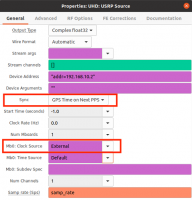
I have changed usrp clock source to external.

and then got error

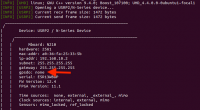
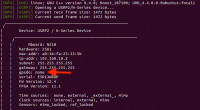
When I probe the usrp (using the UHD tool) it tells me that there is no gpsdo module

Is it normal? It seems like the usrp doesn't use the external clock reference. How can I fix it?


On 09/11/2023 16:48, gengzy096@gmail.com wrote:
Hi,
I am using USRP N210 and LEO Bodnar GPSDO. As the external clock
reference, the GPSDO has successfully found the GPS signal and been
locked. ( two LEDs on the front of GPSDO are red and constantly on.)
I have changed usrp clock source to external.
and then got error
When I probe the usrp (using the UHD tool) it tells me that there is
no gpsdo module
Is it normal? It seems like the usrp doesn't use the external clock
reference. How can I fix it?
When UHD refers to a GSPDO, it's talking about an INTERNALLY MOUNTED
GPSDO MODULE inside the radio.
Your radio doesn't have one.
However, if you connect the 10MHz and 1PPS outputs to your USRP N210,
and select different options--like TIME SOURCE: External,
it should work except that UHD will have no access to the actual
time-of-day from your Leo Bodnar unit. Many of the USRP
family of devices support an internally-mounted GPSDO unit--purchased
separately from Ettus/NI. But UHD has no
ability to interact with a "foreign" GPSDO clock, other than using
its 1PPS and 10MHz outputs to the front-panel connectors.
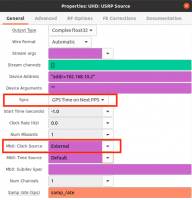
 Select "PC TIme on Next PPS", and use Time source: External and Clock
 Source: External

Thanks for your reply.
Select "PC TIme on Next PPS", and use Time source: External and Clock
Source: External
Another question is that Leo Bodnar GPSDO only connects the REF CLOCK of USRP, so the clock source should be set to external. But the PPS IN of USRP doesn’t connect anything, so should the time source also be set to external? In addition, in this situation(PPS IN of USRP doesn’t connect anything), should we select "PC TIme on Next PPS"?
Also, I was wondering if there is a way to know that usrp is successfully using an external clock reference?
On 10/11/2023 10:07, gengzy096@gmail.com wrote:
Thanks for your reply.
Select "PC TIme on Next PPS", and use Time source: External and Clock
Source: External
Another question is that Leo Bodnar GPSDO only connects the REF CLOCK
of USRP, so the clock source should be set to external. But the PPS IN
of USRP doesn’t connect anything, so should the time source also be
set to external? In addition, in this situation(PPS IN of USRP doesn’t
connect anything), should we select "PC TIme on Next PPS"?
Oh, I wasn't aware that it didn't provide a 1PPS output. In which case,
use "PC Time on Next PPS", and configure the PPS input
for "default". Really, it's not at all ideal if it doesn't provide a
1PPS output, AND you care about absolute time being
accurate.
Also, I was wondering if there is a way to know that usrp is
successfully using an external clock reference?
There's a ref-locked sensor that you can query, but I think in the
startup headers produced by the library, it will note
whether it has locked to the external REF clock.
USRP-users mailing list --usrp-users@lists.ettus.com
To unsubscribe send an email tousrp-users-leave@lists.ettus.com