

usrp-users@lists.ettus.com
Discussion and technical support related to USRP, UHD, RFNoC
View all threadsCannot Install SDK on 32-bit Linux Machine - Is there work Around?

To All,
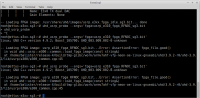
I went through the process of creating my own bit file using the rfnoc GUI tool. I am now trying to load it to the E310 using the below command.
uhd_usrp_probe -args='fpga=/home/rfnoc/rfnoc_tutorial/share/uhd/imagesusrp_e310_fpga_RFNOC_sg3.bit
See attached error screen shot.
I was told I need to install the Section "Cross-Compiling rfnoc-devel UHD" to be able to upload the bit file using the above command
https://kb.ettus.com/Software_Development_on_the_E3xx_USRP_-Building_RFNoC_UHD/GNU_Radio/_gr-ettus_from_Source
BUT, when I try to follow the instructions and install the SDK file, I cannot because my machine is a 32-bit processor machine.
Is there a work around?
Thanks,
Konstantin

Hi Konstanti,
the most common reason for that is actually a typo in the file name or
in the path; can you verifying the file is actually readable (i.e.
ls -l
/home/rfnoc/rfnoc_tutorial/share/uhd/imagesusrp_e310_fpga_RFNOC_sg3.bit
displays read privileges)?
Best regards,
Marcus
On Thu, 2018-05-31 at 13:44 +0000, Matheou, Konstantin J. (GRC-
LCI0)[ZIN TECHNOLOGIES INC] wrote:
To All,
I went through the process of creating my own bit file using the
rfnoc GUI tool. I am now trying to load it to the E310 using the
below command.
uhd_usrp_probe
–args=’fpga=/home/rfnoc/rfnoc_tutorial/share/uhd/imagesusrp_e310_fpga
_RFNOC_sg3.bit
See attached error screen shot.
I was told I need to install the Section “Cross-Compiling rfnoc-devel
UHD” to be able to upload the bit file using the above command
https://kb.ettus.com/Software_Development_on_the_E3xx_USRP_-_Building
RFNoC_UHD/GNU_Radio/_gr-ettus_from_Source
BUT, when I try to follow the instructions and install the SDK file,
I cannot because my machine is a 32-bit processor machine.
Is there a work around?
Thanks,
Konstantin

Hello Konstantin:
I think that the E310 SDK requires a 64-bit OS.
You should be able to build an SDK for a 32-bit machine on a 64-bit machine
using the SDKMACHINE variable. The Yocto manual should have documentation
on this variable.
The post below might also be of interest to you.
http://lists.ettus.com/pipermail/usrp-users_lists.ettus.com/2018-June/056828.html
--Neel Pandeya
On 31 May 2018 at 12:35, Marcus Müller via USRP-users <
usrp-users@lists.ettus.com> wrote:
Hi Konstanti,
the most common reason for that is actually a typo in the file name or
in the path; can you verifying the file is actually readable (i.e.
ls -l
/home/rfnoc/rfnoc_tutorial/share/uhd/imagesusrp_e310_fpga_RFNOC_sg3.bit
displays read privileges)?
Best regards,
Marcus
On Thu, 2018-05-31 at 13:44 +0000, Matheou, Konstantin J. (GRC-
LCI0)[ZIN TECHNOLOGIES INC] wrote:
To All,
I went through the process of creating my own bit file using the
rfnoc GUI tool. I am now trying to load it to the E310 using the
below command.
uhd_usrp_probe
–args=’fpga=/home/rfnoc/rfnoc_tutorial/share/uhd/imagesusrp_e310_fpga
_RFNOC_sg3.bit
See attached error screen shot.
I was told I need to install the Section “Cross-Compiling rfnoc-devel
UHD” to be able to upload the bit file using the above command
https://kb.ettus.com/Software_Development_on_the_E3xx_USRP_-_Building
RFNoC_UHD/GNU_Radio/_gr-ettus_from_Source
BUT, when I try to follow the instructions and install the SDK file,
I cannot because my machine is a 32-bit processor machine.
Is there a work around?
Thanks,
Konstantin
USRP-users mailing list
USRP-users@lists.ettus.com
http://lists.ettus.com/mailman/listinfo/usrp-users_lists.ettus.com