usrp-users@lists.ettus.com
Discussion and technical support related to USRP, UHD, RFNoC
View all threadsNo aapplicable UHD device found when update N310 FPGA

Dear community,
I'm a new user of USRP N310. I follow this guide
https://kb.ettus.com/USRP_N300/N310/N320/N321_Getting_Started_Guide and
now I can connect to N310 by RJ45 port. I have completed the Linux File
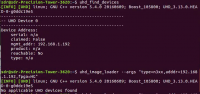
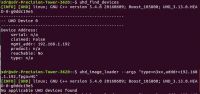
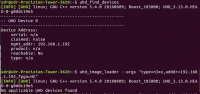
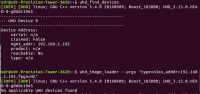
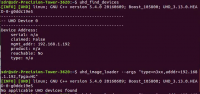
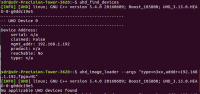
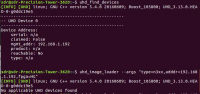
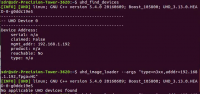
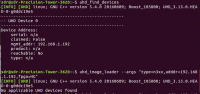
System update. When I try to update FPGA images, it said "No applicable UHD
devices found". Why does this happen? Any advice would be appreciated.
[image: image.png]
Regards,
Heng

On 07/13/2020 09:19 PM, Heng Zhang via USRP-users wrote:
Dear community,
I'm a new user of USRP N310. I follow this guide
https://kb.ettus.com/USRP_N300/N310/N320/N321_Getting_Started_Guideand
now I can connect to N310 by RJ45 port. I have completed the Linux
File System update. When I try to update FPGA images, it said "No
applicable UHD devices found". Why does this happen? Any advice would
be appreciated.
image.png
Regards,
Heng
Can you "ping" the USRP device from your host? That's the first
diagnostic step. Has it (the USRP) changed addresses?

I'm not sure if N320/N321 are supported in UHD v.3.13. You should use UHD
v.3.15 unless you have a compelling reason not to.
On Mon, Jul 13, 2020 at 6:30 PM Marcus D. Leech via USRP-users <
usrp-users@lists.ettus.com> wrote:
On 07/13/2020 09:19 PM, Heng Zhang via USRP-users wrote:
Dear community,
I'm a new user of USRP N310. I follow this guide
https://kb.ettus.com/USRP_N300/N310/N320/N321_Getting_Started_Guide and
now I can connect to N310 by RJ45 port. I have completed the Linux File
System update. When I try to update FPGA images, it said "No applicable UHD
devices found". Why does this happen? Any advice would be appreciated.
[image: image.png]
Regards,
Heng
Can you "ping" the USRP device from your host? That's the first
diagnostic step. Has it (the USRP) changed addresses?
USRP-users mailing list
USRP-users@lists.ettus.com
http://lists.ettus.com/mailman/listinfo/usrp-users_lists.ettus.com
On 07/13/2020 09:35 PM, Robin Coxe wrote:
I'm not sure if N320/N321 are supported in UHD v.3.13. You should use
UHD v.3.15 unless you have a compelling reason not to.
Thanks, Robin, but this is an N310. An upgrade is definitely advisable,
but I want to baby-step the debugging...
On Mon, Jul 13, 2020 at 6:30 PM Marcus D. Leech via USRP-users
<usrp-users@lists.ettus.com mailto:usrp-users@lists.ettus.com> wrote:
On 07/13/2020 09:19 PM, Heng Zhang via USRP-users wrote:
 Dear community,
 I'm a new user of USRP N310.  I follow this guide
 https://kb.ettus.com/USRP_N300/N310/N320/N321_Getting_Started_Guide
 and now I can connect to N310 by RJ45 port.  I have completed the
 Linux File System update. When I try to update FPGA images, it
 said "No applicable UHD devices found".  Why does this happen?
 Any advice would be appreciated.
 image.png

 Regards,
 Heng
 Can you "ping" the USRP device from your host?  That's the first
 diagnostic step.  Has it (the USRP) changed addresses?


 _______________________________________________
 USRP-users mailing list
 USRP-users@lists.ettus.com <mailto:USRP-users@lists.ettus.com>
 http://lists.ettus.com/mailman/listinfo/usrp-users_lists.ettus.com
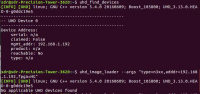
Yes, I can "ping" the USRP address derived from command "uhd_find_devices",
for example, "192.168.1.191". I also try to update FPGA in ARM CPU mode but
it still says "NO applicable UHD devices found".
Regards,
Heng
Marcus D. Leech via USRP-users usrp-users@lists.ettus.com 于2020年7月14日周二
上午9:30写道:
On 07/13/2020 09:19 PM, Heng Zhang via USRP-users wrote:
Dear community,
I'm a new user of USRP N310. I follow this guide
https://kb.ettus.com/USRP_N300/N310/N320/N321_Getting_Started_Guide and
now I can connect to N310 by RJ45 port. I have completed the Linux File
System update. When I try to update FPGA images, it said "No applicable UHD
devices found". Why does this happen? Any advice would be appreciated.
[image: image.png]
Regards,
Heng
Can you "ping" the USRP device from your host? That's the first
diagnostic step. Has it (the USRP) changed addresses?
USRP-users mailing list
USRP-users@lists.ettus.com
http://lists.ettus.com/mailman/listinfo/usrp-users_lists.ettus.com
I am simply parrotting the Getting Started Guide, which says in bold
letters at the very top:
When you receive a brand-new device, it is strongly recommended that you
download the most recent filesystem image from the Ettus Research website
and write it to the SD card that comes with the unit. It is not recommended
that you use the SD card from the factory as-is. Instructions on
downloading the latest filesystem image and writing it to the SD card are
listed below.
Note that if you are operating the device in Network Mode, the version of
UHD running on the host computer and the USRP N3xx must match.
Recent N310s are most likely shipping with SD cards that have a UHD version
3.13.
On Mon, Jul 13, 2020 at 6:40 PM Heng Zhang via USRP-users <
usrp-users@lists.ettus.com> wrote:
Yes, I can "ping" the USRP address derived from command
"uhd_find_devices", for example, "192.168.1.191". I also try to update FPGA
in ARM CPU mode but it still says "NO applicable UHD devices found".
Regards,
Heng
Marcus D. Leech via USRP-users usrp-users@lists.ettus.com 于2020年7月14日周二
上午9:30写道:
On 07/13/2020 09:19 PM, Heng Zhang via USRP-users wrote:
Dear community,
I'm a new user of USRP N310. I follow this guide
https://kb.ettus.com/USRP_N300/N310/N320/N321_Getting_Started_Guide and
now I can connect to N310 by RJ45 port. I have completed the Linux File
System update. When I try to update FPGA images, it said "No applicable UHD
devices found". Why does this happen? Any advice would be appreciated.
[image: image.png]
Regards,
Heng
Can you "ping" the USRP device from your host? That's the first
diagnostic step. Has it (the USRP) changed addresses?
USRP-users mailing list
USRP-users@lists.ettus.com
http://lists.ettus.com/mailman/listinfo/usrp-users_lists.ettus.com
USRP-users mailing list
USRP-users@lists.ettus.com
http://lists.ettus.com/mailman/listinfo/usrp-users_lists.ettus.com
On 07/13/2020 09:39 PM, Heng Zhang wrote:
Yes, I can "ping" the USRP address derived from command
"uhd_find_devices", for example, "192.168.1.191". I also try to update
FPGA in ARM CPU mode but it still says "NO applicable UHD devices found".
Regards,
Heng
OK, so when you follow the steps here:
https://kb.ettus.com/USRP_N300/N310/N320/N321_Getting_Started_Guide#Embedded_Mode_FPGA_Image_Update
Could you show us the complete log of what happens?
Marcus D. Leech via USRP-users <usrp-users@lists.ettus.com
mailto:usrp-users@lists.ettus.com> 于2020年7月14日周二 上午9:30写道:
On 07/13/2020 09:19 PM, Heng Zhang via USRP-users wrote:
 Dear community,
 I'm a new user of USRP N310.  I follow this guide
 https://kb.ettus.com/USRP_N300/N310/N320/N321_Getting_Started_Guide
 and now I can connect to N310 by RJ45 port.  I have completed the
 Linux File System update. When I try to update FPGA images, it
 said "No applicable UHD devices found".  Why does this happen?
 Any advice would be appreciated.
 image.png

 Regards,
 Heng
 Can you "ping" the USRP device from your host?  That's the first
 diagnostic step.  Has it (the USRP) changed addresses?


 _______________________________________________
 USRP-users mailing list
 USRP-users@lists.ettus.com <mailto:USRP-users@lists.ettus.com>
 http://lists.ettus.com/mailman/listinfo/usrp-users_lists.ettus.com
Yes, I will do that. And I will also try a UHD version>3.13
Marcus D. Leech patchvonbraun@gmail.com 于2020年7月14日周二 上午9:44写道:
On 07/13/2020 09:39 PM, Heng Zhang wrote:
Yes, I can "ping" the USRP address derived from command
"uhd_find_devices", for example, "192.168.1.191". I also try to update FPGA
in ARM CPU mode but it still says "NO applicable UHD devices found".
Regards,
Heng
OK, so when you follow the steps here:
https://kb.ettus.com/USRP_N300/N310/N320/N321_Getting_Started_Guide#Embedded_Mode_FPGA_Image_Update
Could you show us the complete log of what happens?
Marcus D. Leech via USRP-users usrp-users@lists.ettus.com 于2020年7月14日周二
上午9:30写道:
On 07/13/2020 09:19 PM, Heng Zhang via USRP-users wrote:
Dear community,
I'm a new user of USRP N310. I follow this guide
https://kb.ettus.com/USRP_N300/N310/N320/N321_Getting_Started_Guide and
now I can connect to N310 by RJ45 port. I have completed the Linux File
System update. When I try to update FPGA images, it said "No applicable UHD
devices found". Why does this happen? Any advice would be appreciated.
[image: image.png]
Regards,
Heng
Can you "ping" the USRP device from your host? That's the first
diagnostic step. Has it (the USRP) changed addresses?
USRP-users mailing list
USRP-users@lists.ettus.com
http://lists.ettus.com/mailman/listinfo/usrp-users_lists.ettus.com
Dear all,
The problem has been resolved by updating the UHD version to v3.15.0.0. By
the way, is there any information about the UHD versions that support N310?
Regars,
Heng
Heng Zhang zh.heng96@gmail.com 于2020年7月14日周二 上午10:09写道:
Yes, I will do that. And I will also try a UHD version>3.13
Marcus D. Leech patchvonbraun@gmail.com 于2020年7月14日周二 上午9:44写道:
On 07/13/2020 09:39 PM, Heng Zhang wrote:
Yes, I can "ping" the USRP address derived from command
"uhd_find_devices", for example, "192.168.1.191". I also try to update FPGA
in ARM CPU mode but it still says "NO applicable UHD devices found".
Regards,
Heng
OK, so when you follow the steps here:
https://kb.ettus.com/USRP_N300/N310/N320/N321_Getting_Started_Guide#Embedded_Mode_FPGA_Image_Update
Could you show us the complete log of what happens?
Marcus D. Leech via USRP-users usrp-users@lists.ettus.com
于2020年7月14日周二 上午9:30写道:
On 07/13/2020 09:19 PM, Heng Zhang via USRP-users wrote:
Dear community,
I'm a new user of USRP N310. I follow this guide
https://kb.ettus.com/USRP_N300/N310/N320/N321_Getting_Started_Guide
and now I can connect to N310 by RJ45 port. I have completed the Linux
File System update. When I try to update FPGA images, it said "No
applicable UHD devices found". Why does this happen? Any advice would
be appreciated.
[image: image.png]
Regards,
Heng
Can you "ping" the USRP device from your host? That's the first
diagnostic step. Has it (the USRP) changed addresses?
USRP-users mailing list
USRP-users@lists.ettus.com
http://lists.ettus.com/mailman/listinfo/usrp-users_lists.ettus.com
On 07/14/2020 04:13 AM, Heng Zhang via USRP-users wrote:
Dear all,
The problem has been resolved by updating the UHD version to
v3.15.0.0. By the way, is there any information about the UHD versions
that support N310?
Regars,
Heng
https://github.com/EttusResearch/uhd/releases
Includes the release notes for every release, which will have an
indication of which new devices are supported.
Heng Zhang <zh.heng96@gmail.com mailto:zh.heng96@gmail.com> 于2020年
7月14日周二 上午10:09写道:
 Yes, I will do that. And I will also try a UHD version>3.13

 Marcus D. Leech <patchvonbraun@gmail.com
 <mailto:patchvonbraun@gmail.com>> 于2020年7月14日周二 上午9:44写道:

     On 07/13/2020 09:39 PM, Heng Zhang wrote:
     Yes, I can "ping" the USRP address derived from command
     "uhd_find_devices", for example, "192.168.1.191". I also try
     to update FPGA in ARM CPU mode but it still says "NO
     applicable UHD devices found".


     Regards,
     Heng
     OK, so when you follow the steps here:

     https://kb.ettus.com/USRP_N300/N310/N320/N321_Getting_Started_Guide#Embedded_Mode_FPGA_Image_Update

     Could you show us the complete log of what happens?
     Marcus D. Leech via USRP-users <usrp-users@lists.ettus.com
     <mailto:usrp-users@lists.ettus.com>> 于2020年7月14日周二 上午
     9:30写道:

         On 07/13/2020 09:19 PM, Heng Zhang via USRP-users wrote:
         Dear community,
         I'm a new user of USRP N310.  I follow this guide
         https://kb.ettus.com/USRP_N300/N310/N320/N321_Getting_Started_Guide
         and now I can connect to N310 by RJ45 port.  I have
         completed the Linux File System update. When I try to
         update FPGA images, it said "No applicable UHD devices
         found".  Why does this happen? Any advice would
         be appreciated.
         image.png

         Regards,
         Heng
         Can you "ping" the USRP device from your host?  That's
         the first diagnostic step.  Has it (the USRP) changed
         addresses?


         _______________________________________________
         USRP-users mailing list
         USRP-users@lists.ettus.com
         <mailto:USRP-users@lists.ettus.com>
         http://lists.ettus.com/mailman/listinfo/usrp-users_lists.ettus.com
USRP-users mailing list
USRP-users@lists.ettus.com
http://lists.ettus.com/mailman/listinfo/usrp-users_lists.ettus.com