usrp-users@lists.ettus.com

Discussion and technical support related to USRP, UHD, RFNoC

View all threads

White Rabbit and N310

MM
Marcus Müller
Thu, Jul 25, 2024 11:07 AM

Hi Scott,

can't give you much input on the mender side of things – also, honestly, probably cleverer
to stay with Hovhannes about this – he's your support point of contact for that N320,
after all.

Regarding the difference between detecting with uhd_find_devices and the config utility:
they do slightly different things, that I brushed over in my last mail, clearly. (for
details: you can send a raw ethernet frame, if you bypass the IP stack of your OS, to talk
to the firmware on the USRP. That's not very useful in general, but for these kinds of
things it's OK).
Make sure you have configured Windows to give a statically assigned IP address to your
USB-Ethernet adapter, from the 192.168.10.0/24 subnet (so anything 192.168.10.1 to
192.168.10.254, excluding the .2, since that already is used by the USRP).

Also note, regarding your USB adapter: While detection might work with non-gigabit
Ethernet adapters, sample streaming won't; so make doubly sure this isn't a 100 Mb/s
("fast ethernet") adapter only. Also, in the past, we've seen USB-Gigabit Adapters
actually suffer under the high load of high sample rates, and start to drop or reorder
packets, leading to all-around sadness with customers. I haven't tested any GigE adapter
with a USRP2+ (so USRP2, N200 or N210) lately; but ten years ago, I would have strongly
recommended you stick with PCIe Gigabit ethernet cards.

Best,
Marcus

On 24.07.24 20:42, Dr. Scott Best wrote:

Dear Marcus,

I have been working with your colleague, Hovhannes Manjikyan, on my communication
problems with the n320.  We have been unable to install
n3xx_common_mender_default-v4.7.0.0 after it is uploaded to the n320.  He will get back
to me tomorrow with a path forward on this problem for the new, out-of-the-box n320,
Serial: 32B1464.

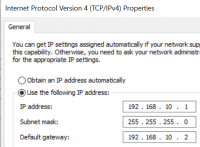
I also have an older n200 that requires firmware and FPGA updates.  The n200 is
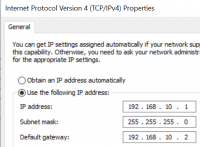
connected to a USB-to-RJ45 adapter on my laptop with the following configuration:

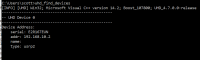
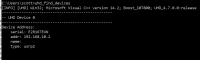
I can use the uhd_find_devices command to find the n200 when it is connected to my LAN,
and the following information is provided:

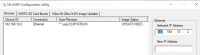
The uhd_find_devices command does not work when the n200 is connected to the USB-to-RJ45
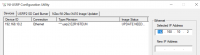
port.  However, the NI-USRP Configuration Utility is able to find the n200, as shown here:

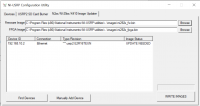
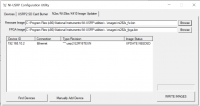
As you can see, the firmware needs to be updated to use the n200 with MATLAB.  I
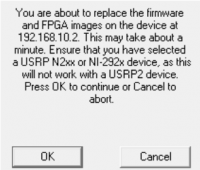
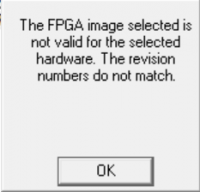
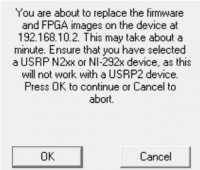
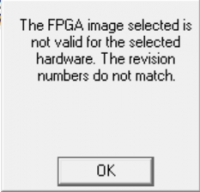
attempted to update the firmware using the NI-USRP Configuration Utility, but this was
not successful due to a compatibility error, as shown here:

Do you have a procedure I can follow to fix this problem so the firmware can be updated
for the n200?

Thanks in advance for your timely assistance.

Respectfully,

Scott

Dr. Scott Best

Chief Technology Officer

SiberSci, LLC

1-270-228-4901 office

scott_best@sibersci.com e-mail

https://sibersci.com http://www.sibersci.com/

Notice: This e-mail is intended solely for use of the individual or entity to which it
is addressed and may contain information that is proprietary, privileged, company
confidential and/or exempt from disclosure under applicable law. If the reader is not
the intended recipient or agent responsible for delivering the message to the intended
recipient, you are hereby notified that any dissemination, distribution or copying of
this communication is strictly prohibited. If this communication has been transmitted
from a U.S. location it may also contain data subject to the International Traffic in
Arms Regulations or U.S. Export Administration Regulations and cannot be disseminated,
distributed or copied to foreign nationals, residing in the U.S. or abroad, without the
prior approval of the U.S. Department of State or appropriate export licensing
authority. If you have received this communication in error, please notify the sender by
reply e-mail or collect telephone call and delete or destroy all copies of this e-mail
message, any physical copies made of this e-mail message and/or any file attachment(s).

*From:*Marcus Müller marcus.mueller@ettus.com
Sent: Wednesday, July 24, 2024 10:16 AM
To: usrp-users@lists.ettus.com; Dr. Scott Best scott_best@sibersci.com
Subject: Re: [USRP-users] Re: Where can I download the "NI-USRP Configuration Utility"
for Windows 10 x64

(just to be clear: you can probably do what you want to do with that tool, but with
other tools, for the N320. I don't know exactly what you're planning to do, but if you
could reply to the list what you're currently facing, this might be quickly resolvable,
without downloading a 6GB installer image)

On 24.07.24 17:12, Marcus Müller wrote:

 Note that while I've never used it, I don't think it'll work with the N320; IIRC it
 is a gen2-device wrapper around what you do with usrp_burn_mb_eeprom,
 usrp2_card_burner, and uhd_image_loader.

 Best,
 Marcus

 On 24.07.24 15:36, Martin Anderseck wrote:

     The NI-USRP configuration utility should be part of the NI-USRP tool chain:

     https://www.ni.com/en/support/downloads/drivers/download.ni-usrp.html#484354

     /Martin

     INTERNAL - NI CONFIDENTIAL

     *From:*Dr. Scott Best via USRP-users <usrp-users@lists.ettus.com>
     <mailto:usrp-users@lists.ettus.com>
     *Sent:* Wednesday, July 24, 2024 2:03 PM
     *To:* martin.braun@ettus.com
     *Cc:* usrp-users@lists.ettus.com
     *Subject:* [USRP-users] Where can I download the "NI-USRP Configuration Utility"
     for Windows 10 x64
     *Importance:* High

     Dear Martin,

     I have an n200 and a pair of n320s that I am working on using for a project.  I
     watched a recent YouTube movie about using the “NI-USRP Configuration Utility”
     for Windows 10 x 64 for this purpose.  I have been unable to find a URL to
     download a copy of this handy utility, so can you provide me with the download
     location?

     Thanks in advance for your timely assistance.

     Respectfully,

     Scott

     Dr. Scott Best

     Chief Technology Officer

     *SiberSci, LLC*

     1-270-228-4901 office

     scott_best@sibersci.com e-mail

     https://sibersci.com <http://www.sibersci.com/>

     Notice: This e-mail is intended solely for use of the individual or entity to
     which it is addressed and may contain information that is proprietary,
     privileged, company confidential and/or exempt from disclosure under applicable
     law. If the reader is not the intended recipient or agent responsible for
     delivering the message to the intended recipient, you are hereby notified that
     any dissemination, distribution or copying of this communication is strictly
     prohibited. If this communication has been transmitted from a U.S. location it
     may also contain data subject to the International Traffic in Arms Regulations
     or U.S. Export Administration Regulations and cannot be disseminated,
     distributed or copied to foreign nationals, residing in the U.S. or abroad,
     without the prior approval of the U.S. Department of State or appropriate export
     licensing authority. If you have received this communication in error, please
     notify the sender by reply e-mail or collect telephone call and delete or
     destroy all copies of this e-mail message, any physical copies made of this
     e-mail message and/or any file attachment(s).

     National Instruments Dresden GmbH; Geschäftsführer (Managing Directors): Sabrina
     Gilman, Kathleen Heard Spurck, Carl Schumacher; Sitz (Registered Office):
     Dresden; HRB (Commercial Register No.): 22081; Registergericht (Registration
     Court): Dresden

     This email and any attachments are intended only for the person to whom this
     email is addressed and may contain confidential and/or privileged information.
     If you received this email in error, please do not disclose the contents to
     anyone, but notify the sender by return email and delete this email (and any
     attachments) from your system.

     _______________________________________________

     USRP-users mailing list --usrp-users@lists.ettus.com

     To unsubscribe send an email tousrp-users-leave@lists.ettus.com
Hi Scott, can't give you much input on the mender side of things – also, honestly, probably cleverer to stay with Hovhannes about this – he's your support point of contact for that N320, after all. Regarding the difference between detecting with uhd_find_devices and the config utility: they do slightly different things, that I brushed over in my last mail, clearly. (for details: you can send a raw ethernet frame, if you bypass the IP stack of your OS, to talk to the firmware on the USRP. That's not very useful in general, but for these kinds of things it's OK). Make sure you have configured Windows to give a statically assigned IP address to your USB-Ethernet adapter, from the 192.168.10.0/24 subnet (so anything 192.168.10.1 to 192.168.10.254, excluding the .2, since that already is used by the USRP). Also note, regarding your USB adapter: While detection might work with non-gigabit Ethernet adapters, sample streaming won't; so make doubly sure this isn't a 100 Mb/s ("fast ethernet") adapter only. Also, in the past, we've seen USB-Gigabit Adapters actually suffer under the high load of high sample rates, and start to drop or reorder packets, leading to all-around sadness with customers. I haven't tested any GigE adapter with a USRP2+ (so USRP2, N200 or N210) lately; but ten years ago, I would have strongly recommended you stick with PCIe Gigabit ethernet cards. Best, Marcus On 24.07.24 20:42, Dr. Scott Best wrote: > Dear Marcus, > > I have been working with your colleague, Hovhannes Manjikyan, on my communication > problems with the n320.  We have been unable to install > n3xx_common_mender_default-v4.7.0.0 after it is uploaded to the n320.  He will get back > to me tomorrow with a path forward on this problem for the new, out-of-the-box n320, > Serial: 32B1464. > > I also have an older n200 that requires firmware and FPGA updates.  The n200 is > connected to a USB-to-RJ45 adapter on my laptop with the following configuration: > > I can use the uhd_find_devices command to find the n200 when it is connected to my LAN, > and the following information is provided: > > The uhd_find_devices command does not work when the n200 is connected to the USB-to-RJ45 > port.  However, the NI-USRP Configuration Utility is able to find the n200, as shown here: > > As you can see, the firmware needs to be updated to use the n200 with MATLAB.  I > attempted to update the firmware using the NI-USRP Configuration Utility, but this was > not successful due to a compatibility error, as shown here: > > Do you have a procedure I can follow to fix this problem so the firmware can be updated > for the n200? > > Thanks in advance for your timely assistance. > > Respectfully, > > Scott > > Dr. Scott Best > > Chief Technology Officer > > *SiberSci, LLC* > > 1-270-228-4901 office > > scott_best@sibersci.com e-mail > > https://sibersci.com <http://www.sibersci.com/> > > Notice: This e-mail is intended solely for use of the individual or entity to which it > is addressed and may contain information that is proprietary, privileged, company > confidential and/or exempt from disclosure under applicable law. If the reader is not > the intended recipient or agent responsible for delivering the message to the intended > recipient, you are hereby notified that any dissemination, distribution or copying of > this communication is strictly prohibited. If this communication has been transmitted > from a U.S. location it may also contain data subject to the International Traffic in > Arms Regulations or U.S. Export Administration Regulations and cannot be disseminated, > distributed or copied to foreign nationals, residing in the U.S. or abroad, without the > prior approval of the U.S. Department of State or appropriate export licensing > authority. If you have received this communication in error, please notify the sender by > reply e-mail or collect telephone call and delete or destroy all copies of this e-mail > message, any physical copies made of this e-mail message and/or any file attachment(s). > > *From:*Marcus Müller <marcus.mueller@ettus.com> > *Sent:* Wednesday, July 24, 2024 10:16 AM > *To:* usrp-users@lists.ettus.com; Dr. Scott Best <scott_best@sibersci.com> > *Subject:* Re: [USRP-users] Re: Where can I download the "NI-USRP Configuration Utility" > for Windows 10 x64 > > (just to be clear: you can probably do what you want to do with that tool, but with > other tools, for the N320. I don't know exactly what you're planning to do, but if you > could reply to the list what you're currently facing, this might be quickly resolvable, > without downloading a 6GB installer image) > > On 24.07.24 17:12, Marcus Müller wrote: > > Note that while I've never used it, I don't think it'll work with the N320; IIRC it > is a gen2-device wrapper around what you do with usrp_burn_mb_eeprom, > usrp2_card_burner, and uhd_image_loader. > > Best, > Marcus > > On 24.07.24 15:36, Martin Anderseck wrote: > > The NI-USRP configuration utility should be part of the NI-USRP tool chain: > > https://www.ni.com/en/support/downloads/drivers/download.ni-usrp.html#484354 > > /Martin > > INTERNAL - NI CONFIDENTIAL > > *From:*Dr. Scott Best via USRP-users <usrp-users@lists.ettus.com> > <mailto:usrp-users@lists.ettus.com> > *Sent:* Wednesday, July 24, 2024 2:03 PM > *To:* martin.braun@ettus.com > *Cc:* usrp-users@lists.ettus.com > *Subject:* [USRP-users] Where can I download the "NI-USRP Configuration Utility" > for Windows 10 x64 > *Importance:* High > > Dear Martin, > > I have an n200 and a pair of n320s that I am working on using for a project.  I > watched a recent YouTube movie about using the “NI-USRP Configuration Utility” > for Windows 10 x 64 for this purpose.  I have been unable to find a URL to > download a copy of this handy utility, so can you provide me with the download > location? > > Thanks in advance for your timely assistance. > > Respectfully, > > Scott > > Dr. Scott Best > > Chief Technology Officer > > *SiberSci, LLC* > > 1-270-228-4901 office > > scott_best@sibersci.com e-mail > > https://sibersci.com <http://www.sibersci.com/> > > Notice: This e-mail is intended solely for use of the individual or entity to > which it is addressed and may contain information that is proprietary, > privileged, company confidential and/or exempt from disclosure under applicable > law. If the reader is not the intended recipient or agent responsible for > delivering the message to the intended recipient, you are hereby notified that > any dissemination, distribution or copying of this communication is strictly > prohibited. If this communication has been transmitted from a U.S. location it > may also contain data subject to the International Traffic in Arms Regulations > or U.S. Export Administration Regulations and cannot be disseminated, > distributed or copied to foreign nationals, residing in the U.S. or abroad, > without the prior approval of the U.S. Department of State or appropriate export > licensing authority. If you have received this communication in error, please > notify the sender by reply e-mail or collect telephone call and delete or > destroy all copies of this e-mail message, any physical copies made of this > e-mail message and/or any file attachment(s). > > National Instruments Dresden GmbH; Geschäftsführer (Managing Directors): Sabrina > Gilman, Kathleen Heard Spurck, Carl Schumacher; Sitz (Registered Office): > Dresden; HRB (Commercial Register No.): 22081; Registergericht (Registration > Court): Dresden > > This email and any attachments are intended only for the person to whom this > email is addressed and may contain confidential and/or privileged information. > If you received this email in error, please do not disclose the contents to > anyone, but notify the sender by return email and delete this email (and any > attachments) from your system. > > _______________________________________________ > > USRP-users mailing list --usrp-users@lists.ettus.com > > To unsubscribe send an email tousrp-users-leave@lists.ettus.com >
DS
Dr. Scott Best
Thu, Jul 25, 2024 11:58 AM

Dear Marcus,

Thanks for the additional port information.  I will meet with Hovhannes
later today to continue working on this problem.

Do I need to use different .bin files to update my n200 using the NI-USRP
Configuration Utility to update the firmware?

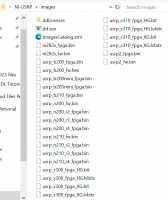
I have the following .bin files available:

The ni292x_fpga.bin and ni292x_fw.bin files were rejected as incompatible
with the n200 hardware, so should I use usrp_n200_fw.bin and
usrp_n200_r2_fpga.bin. or usrp_n200_r3_fpga.bin or usrp_n200_r4
instead_fpga.bin to update the firmware?

Respectfully,

Scott

Dr. Scott Best

Chief Technology Officer

SiberSci, LLC

1-270-228-4901  office

scott_best@sibersci.com  e-mail

https://sibersci.com http://www.sibersci.com/

Notice: This e-mail is intended solely for use of the individual or entity
to which it is addressed and may contain information that is proprietary,
privileged, company confidential and/or exempt from disclosure under
applicable law. If the reader is not the intended recipient or agent
responsible for delivering the message to the intended recipient, you are
hereby notified that any dissemination, distribution or copying of this
communication is strictly prohibited. If this communication has been
transmitted from a U.S. location it may also contain data subject to the
International Traffic in Arms Regulations or U.S. Export Administration
Regulations and cannot be disseminated, distributed or copied to foreign
nationals, residing in the U.S. or abroad, without the prior approval of
the U.S. Department of State or appropriate export licensing authority. If
you have received this communication in error, please notify the sender by
reply e-mail or collect telephone call and delete or destroy all copies of
this e-mail message, any physical copies made of this e-mail message and/or
any file attachment(s).

From: Marcus Müller marcus.mueller@ettus.com
Sent: Thursday, July 25, 2024 6:08 AM
To: Dr. Scott Best scott_best@sibersci.com; usrp-users@lists.ettus.com
Subject: Re: [USRP-users] Re: Where can I download the "NI-USRP
Configuration Utility" for Windows 10 x64

Hi Scott,

can't give you much input on the mender side of things – also, honestly,
probably cleverer to stay with Hovhannes about this – he's your support
point of contact for that N320, after all.

Regarding the difference between detecting with uhd_find_devices and the
config utility: they do slightly different things, that I brushed over in
my last mail, clearly. (for details: you can send a raw ethernet frame, if
you bypass the IP stack of your OS, to talk to the firmware on the USRP.
That's not very useful in general, but for these kinds of things it's OK).
Make sure you have configured Windows to give a statically assigned IP
address to your USB-Ethernet adapter, from the 192.168.10.0/24 subnet (so
anything 192.168.10.1 to 192.168.10.254, excluding the .2, since that
already is used by the USRP).

Also note, regarding your USB adapter: While detection might work with
non-gigabit Ethernet adapters, sample streaming won't; so make doubly sure
this isn't a 100 Mb/s ("fast ethernet") adapter only. Also, in the past,
we've seen USB-Gigabit Adapters actually suffer under the high load of high
sample rates, and start to drop or reorder packets, leading to all-around
sadness with customers. I haven't tested any GigE adapter with a USRP2+ (so
USRP2, N200 or N210) lately; but ten years ago, I would have strongly
recommended you stick with PCIe Gigabit ethernet cards.

Best,
Marcus

On 24.07.24 20:42, Dr. Scott Best wrote:

Dear Marcus,

I have been working with your colleague, Hovhannes Manjikyan, on my
communication problems with the n320.  We have been unable to install
n3xx_common_mender_default-v4.7.0.0 after it is uploaded to the n320.  He
will get back to me tomorrow with a path forward on this problem for the
new, out-of-the-box n320, Serial: 32B1464.

I also have an older n200 that requires firmware and FPGA updates.  The
n200 is connected to a USB-to-RJ45 adapter on my laptop with the following
configuration:

I can use the uhd_find_devices command to find the n200 when it is
connected to my LAN, and the following information is provided:

The uhd_find_devices command does not work when the n200 is connected to
the USB-to-RJ45 port.  However, the NI-USRP Configuration Utility is able
to find the n200, as shown here:

As you can see, the firmware needs to be updated to use the n200 with
MATLAB.  I attempted to update the firmware using the NI-USRP Configuration
Utility, but this was not successful due to a compatibility error, as shown
here:

Do you have a procedure I can follow to fix this problem so the firmware
can be updated for the n200?

Thanks in advance for your timely assistance.

Respectfully,

Scott

Dr. Scott Best

Chief Technology Officer

SiberSci, LLC

1-270-228-4901  office

scott_best@sibersci.com  e-mail

https://sibersci.com http://www.sibersci.com/

Notice: This e-mail is intended solely for use of the individual or entity
to which it is addressed and may contain information that is proprietary,
privileged, company confidential and/or exempt from disclosure under
applicable law. If the reader is not the intended recipient or agent
responsible for delivering the message to the intended recipient, you are
hereby notified that any dissemination, distribution or copying of this
communication is strictly prohibited. If this communication has been
transmitted from a U.S. location it may also contain data subject to the
International Traffic in Arms Regulations or U.S. Export Administration
Regulations and cannot be disseminated, distributed or copied to foreign
nationals, residing in the U.S. or abroad, without the prior approval of
the U.S. Department of State or appropriate export licensing authority. If
you have received this communication in error, please notify the sender by
reply e-mail or collect telephone call and delete or destroy all copies of
this e-mail message, any physical copies made of this e-mail message and/or
any file attachment(s).

From: Marcus Müller marcus.mueller@ettus.com
Sent: Wednesday, July 24, 2024 10:16 AM
To: usrp-users@lists.ettus.com; Dr. Scott Best scott_best@sibersci.com
Subject: Re: [USRP-users] Re: Where can I download the "NI-USRP
Configuration Utility" for Windows 10 x64

(just to be clear: you can probably do what you want to do with that tool,
but with other tools, for the N320. I don't know exactly what you're
planning to do, but if you could reply to the list what you're currently
facing, this might be quickly resolvable, without downloading a 6GB
installer image)

On 24.07.24 17:12, Marcus Müller wrote:

Note that while I've never used it, I don't think it'll work with the N320;
IIRC it is a gen2-device wrapper around what you do with
usrp_burn_mb_eeprom, usrp2_card_burner, and uhd_image_loader.

Best,
Marcus

On 24.07.24 15:36, Martin Anderseck wrote:

The NI-USRP configuration utility should be part of the NI-USRP tool chain:

https://www.ni.com/en/support/downloads/drivers/download.ni-usrp.html#484354

/Martin

INTERNAL - NI CONFIDENTIAL

From: Dr. Scott Best via USRP-users usrp-users@lists.ettus.com
usrp-users@lists.ettus.com
Sent: Wednesday, July 24, 2024 2:03 PM
To: martin.braun@ettus.com
Cc: usrp-users@lists.ettus.com
Subject: [USRP-users] Where can I download the "NI-USRP Configuration
Utility" for Windows 10 x64
Importance: High

Dear Martin,

I have an n200 and a pair of n320s that I am working on using for a
project.  I watched a recent YouTube movie about using the “NI-USRP
Configuration Utility” for Windows 10 x 64 for this purpose.  I have been
unable to find a URL to download a copy of this handy utility, so can you
provide me with the download location?

Thanks in advance for your timely assistance.

Respectfully,

Scott

Dr. Scott Best

Chief Technology Officer

SiberSci, LLC

1-270-228-4901  office

scott_best@sibersci.com  e-mail

https://sibersci.com http://www.sibersci.com/

Notice: This e-mail is intended solely for use of the individual or entity
to which it is addressed and may contain information that is proprietary,
privileged, company confidential and/or exempt from disclosure under
applicable law. If the reader is not the intended recipient or agent
responsible for delivering the message to the intended recipient, you are
hereby notified that any dissemination, distribution or copying of this
communication is strictly prohibited. If this communication has been
transmitted from a U.S. location it may also contain data subject to the
International Traffic in Arms Regulations or U.S. Export Administration
Regulations and cannot be disseminated, distributed or copied to foreign
nationals, residing in the U.S. or abroad, without the prior approval of
the U.S. Department of State or appropriate export licensing authority. If
you have received this communication in error, please notify the sender by
reply e-mail or collect telephone call and delete or destroy all copies of
this e-mail message, any physical copies made of this e-mail message and/or
any file attachment(s).

National Instruments Dresden GmbH; Geschäftsführer (Managing Directors):
Sabrina Gilman, Kathleen Heard Spurck, Carl Schumacher; Sitz (Registered
Office): Dresden; HRB (Commercial Register No.): 22081; Registergericht
(Registration Court): Dresden

This email and any attachments are intended only for the person to whom
this email is addressed and may contain confidential and/or privileged
information. If you received this email in error, please do not disclose
the contents to anyone, but notify the sender by return email and delete
this email (and any attachments) from your system.


USRP-users mailing list -- usrp-users@lists.ettus.com

To unsubscribe send an email to usrp-users-leave@lists.ettus.com

Dear Marcus, Thanks for the additional port information. I will meet with Hovhannes later today to continue working on this problem. Do I need to use different .bin files to update my n200 using the NI-USRP Configuration Utility to update the firmware? I have the following .bin files available: The ni292x_fpga.bin and ni292x_fw.bin files were rejected as incompatible with the n200 hardware, so should I use usrp_n200_fw.bin and usrp_n200_r2_fpga.bin. or usrp_n200_r3_fpga.bin or usrp_n200_r4 instead_fpga.bin to update the firmware? Respectfully, Scott Dr. Scott Best Chief Technology Officer *SiberSci, LLC* 1-270-228-4901 office scott_best@sibersci.com e-mail https://sibersci.com <http://www.sibersci.com/> Notice: This e-mail is intended solely for use of the individual or entity to which it is addressed and may contain information that is proprietary, privileged, company confidential and/or exempt from disclosure under applicable law. If the reader is not the intended recipient or agent responsible for delivering the message to the intended recipient, you are hereby notified that any dissemination, distribution or copying of this communication is strictly prohibited. If this communication has been transmitted from a U.S. location it may also contain data subject to the International Traffic in Arms Regulations or U.S. Export Administration Regulations and cannot be disseminated, distributed or copied to foreign nationals, residing in the U.S. or abroad, without the prior approval of the U.S. Department of State or appropriate export licensing authority. If you have received this communication in error, please notify the sender by reply e-mail or collect telephone call and delete or destroy all copies of this e-mail message, any physical copies made of this e-mail message and/or any file attachment(s). *From:* Marcus Müller <marcus.mueller@ettus.com> *Sent:* Thursday, July 25, 2024 6:08 AM *To:* Dr. Scott Best <scott_best@sibersci.com>; usrp-users@lists.ettus.com *Subject:* Re: [USRP-users] Re: Where can I download the "NI-USRP Configuration Utility" for Windows 10 x64 Hi Scott, can't give you much input on the mender side of things – also, honestly, probably cleverer to stay with Hovhannes about this – he's your support point of contact for that N320, after all. Regarding the difference between detecting with uhd_find_devices and the config utility: they do slightly different things, that I brushed over in my last mail, clearly. (for details: you can send a raw ethernet frame, if you bypass the IP stack of your OS, to talk to the firmware on the USRP. That's not very useful in general, but for these kinds of things it's OK). Make sure you have configured Windows to give a statically assigned IP address to your USB-Ethernet adapter, from the 192.168.10.0/24 subnet (so anything 192.168.10.1 to 192.168.10.254, excluding the .2, since that already is used by the USRP). Also note, regarding your USB adapter: While detection might work with non-gigabit Ethernet adapters, sample streaming won't; so make doubly sure this isn't a 100 Mb/s ("fast ethernet") adapter only. Also, in the past, we've seen USB-Gigabit Adapters actually suffer under the high load of high sample rates, and start to drop or reorder packets, leading to all-around sadness with customers. I haven't tested any GigE adapter with a USRP2+ (so USRP2, N200 or N210) lately; but ten years ago, I would have strongly recommended you stick with PCIe Gigabit ethernet cards. Best, Marcus On 24.07.24 20:42, Dr. Scott Best wrote: Dear Marcus, I have been working with your colleague, Hovhannes Manjikyan, on my communication problems with the n320. We have been unable to install n3xx_common_mender_default-v4.7.0.0 after it is uploaded to the n320. He will get back to me tomorrow with a path forward on this problem for the new, out-of-the-box n320, Serial: 32B1464. I also have an older n200 that requires firmware and FPGA updates. The n200 is connected to a USB-to-RJ45 adapter on my laptop with the following configuration: I can use the uhd_find_devices command to find the n200 when it is connected to my LAN, and the following information is provided: The uhd_find_devices command does not work when the n200 is connected to the USB-to-RJ45 port. However, the NI-USRP Configuration Utility is able to find the n200, as shown here: As you can see, the firmware needs to be updated to use the n200 with MATLAB. I attempted to update the firmware using the NI-USRP Configuration Utility, but this was not successful due to a compatibility error, as shown here: Do you have a procedure I can follow to fix this problem so the firmware can be updated for the n200? Thanks in advance for your timely assistance. Respectfully, Scott Dr. Scott Best Chief Technology Officer *SiberSci, LLC* 1-270-228-4901 office scott_best@sibersci.com e-mail https://sibersci.com <http://www.sibersci.com/> Notice: This e-mail is intended solely for use of the individual or entity to which it is addressed and may contain information that is proprietary, privileged, company confidential and/or exempt from disclosure under applicable law. If the reader is not the intended recipient or agent responsible for delivering the message to the intended recipient, you are hereby notified that any dissemination, distribution or copying of this communication is strictly prohibited. If this communication has been transmitted from a U.S. location it may also contain data subject to the International Traffic in Arms Regulations or U.S. Export Administration Regulations and cannot be disseminated, distributed or copied to foreign nationals, residing in the U.S. or abroad, without the prior approval of the U.S. Department of State or appropriate export licensing authority. If you have received this communication in error, please notify the sender by reply e-mail or collect telephone call and delete or destroy all copies of this e-mail message, any physical copies made of this e-mail message and/or any file attachment(s). *From:* Marcus Müller <marcus.mueller@ettus.com> *Sent:* Wednesday, July 24, 2024 10:16 AM *To:* usrp-users@lists.ettus.com; Dr. Scott Best <scott_best@sibersci.com> *Subject:* Re: [USRP-users] Re: Where can I download the "NI-USRP Configuration Utility" for Windows 10 x64 (just to be clear: you can probably do what you want to do with that tool, but with other tools, for the N320. I don't know exactly what you're planning to do, but if you could reply to the list what you're currently facing, this might be quickly resolvable, without downloading a 6GB installer image) On 24.07.24 17:12, Marcus Müller wrote: Note that while I've never used it, I don't think it'll work with the N320; IIRC it is a gen2-device wrapper around what you do with usrp_burn_mb_eeprom, usrp2_card_burner, and uhd_image_loader. Best, Marcus On 24.07.24 15:36, Martin Anderseck wrote: The NI-USRP configuration utility should be part of the NI-USRP tool chain: https://www.ni.com/en/support/downloads/drivers/download.ni-usrp.html#484354 /Martin INTERNAL - NI CONFIDENTIAL *From:* Dr. Scott Best via USRP-users <usrp-users@lists.ettus.com> <usrp-users@lists.ettus.com> *Sent:* Wednesday, July 24, 2024 2:03 PM *To:* martin.braun@ettus.com *Cc:* usrp-users@lists.ettus.com *Subject:* [USRP-users] Where can I download the "NI-USRP Configuration Utility" for Windows 10 x64 *Importance:* High Dear Martin, I have an n200 and a pair of n320s that I am working on using for a project. I watched a recent YouTube movie about using the “NI-USRP Configuration Utility” for Windows 10 x 64 for this purpose. I have been unable to find a URL to download a copy of this handy utility, so can you provide me with the download location? Thanks in advance for your timely assistance. Respectfully, Scott Dr. Scott Best Chief Technology Officer *SiberSci, LLC* 1-270-228-4901 office scott_best@sibersci.com e-mail https://sibersci.com <http://www.sibersci.com/> Notice: This e-mail is intended solely for use of the individual or entity to which it is addressed and may contain information that is proprietary, privileged, company confidential and/or exempt from disclosure under applicable law. If the reader is not the intended recipient or agent responsible for delivering the message to the intended recipient, you are hereby notified that any dissemination, distribution or copying of this communication is strictly prohibited. If this communication has been transmitted from a U.S. location it may also contain data subject to the International Traffic in Arms Regulations or U.S. Export Administration Regulations and cannot be disseminated, distributed or copied to foreign nationals, residing in the U.S. or abroad, without the prior approval of the U.S. Department of State or appropriate export licensing authority. If you have received this communication in error, please notify the sender by reply e-mail or collect telephone call and delete or destroy all copies of this e-mail message, any physical copies made of this e-mail message and/or any file attachment(s). National Instruments Dresden GmbH; Geschäftsführer (Managing Directors): Sabrina Gilman, Kathleen Heard Spurck, Carl Schumacher; Sitz (Registered Office): Dresden; HRB (Commercial Register No.): 22081; Registergericht (Registration Court): Dresden This email and any attachments are intended only for the person to whom this email is addressed and may contain confidential and/or privileged information. If you received this email in error, please do not disclose the contents to anyone, but notify the sender by return email and delete this email (and any attachments) from your system. _______________________________________________ USRP-users mailing list -- usrp-users@lists.ettus.com To unsubscribe send an email to usrp-users-leave@lists.ettus.com